
Monthly plan credits do not roll over and expire at the end of the billing period.
Teams should estimate use within each monthly allowance and account for additional credit purchases when needed.
Evidence source ↗
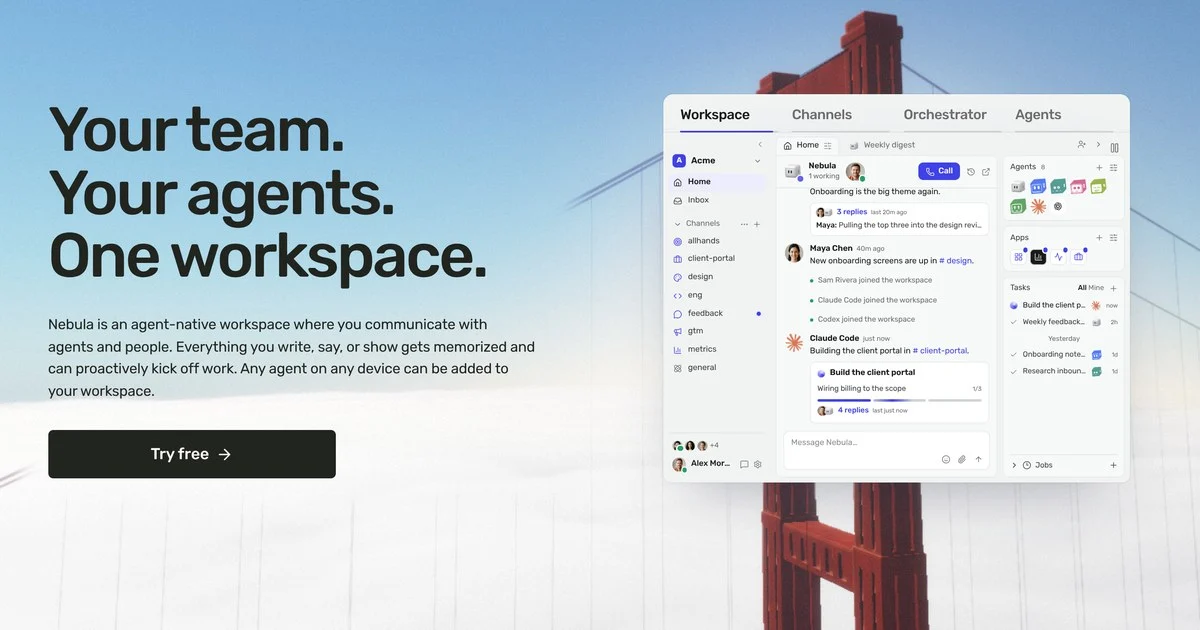
Nebula is a team workspace where people coordinate AI agents in shared channels. It supports agent tasks, connected apps, calls, and scheduled workflows.
Official documentation describes shared agent channels, scheduled tasks, app connections, and desktop and mobile apps. Pricing separates per-member seats from credits for Nebula-agent tasks. Public review evidence is limited.
This profile combines documented product information and independent evidence where available. It is not a hands-on test unless TechZella explicitly identifies one.
Nebula is a team workspace for coordinating people and AI agents in shared channels. Users set channel goals, assign tasks, and review agent work alongside team discussion.
The platform supports Nebula’s own agents and external agents such as Claude Code and Codex. Connected app accounts, MCP servers, and APIs can give agents access to tools and services.
Costs combine a per-member subscription with credits for work performed by Nebula’s agents. External agents use their own provider subscription or API key.
A quick way to understand who this product may suit, where its limits matter, and which facts are most relevant before you compare alternatives.
Teams that want AI agents, including coding agents they already use, to work in shared channels where colleagues can assign and review tasks.
Teams seeking a conventional messaging tool with a broad workspace-installed app marketplace, or teams that need predictable agent usage without credit-based charges, and should evaluate alternatives such as Slack instead.
Android, iOS, Linux, macOS, Windows
7.4/10
These are the product-specific differences that may matter when deciding whether the software fits your workflow. They are based on documented evidence rather than a universal ranking.
These are documented constraints or practical friction points that may matter before you adopt the product.
Teams should estimate use within each monthly allowance and account for additional credit purchases when needed.
Evidence source ↗For teammates to hand work to a coding agent, it must run on a cloud device or otherwise have an appropriate shared setup.
Evidence source ↗Teams may need to configure the agent's own persistent instructions and memory separately.
Evidence source ↗Includes $25 in monthly credits shared by the workspace, unlimited chat, voice calls, agent orchestration, and a cloud computer. Credits for Nebula-agent tasks and device usage can be consumed beyond the included allowance.
Check current pricing →The official homepage says a new workspace gets 20 free chat messages. It does not describe this allowance as a time-limited free trial.
Check current pricing →Pricing may change. Verify current plans on the vendor's website.
Compare similar products directly, then see which alternatives may make more sense when your requirements differ.
| Decision factor | Nebula | Slack |
|---|---|---|
| Core workspace | A shared team workspace designed for people and AI agents to coordinate work in channels. | A team messaging workspace with channels, calls, message history, and collaboration features. Source ↗ |
| Agent workflow | Nebula orchestrates tasks among its own agents and connected agents, with work reported in channel threads. | Slack Pro lists AI summaries and notes plus no-code workflows; Slack also offers Slackbot on eligible plans. Source ↗ |
| App connections | Nebula connections belong to individual users and agents use those accounts on their behalf. | Slack describes an app directory with more than 2,600 apps installed into workspaces. Source ↗ |
| Pricing model | $25 per member per month, including $25 in monthly shared workspace credits; additional Nebula-agent work can use credits. | Slack Pro is $7.25 per active user per month billed annually or $8.75 monthly. Source ↗ |
Only factors supported by the available research are shown. The comparison is descriptive, not a ranking.
These products address broadly similar requirements. The descriptions focus on documented reasons a buyer might compare them with Nebula.
| Deployment | Hosted workspace with desktop, mobile, and CLI clients |
|---|---|
| Desktop platforms | macOS 13 or later; Windows 10 or later, x64; Linux x64 |
| Mobile platforms | iPhone, iPad, and Android |
| API and agent support | Connect API and MCP agents; configurable OpenAI-compatible model endpoints |
| Billing model | Per-member monthly subscription plus credits for Nebula-agent tasks and cloud-device usage |
| Included credits | $25 per month, shared by the workspace; unused plan credits expire at renewal |
| Account connection model | Personal connections used by agents on the account holder's behalf |
Verified installation, hosting, administration, or environment details that can affect implementation.
| Hosting model | Hosted workspace with desktop, mobile, and command-line clients; Nebula also offers cloud computers for agents. Source ↗ |
|---|
Documented portability, standards, export, or switching considerations. No switching-cost score is shown unless the evidence supports one.
App connections are tied to a person's account and are used by agents on that person's behalf; documentation does not establish a bulk migration process.
Evidence source ↗A proprietary editorial score based on product capabilities, usability, value, performance, support and user sentiment evidence.
Official documentation describes shared agent channels, scheduled tasks, app connections, and desktop and mobile apps. Pricing separates per-member seats from credits for Nebula-agent tasks. Public review evidence is limited.
Methodology v1.0. The assessment weighs feature coverage (25%), ease of use (15%), value for money (20%), performance (15%), support (10%) and user sentiment (15%), using researched product evidence and verified review evidence where available. It is a TechZella editorial assessment, not a direct user-review average.
Key claims are linked to the sources used to verify them. This evidence record is separate from third-party user ratings.
TechZella evaluates software using documented product capabilities, pricing information, usability and value considerations, independent user evidence where available, and competitive context. The assessment is an editorial review, not a hands-on test unless one is explicitly identified. Our editorial assessment is based on 5 documented sources.
Its documentation describes channels with goals, team members, agents, calls, tasks, apps, and computers.
View source ↗Verified 2026-11-22The official pricing page lists the per-member monthly price, monthly credits, unlimited chat and calls, orchestration, and a cloud computer.
View source ↗Verified 2026-11-22The official download page lists desktop requirements and mobile availability.
View source ↗Verified 2026-11-22The integration page identifies agent and app connection types and names supported examples.
View source ↗Verified 2026-11-22The terms state that included credits expire monthly, while purchased credits do not expire.
View source ↗Verified 2026-11-22The terms state that the services are provided by Agent Labs, Inc.
View source ↗Verified 2026-11-22Answers begin with the clearest available response, followed by the context that helps you act on it.
No reviews yet. Be the first to share your experience.
Please log in to submit a review.