
Free Trial
€0
trial
No credit card required. Includes one hour of transcription, access to Pro features, and GDPR-compliant processing.
Check current pricing →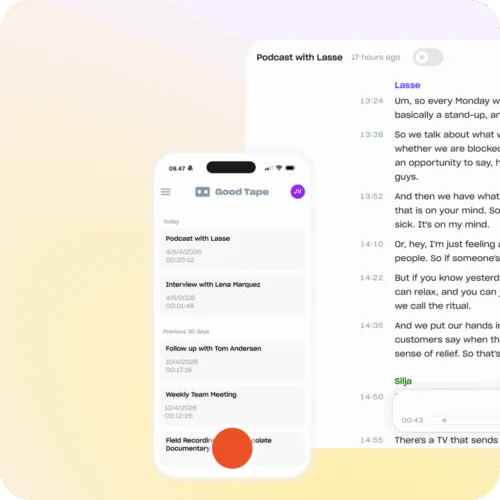
Good Tape is a privacy-focused AI transcription platform for converting audio and video into editable, searchable text.
Good Tape documents extensive transcription, editing, export, mobile recording, team, API, and privacy features. Current pricing includes a free trial and a u20ac16 monthly equivalent Pro plan billed annually. Independent review-platform evidence was not sufficiently verified.
This profile combines documented product information and independent evidence where available. It is not a hands-on test unless TechZella explicitly identifies one.
A quick way to understand who this product may suit, where its limits matter, and which facts are most relevant before you compare alternatives.
Android, API, iOS, MCP, Web
8.4/10
Good Tape is a Copenhagen-based software company providing AI transcription for audio and video files. The service targets journalists, researchers, legal professionals, consultants, creators, educators, governments, and media teams.
Users can upload recordings through the web application or capture audio through Good Tape’s iOS and Android recorder. The platform produces editable transcripts, supports more than 100 languages, and links transcript text with synchronized audio playback.
Good Tape emphasizes European data processing, encryption, GDPR compliance, ISO 27001 certification, and a policy against training models on customer files. Its API supports programmatic transcription, while its MCP connector provides a beta connection to compatible AI tools.
No credit card required. Includes one hour of transcription, access to Pro features, and GDPR-compliant processing.
Check current pricing →Includes 20 transcription hours per month, 100+ languages, speaker labels, AI summaries, bulk uploads, mobile recording, notes, MCP beta, and a standard DPA.
Check current pricing →Adds team administration, 20 hours per seat, centralized billing, SSO, SLA support, tailored onboarding, and organization-wide DPA coverage.
Check current pricing →Pricing may change. Verify current plans on the vendor's website.
Compare similar products directly, then see which alternatives may make more sense when your requirements differ.
These products address broadly similar requirements. The descriptions focus on documented reasons a buyer might compare them with Good Tape.
| Product type | AI transcription software |
|---|---|
| Deployment | Cloud-based web application |
| Mobile support | iOS and Android |
| API | Available; separate billing |
| MCP | Available in beta |
| Languages | 100+ |
| Maximum upload size | Up to 2 GB per file |
| Supported media | Audio and video |
| Security | ISO 27001 certified; GDPR compliant |
| Data residency | EU-based processing |
| Free trial | 1 hour; no credit card required |
| Integrations | API and MCP; meeting integrations coming soon |
| Company size | 11-50 employees listed on LinkedIn |
| Headquarters | Copenhagen, Denmark |
A proprietary editorial score based on product capabilities, usability, value, performance, support and user sentiment evidence.
Good Tape documents extensive transcription, editing, export, mobile recording, team, API, and privacy features. Current pricing includes a free trial and a u20ac16 monthly equivalent Pro plan billed annually. Independent review-platform evidence was not sufficiently verified.
Methodology v1.0. The assessment weighs feature coverage (25%), ease of use (15%), value for money (20%), performance (15%), support (10%) and user sentiment (15%), using researched product evidence and verified review evidence where available. It is a TechZella editorial assessment, not a direct user-review average.
No reviews yet. Be the first to share your experience.
Please log in to submit a review.
Yes. The current free trial costs €0, requires no credit card, and includes one hour of transcription with access to Pro features.
Good Tape provides a web application and recorder apps for iOS and Android. It also offers an API and a beta MCP connector.
Yes. The API supports programmatic transcription, speaker detection, more than 100 languages, and common audio and video formats. API billing is separate from regular subscriptions.
Good Tape provides an API and MCP connector. Its pricing page lists meeting integrations as coming soon, so broadly available native meeting integrations were not verified.
Yes. The mobile recorder can store audio locally while offline and synchronize recordings when an internet connection returns.
Yes. Users can edit transcript text, rename speakers, adjust line lengths, and play back synchronized audio through the web application.
No. The mobile application does not support recording native cellular phone calls.
Good Tape states that it uses EU-based processing, encrypts files in transit and at rest, supports GDPR requirements, and does not train models on customer data.