
Sortly's offline mode is available only in its iOS and Android apps, not the web app.
Teams working without network access should sync inventory before disconnecting and reconnect after returning online to upload changes.
Evidence source ↗
Sortly is cloud-based inventory software for organizing and tracking stock, tools, supplies, and equipment. It offers web and mobile access, barcode and QR scanning, and inventory reports.
Official materials document mobile barcode and QR scanning, inventory organization, alerts, exports, and integrations. Public Capterra and G2 ratings are positive overall, but Sortly publishes plan caps and confines API access to Enterprise. Scores reflect evidence review, not hands-on testing.
This profile combines documented product information and independent evidence where available. It is not a hands-on test unless TechZella explicitly identifies one.
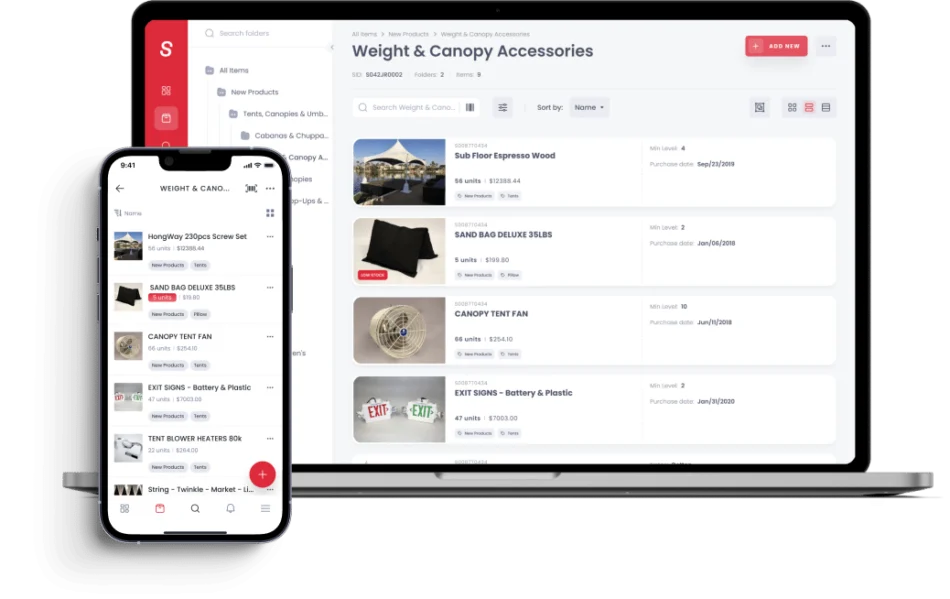
Sortly is cloud-based inventory software for tracking physical items such as supplies, materials, parts, tools, and equipment. Teams can organize records into folders, add photos and custom details, and access inventory through a web app or mobile apps.
Its warehouse use centers on inventory visibility, location organization, scanning, and item check-in/check-out. It is not presented in its product materials as a full warehouse execution suite; buyers needing detailed bin management, putaway, or order-picking workflows should compare its scope with broader inventory platforms.
A quick way to understand who this product may suit, where its limits matter, and which facts are most relevant before you compare alternatives.
Small and midsize teams that need a visual, mobile-accessible way to track supplies, tools, parts, or equipment across locations, with barcode or QR workflows.
Buyers needing a documented end-to-end warehouse execution system with bin-location control, putaway, pick-and-pack order fulfillment, and extensive direct integrations should compare broader inventory platforms before choosing Sortly, and should evaluate alternatives such as Zoho Inventory instead.
Android, API, Cloud, iOS, Web
7.9/10
These are the product-specific differences that may matter when deciding whether the software fits your workflow. They are based on documented evidence rather than a universal ranking.
These are documented constraints or practical friction points that may matter before you adopt the product.
Teams working without network access should sync inventory before disconnecting and reconnect after returning online to upload changes.
Evidence source ↗A buyer who needs custom system synchronization should include Enterprise eligibility, developer time, and ongoing maintenance in the evaluation.
Evidence source ↗Teams planning a full migration or backup must use the Dropbox export to obtain item photos as files.
Evidence source ↗Trial users should record the end date and cancellation route, especially when subscribing through an app store.
Evidence source ↗100 unique items, one user license, and two active jobs.
Check current pricing →Monthly list price. The pricing page also displays a discounted annual equivalent of $24 per month for the first year for new annual subscriptions; includes 500 unique items and two user licenses.
Check current pricing →Monthly list price. The pricing page also displays a discounted annual equivalent of $74 per month for the first year for new annual subscriptions; includes 2,000 unique items and five user licenses.
Check current pricing →Monthly list price. The pricing page also displays a discounted annual equivalent of $149 per month for the first year for new annual subscriptions; includes 5,000 unique items and eight user licenses.
Check current pricing →Quote-based plan with 10,000+ unique items, 12+ user licenses, unlimited active jobs, API and webhooks, and a dedicated customer success manager.
Check current pricing →Pricing may change. Verify current plans on the vendor's website.
Compare similar products directly, then see which alternatives may make more sense when your requirements differ.
| Decision factor | Sortly | Zoho Inventory |
|---|---|---|
| Core scope | Visual tracking of items, supplies, tools, and equipment, with folders, photos, and item details. | Inventory and order platform with purchasing, sales orders, invoicing, fulfillment, and warehouse features. Source ↗ |
| Warehouse workflows | Folders can represent locations, and inventory can be tracked across folders; published materials emphasize item tracking and job workflows. | Documents multi-warehouse stock, transfer orders, bin locations, picklists, and warehouse-specific reporting. Source ↗ |
| Pricing model | Free tier plus paid subscriptions; published monthly list rates are $49, $149, and $299 for Advanced, Ultra, and Premium, with Enterprise quote-based. | Free tier plus subscriptions; its U.S. pricing page lists monthly prices from $39 to $299 for paid plans. Source ↗ |
| API access | Public API access is limited to Enterprise and capped at 1,000 requests per 15-minute window. | The pricing comparison page lists daily API-call allowances by plan, ranging from 1,000 to 10,000 calls per day. Source ↗ |
Only factors supported by the available research are shown. The comparison is descriptive, not a ranking.
These products address broadly similar requirements. The descriptions focus on documented reasons a buyer might compare them with Sortly.





| Deployment | Cloud-based SaaS |
|---|---|
| Web access | Web app |
| Mobile apps | iOS and Android |
| Offline mode | Available in mobile apps only; changes sync after reconnecting |
| API | Enterprise only; OAuth 2.0; up to 1,000 requests per 15-minute window |
| Webhooks | Enterprise only |
| Integrations | AppFolio Stack, Amazon Business US, QuickBooks Online, Slack, Microsoft Teams, API, and webhooks; plan and regional availability may vary |
| Free trial | 14 days for paid plans; credit card required; converts automatically unless canceled |
| Unique-item limits | 100 Free; 500 Advanced; 2,000 Ultra; 5,000 Premium; 10,000+ Enterprise |
| Export | CSV, Excel, PDF, or Dropbox; Dropbox export can include original item image files |
Verified installation, hosting, administration, or environment details that can affect implementation.
| Hosting | Cloud-based service with a web app and iOS and Android mobile apps. Source ↗ |
|---|---|
| Offline operation | Mobile apps support offline work; users must turn syncing off and later re-enable it to send offline changes. Source ↗ |
Documented portability, standards, export, or switching considerations. No switching-cost score is shown unless the evidence supports one.
Sortly documents importing an existing inventory list. The specific import formats and field mapping should be checked against the buyer's source data.
Evidence source ↗Inventory can be exported as CSV or Excel, as a PDF report, or to Dropbox. Dropbox export includes original item image files; spreadsheet exports include image URLs.
Evidence source ↗A proprietary editorial score based on product capabilities, usability, value, performance, support and user sentiment evidence.
Official materials document mobile barcode and QR scanning, inventory organization, alerts, exports, and integrations. Public Capterra and G2 ratings are positive overall, but Sortly publishes plan caps and confines API access to Enterprise. Scores reflect evidence review, not hands-on testing.
Methodology v1.0. The assessment weighs feature coverage (25%), ease of use (15%), value for money (20%), performance (15%), support (10%) and user sentiment (15%), using researched product evidence and verified review evidence where available. It is a TechZella editorial assessment, not a direct user-review average.
Key claims are linked to the sources used to verify them. This evidence record is separate from third-party user ratings.
TechZella evaluates software using documented product capabilities, pricing information, usability and value considerations, independent user evidence where available, and competitive context. The assessment is an editorial review, not a hands-on test unless one is explicitly identified. Our editorial assessment is based on 7 documented sources.
The official pricing page lists Free, Advanced, Ultra, Premium, and Enterprise plans.
View source ↗Verified 2026-10-12The product feature pages describe scanning, custom label generation, alerts, and photo-based item records.
View source ↗Verified 2026-10-12The help center gives installation instructions for both app stores and specifies the offline-mode limitation.
View source ↗Verified 2026-10-12The API overview says API access is available only on Enterprise and describes authentication, rate limits, and supported item and folder operations.
View source ↗Verified 2026-10-12The integrations page lists AppFolio Stack, Amazon Business US, QuickBooks Online, Slack, Microsoft Teams, webhooks, and the API.
View source ↗Verified 2026-10-12The export guide describes CSV/XLSX and PDF options and identifies Dropbox as the export option that includes original image files.
View source ↗Verified 2026-10-12The public review page displayed the overall rating, review count, ease-of-use score, and customer-service score.
View source ↗Verified 2026-10-12Yes. Sortly lists a $0 plan with limits including 100 unique items, one user license, and two active jobs.
Sortly offers a 14-day trial for paid plans. The trial requires a credit card and converts automatically unless canceled before it ends.
Sortly provides a web app and mobile apps for iOS and Android. Its mobile apps support offline mode; the web app does not.
Yes. Public API access is limited to Enterprise. Sortly documents OAuth 2.0 authentication and a limit of 1,000 requests per 15-minute window.
Sortly lists AppFolio Stack, Amazon Business US, QuickBooks Online, Slack, Microsoft Teams, webhooks, and its Public API. Availability can depend on the plan and account region.
Users can export inventory as CSV or Excel, create PDF reports, or export to Dropbox. Spreadsheet exports contain image URLs, while Dropbox exports can include the original image files.
No reviews yet. Be the first to share your experience.
Please log in to submit a review.