
A public website needs a paid per-site license, and the buyer supplies hosting and a domain.
The license price is not the full operating cost; hosting and domain charges are separate.
Evidence source ↗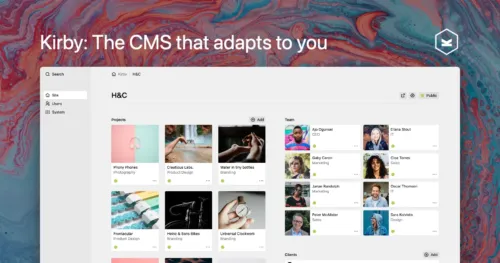
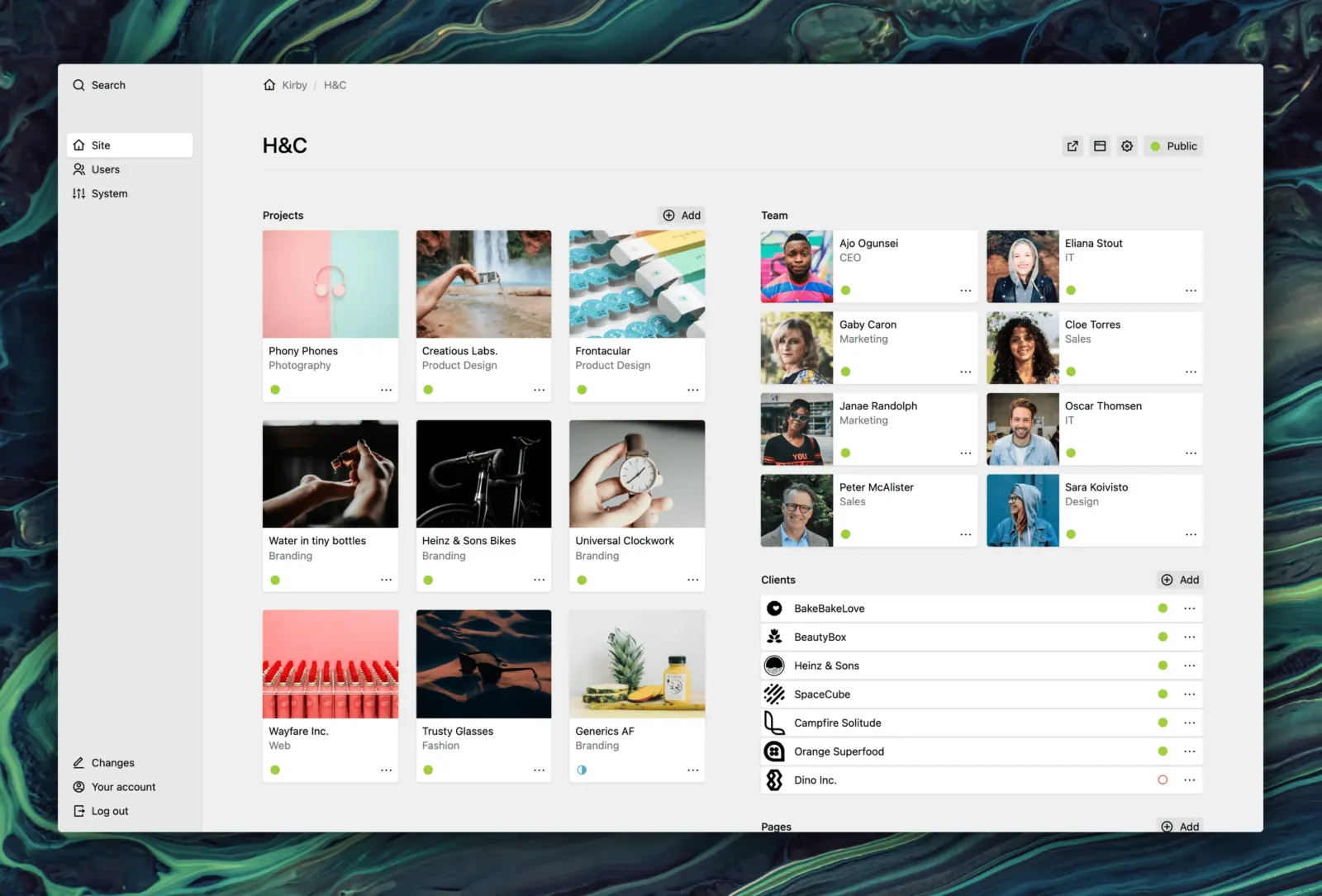
Kirby is a self-hosted, file-based CMS with a customizable browser Panel, PHP templates, plugins, and REST API options for traditional or headless websites.
Scores reflect documented customization, content workflows, API options, and license terms. G2's small review sample supports only cautious sentiment conclusions; performance and support scores are editorial assessments, not benchmark results.
This profile combines documented product information and independent evidence where available. It is not a hands-on test unless TechZella explicitly identifies one.
Kirby is a self-hosted content management system from Content Folder GmbH & Co. KG. It stores standard site content in files and folders, while its browser-based Panel gives editors a configurable interface for managing that content.
Developers define content forms and structures with blueprints, then build a website using PHP templates or connect another frontend through Kirby’s API options. The file-based model avoids requiring a database for standard content, but customers remain responsible for hosting and server configuration.
A quick way to understand who this product may suit, where its limits matter, and which facts are most relevant before you compare alternatives.
Developers and agencies building custom websites who want a configurable editor interface, file-based content storage, and the option to use a traditional or decoupled frontend.
Teams seeking a hosted, managed CMS or a database-first platform may prefer a different architecture; Kirby requires hosting, domain setup, and PHP-compatible server administration, and should evaluate alternatives such as WordPress or Grav instead.
API, On-premises, Self-hosted, Web
7.9/10
These are the product-specific differences that may matter when deciding whether the software fits your workflow. They are based on documented evidence rather than a universal ranking.
These are documented constraints or practical friction points that may matter before you adopt the product.
The license price is not the full operating cost; hosting and domain charges are separate.
Evidence source ↗For client projects, eligibility is based on the client's revenue or funding, not the agency's.
Evidence source ↗Buyers should check their hosting runtime and custom plugins before planning an upgrade.
Evidence source ↗Per-site license for eligible customers with annual revenue or funding below €1 million. Includes three years of feature updates; VAT may apply.
Check current pricing →Per-site license for companies and organizations of any size. Includes three years of feature updates; VAT may apply.
Check current pricing →Local development and private testing are free; public production use requires a paid license.
Check current pricing →Pricing may change. Verify current plans on the vendor's website.
Compare similar products directly, then see which alternatives may make more sense when your requirements differ.
These products address broadly similar requirements. The descriptions focus on documented reasons a buyer might compare them with Kirby.




| Deployment | Self-hosted |
|---|---|
| License scope | One installation on one domain |
| Content storage | Files and folders; no database required for standard content |
| Server requirements | PHP 8.2 or later for Kirby 5; POSIX-compatible server with URL rewriting |
| Supported web servers | Apache, nginx, and Caddy configurations are documented |
| API | REST API, KQL, and custom routes |
| Free trial | Online demo, local installation, and private development/testing |
| Feature updates | Three years included with paid licenses |
Verified installation, hosting, administration, or environment details that can affect implementation.
| Hosting | Self-hosted; the licensee supplies the hosting and domain. Documented server options include Apache, nginx, and Caddy. Source ↗ |
|---|---|
| Server requirements | Kirby 5 requires PHP 8.2 or later and a POSIX-compatible server operating system with URL rewriting. Source ↗ |
Documented portability, standards, export, or switching considerations. No switching-cost score is shown unless the evidence supports one.
Kirby's migration guide describes importing content through scripts or plugins, structuring pages as folders and text files, and moving media files alongside content.
Evidence source ↗A proprietary editorial score based on product capabilities, usability, value, performance, support and user sentiment evidence.
Scores reflect documented customization, content workflows, API options, and license terms. G2's small review sample supports only cautious sentiment conclusions; performance and support scores are editorial assessments, not benchmark results.
Methodology v1.0. The assessment weighs feature coverage (25%), ease of use (15%), value for money (20%), performance (15%), support (10%) and user sentiment (15%), using researched product evidence and verified review evidence where available. It is a TechZella editorial assessment, not a direct user-review average.
Key claims are linked to the sources used to verify them. This evidence record is separate from third-party user ratings.
TechZella evaluates software using documented product capabilities, pricing information, usability and value considerations, independent user evidence where available, and competitive context. The assessment is an editorial review, not a hands-on test unless one is explicitly identified. Our editorial assessment is based on 6 documented sources.
The official content guide describes Kirby as a flat-file CMS and identifies the content folder as its primary data source.
View source ↗Verified 2026-10-13The pricing page lists Basic and Enterprise per-site prices and describes the license as a one-time payment.
View source ↗Verified 2026-10-13Official documentation describes REST API access, content representations, KQL, and custom routes for headless use.
View source ↗Verified 2026-10-13The documentation explains that blueprints configure Panel forms for pages, files, users, and other content structures.
View source ↗Verified 2026-10-13Official guides describe custom user roles and permissions, as well as draft, unlisted, and listed page states.
View source ↗Verified 2026-10-13Kirby's contact page lists the company, its Neckargemünd address, and Bastian Allgeier as general manager.
View source ↗Verified 2026-10-13Answers begin with the clearest available response, followed by the context that helps you act on it.
No reviews yet. Be the first to share your experience.
Please log in to submit a review.