Editorial overview
Aggregated Overview
The project documents multiple model backends, chat and generation modes, tools, training, and compatible APIs. It is free under AGPL-3.0, but performance depends on local hardware. No reliable independent review sample was verified, so user sentiment and support scores are conservative evidence assessments, not user ratings.
This profile combines documented product information and independent evidence where available. It is not a hands-on test unless TechZella explicitly identifies one.
Overview
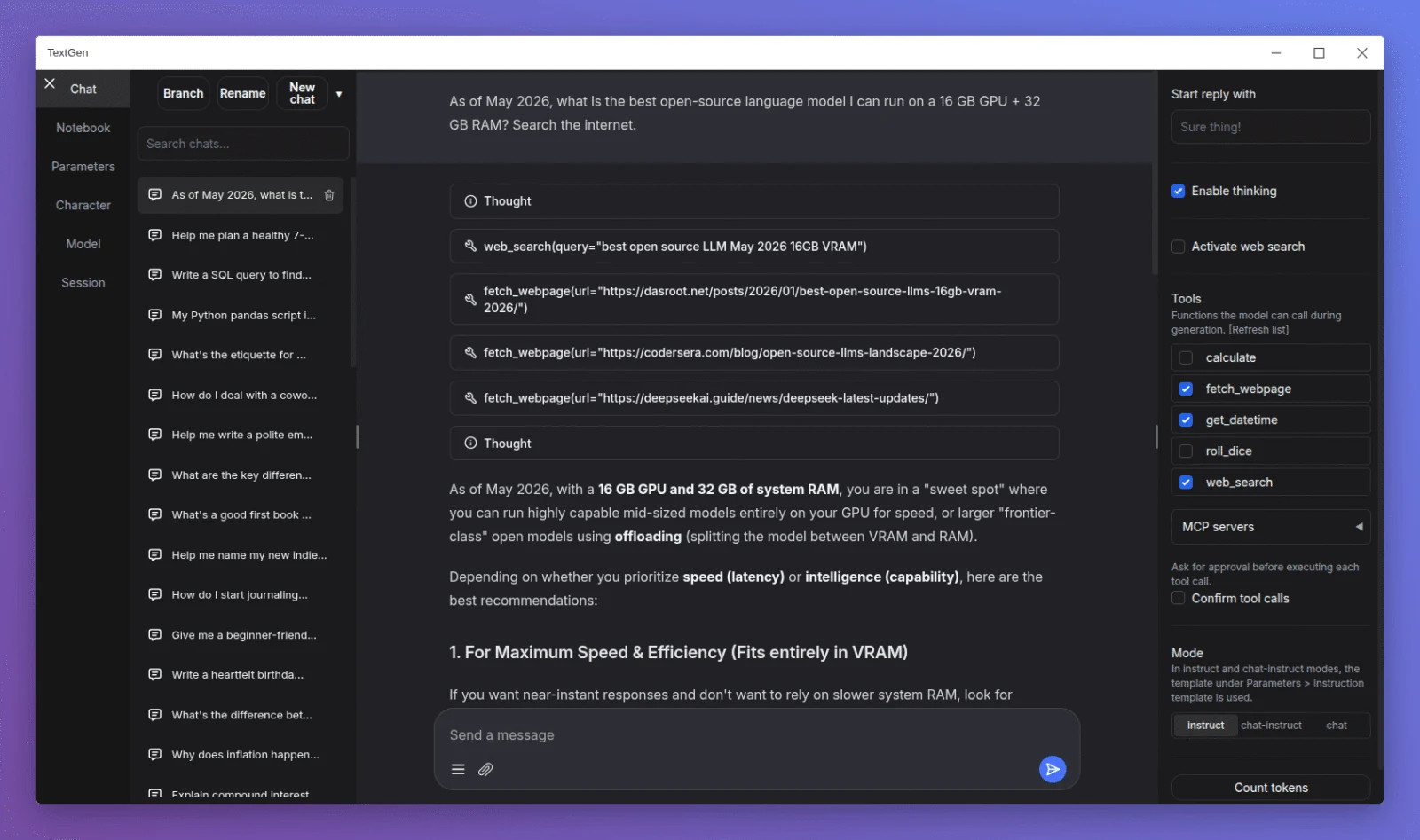
Text Generation WebUI is the earlier name for TextGen, an open-source local language-model application maintained under the oobabooga GitHub account. The project now offers a portable desktop app and browser-based interface.
It supports several inference backends, chat and text-generation workflows, model tools, and compatible APIs. It is aimed at users prepared to choose models and operate suitable local hardware rather than purchase a managed hosted service.
Text Generation WebUI Decision Snapshot
A quick way to understand who this product may suit, where its limits matter, and which facts are most relevant before you compare alternatives.
Best suited toIndividuals and technical teams who want to run and customize language models on their own Windows, Linux, or macOS hardware, or expose a local model through a compatible API.
Look elsewhere ifBuyers who need a managed cloud service, centrally operated enterprise support, or predictable performance without selecting and maintaining suitable hardware, and should evaluate alternatives such as LM Studio: consider it when a local-model desktop interface and its documented REST API meet the workflow; TextGen differs through its AGPL-3.0 license and documented backend and extension options. or Ollama: consider it when a local runtime plus optional cloud models and usage-credit plans are important; TextGen differs as a local UI-oriented project with multiple documented backends and a free open-source distribution. instead.
PlatformsAPI, Desktop, Linux, macOS, Windows
TechZella assessment7.5/10
Text Generation WebUI — What Sets It Apart?
These are the product-specific differences that may matter when deciding whether the software fits your workflow. They are based on documented evidence rather than a universal ranking.
- Combines a desktop application with a browser-based interface and local model-serving API.
- Supports several model backends, including llama.cpp, Transformers, ExLlamaV3, and TensorRT-LLM, with model switching without restarting.
- Includes chat tools, MCP server support, LoRA fine-tuning, and image generation alongside text generation.
Editorial assessmentText Generation WebUI Pros & Cons
Pros
- Supports multiple inference backends and local model workflows.
- Offers portable builds for Windows, Linux, and macOS.
- Includes compatible APIs, tool calling, and documented fine-tuning features.
- The project lists no subscription price and uses an open-source license.
Cons
- Local model performance depends on the user's hardware and chosen model.
- Users are responsible for model downloads, updates, and hardware-specific setup.
- Some features require a fuller installation or additional configuration.
- AGPL-3.0 licensing may require review for certain distribution or network-service uses.
Text Generation WebUI Gotchas & Operational Limits
These are documented constraints or practical friction points that may matter before you adopt the product.
The portable releases are hardware-specific and include substantial downloads; choose the build that matches the operating system and accelerator.
Selecting an incompatible build or GPU option can prevent launch or leave the intended acceleration unavailable.
Evidence source ↗The API is not enabled by default; it must be started with the API option. Network exposure and API-key configuration are separate settings.
Applications cannot connect until the API is enabled, and exposing a locally hosted endpoint requires deliberate access configuration.
Evidence source ↗TextGen is the new project name and repository location; earlier documentation may refer to text-generation-webui and the previous GitHub repository.
Old tutorials and install commands may not match the current releases and workflow.
Evidence source ↗Text Generation WebUI Pricing & Plans
Free
$0
ongoing
Free and open-source software under AGPL-3.0. Users provide their own hardware and model files.
Check current pricing →Pricing may change. Verify current plans on the vendor's website.
Cost contextTotal Cost & Hidden Costs
Additional costs or implementation requirements that are documented in the available evidence.
Hardware and power
The software is free, but local inference requires the user's own computer and suitable storage, memory, and processing capacity. Requirements vary by model and backend; no single minimum is stated on the reviewed project page.
Evidence source ↗Installation and maintenance
Portable GGUF packages bundle dependencies, while fuller installs require Python/Conda and hardware-specific dependencies. Users manage installation, updates, and model files themselves; paid onboarding was not listed on the project pages checked.
Evidence source ↗Model and extension costs
No product subscription or usage fee is listed. Model downloads and extensions may have separate licenses or requirements; buyers should check the terms of each model and extension independently.
Evidence source ↗Quick Comparison
Compare the product with documented alternatives across the factors that can change a buying decision. Each row is evidence-backed rather than a generic feature checklist.
Text Generation WebUI vs. LM Studio
Documented comparisonText Generation WebUI vs. Ollama
Documented comparisonOnly factors supported by the available research are shown. The comparison is descriptive, not a ranking.
CapabilitiesText Generation WebUI Features
Model inference and chat
- Local text generation and instruction-following modes
- Chat and custom-character conversations
- Model switching across documented backends
- Vision and document attachments
Development and extensibility
- OpenAI- and Anthropic-compatible API endpoints
- Tool calling and MCP server support
- Extensions, including community-provided options
- LoRA fine-tuning workflows
Deployment
- Portable desktop builds for Windows, Linux, and macOS
- Browser interface and Docker deployment options
- CPU and hardware-accelerated build variants
Text Generation WebUI Specifications
| License | AGPL-3.0 |
|---|
| Deployment | Local desktop, browser UI, or Docker |
|---|
| Operating systems | Windows, Linux, macOS |
|---|
| API | OpenAI- and Anthropic-compatible endpoints |
|---|
| Inference backends | llama.cpp, ik_llama.cpp, Transformers, ExLlamaV3, TensorRT-LLM |
|---|
| Pricing | Free; no paid plan listed |
|---|
| Latest release verified | v4.9, released May 20, 2026 |
|---|
Alternatives
LM Studio may suit users who want a local-model desktop application with documented REST and OpenAI-compatible APIs. TextGen may suit users who prefer AGPL-licensed software and its documented multi-backend, extension, fine-tuning, and tool workflows.
Ollama may suit buyers who want a local model runtime alongside cloud model access and paid usage plans. TextGen is a fit for users seeking a local UI, several documented inference backends, and compatible APIs under an open-source license.
Migration & Lock-In
Documented portability, standards, export, or switching considerations. No switching-cost score is shown unless the evidence supports one.
Settings and model data
For portable upgrades, the release instructions say to carry the user_data folder into the new installation; a shared user_data folder can also be placed beside versioned installs.
Evidence source ↗Our evidence-based assessmentTechZella Score
A proprietary editorial score based on product capabilities, usability, value, performance, support and user sentiment evidence.
7.5/10Low confidence
The project documents multiple model backends, chat and generation modes, tools, training, and compatible APIs. It is free under AGPL-3.0, but performance depends on local hardware. No reliable independent review sample was verified, so user sentiment and support scores are conservative evidence assessments, not user ratings.
Methodology v1.0. The assessment weighs feature coverage (25%), ease of use (15%), value for money (20%), performance (15%), support (10%) and user sentiment (15%), using researched product evidence and verified review evidence where available. It is a TechZella editorial assessment, not a direct user-review average.
Editorial transparency
Our Review Methodology
Key claims are linked to the sources used to verify them. This evidence record is separate from third-party user ratings.
TechZella evaluates software using documented product capabilities, pricing information, usability and value considerations, independent user evidence where available, and competitive context. The assessment is an editorial review, not a hands-on test unless one is explicitly identified. Our editorial assessment is based on 3 documented sources.
What TechZella adds- Combines a desktop application with a browser-based interface and local model-serving API.
- Supports several model backends, including llama.cpp, Transformers, ExLlamaV3, and TensorRT-LLM, with model switching without restarting.
- Includes chat tools, MCP server support, LoRA fine-tuning, and image generation alongside text generation.
Important limitations- Local inference performance depends on the user's hardware and selected model; supported builds differ by operating system and accelerator.
- The full installation requires Python and hardware-specific dependencies; some workflows need additional setup beyond the portable GGUF builds.
- AGPL-3.0 licensing may require review for organizations that modify and distribute the software or offer it over a network.
Evidence-backed claimsThe project has been renamed TextGen.The release notes identify the rename and state that the project URL changed to github.com/oobabooga/textgen.
View source ↗Verified 2026-11-12The software is distributed under the AGPL-3.0 license.The official project repository displays AGPL-3.0 as its license.
View source ↗Verified 2026-11-12Portable releases support Windows, Linux, and macOS.The official release page lists portable assets for all three operating systems, with available builds depending on hardware and architecture.
View source ↗Verified 2026-11-12The API supports OpenAI- and Anthropic-compatible endpoints.The official API documentation describes Chat, Completions, and Messages endpoints and explains how to enable the API.
View source ↗Verified 2026-11-12The software documents local model chat, tool calling, vision, fine-tuning, and image generation.The official README describes these capabilities and lists supported backends and extension options.
View source ↗Verified 2026-11-12Portable installation settings and model data can be retained across version updates.The release instructions describe moving the user_data folder into an updated portable installation or sharing it across versioned folders.
View source ↗Verified 2026-11-12
Community feedback
Reviews
No reviews yet. Be the first to share your experience.
Write a Review
Please log in to submit a review.
Recently added Artificial Intelligence Software