
The free Studio plan has a 10 MB per-query limit and supports up to three users.
Larger result sets or broader collaboration may require a paid plan.
Evidence source ↗
Mode is a collaborative analytics platform combining SQL, Python, R, notebooks, visualizations, and dashboards for data teams and business users.
Scores reflect documented SQL, Python, R, reporting, integration, and plan capabilities, plus G2's published rating. They are editorial assessments, not hands-on test results; public paid-plan prices and detailed review text were limited.
This profile combines documented product information and independent evidence where available. It is not a hands-on test unless TechZella explicitly identifies one.
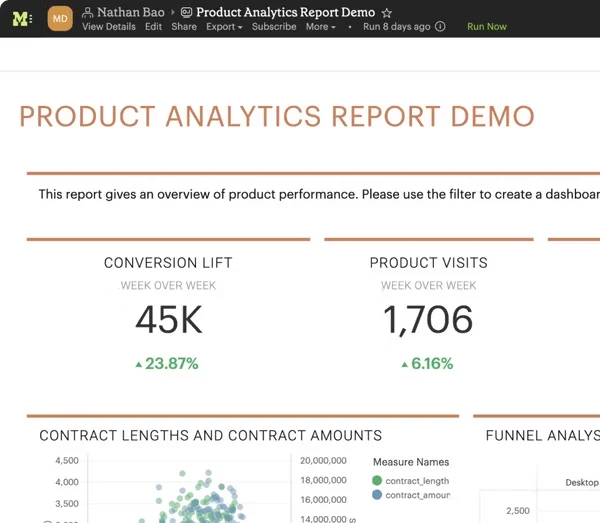
Mode is a collaborative analytics platform for analysts and business teams. It combines SQL editing, Python and R notebooks, visualizations, reusable datasets, and dashboards in a shared workspace.
Mode connects to customer databases rather than requiring teams to work only from uploaded extracts. Its documentation says queries run on demand or on a schedule, not through persistent real-time connections.
A quick way to understand who this product may suit, where its limits matter, and which facts are most relevant before you compare alternatives.
Data teams that want SQL-led analysis with Python and R notebooks, reusable datasets, visual reporting, and sharing with business stakeholders.
Teams that require fully supported mobile browsing, real-time database connections, or SQL joins across multiple database connections in one query should assess alternatives or workarounds, and should evaluate alternatives such as Tableau: Consider it when role-based creator, explorer, and viewer licensing or Tableau Server deployment is important. or Looker: Consider it when an organization needs LookML semantic modeling and Google Cloud's platform and user licensing structure. instead.
Google Chrome, macOS, SaaS, Web, Windows
7.8/10
These are the product-specific differences that may matter when deciding whether the software fits your workflow. They are based on documented evidence rather than a universal ranking.
These are documented constraints or practical friction points that may matter before you adopt the product.
Larger result sets or broader collaboration may require a paid plan.
Evidence source ↗Teams should confirm the current seat requirement and quote before budgeting for a small deployment.
Evidence source ↗Reports run queries on demand or on schedules rather than continuously reflecting source changes.
Evidence source ↗Teams relying on direct spreadsheet exchange may need an alternate workflow.
Evidence source ↗SQL, Python, and R; private database connections; up to three users; 10 MB per query.
Check current pricing →Includes 250 GB per month, 5 GB per query, schedules, permissioning, email and Slack sharing, API access, and standard support. Minimum three users is shown in the plan comparison.
Check current pricing →Adds custom data compute, visualization of tens of millions of rows, advanced identity management and SSO, admin-level API access, and premium support. Minimum 50 users is shown in the plan comparison.
Check current pricing →Mode advertises a 14-day free trial; a work email is required when connecting a business database.
Check current pricing →Pricing may change. Verify current plans on the vendor's website.
Compare the product with documented alternatives across the factors that can change a buying decision. Each row is evidence-backed rather than a generic feature checklist.
| Decision factor | Mode Analytics | Tableau |
|---|---|---|
| Core workflow | SQL, Python, and R analysis are combined with reports, visualizations, and dashboards. | Creator licenses include workbook and data-flow authoring, while Explorer and Viewer licenses provide narrower roles. Source ↗ |
| Deployment model | Web-based access connects to customer databases, including private and cloud-hosted databases. | Tableau offers Tableau Cloud and a self-managed Tableau Server option. Source ↗ |
| Pricing model | Studio is free; Mode directs Pro and Enterprise buyers to sales for pricing. | Tableau Cloud publishes annual per-user prices by edition and role, starting at $15 per Viewer per month. Source ↗ |
| Decision factor | Mode Analytics | Looker |
|---|---|---|
| Core workflow | SQL, Python, and R analysis are combined with reports, visualizations, and dashboards. | Looker includes semantic modeling capabilities and separate developer, standard, and viewer user licenses. Source ↗ |
| Deployment model | Web-based access connects to customer databases, including private and cloud-hosted databases. | Looker (Google Cloud core) is offered as a Google Cloud platform instance. Source ↗ |
| Pricing model | Studio is free; Mode directs Pro and Enterprise buyers to sales for pricing. | Looker platform editions use annual custom quotes and separate user licensing. Source ↗ |
Only factors supported by the available research are shown. The comparison is descriptive, not a ranking.

| Access | Web application |
|---|---|
| Supported desktop browsers | Current stable Chrome, Firefox, Safari, and Microsoft Edge releases |
| Mobile browser support | Not fully supported |
| API | REST API; access requires membership in a Mode Business Workspace |
| Studio query limit | 10 MB per query |
| Pro query and monthly limits | 5 GB per query; 250 GB per month |
| Report query limit | 160 queries per report |
| Maximum query result size | 10 GB |
| Database connection permissions | By default, workspace members can query connected data; connection access can be restricted |
Verified installation, hosting, administration, or environment details that can affect implementation.
| Access and database connection | Mode is accessed through a web workspace and connects to customer databases, including databases hosted in private networks, VPCs, VPNs, or third-party clouds. Database credentials and permissions determine the data accessible through a connection. Source ↗ |
|---|
Tableau may suit organizations that want role-based Creator, Explorer, and Viewer licenses or a self-managed Tableau Server deployment. Looker may suit teams seeking a semantic modeling layer and Google Cloud platform instance. Mode is a relevant option when analysts want SQL, Python, and R in one collaborative reporting environment.
A proprietary editorial score based on product capabilities, usability, value, performance, support and user sentiment evidence.
Scores reflect documented SQL, Python, R, reporting, integration, and plan capabilities, plus G2's published rating. They are editorial assessments, not hands-on test results; public paid-plan prices and detailed review text were limited.
Methodology v1.0. The assessment weighs feature coverage (25%), ease of use (15%), value for money (20%), performance (15%), support (10%) and user sentiment (15%), using researched product evidence and verified review evidence where available. It is a TechZella editorial assessment, not a direct user-review average.
Key claims are linked to the sources used to verify them. This evidence record is separate from third-party user ratings.
TechZella evaluates software using documented product capabilities, pricing information, usability and value considerations, independent user evidence where available, and competitive context. The assessment is an editorial review, not a hands-on test unless one is explicitly identified. Our editorial assessment is based on 6 documented sources.
Mode's company page states that it was founded in San Francisco in 2013.
View source ↗Verified 2026-11-06The official plan comparison lists Studio as free with 10 MB per query and up to three users; Pro and Enterprise have larger limits and added capabilities.
View source ↗Verified 2026-11-06The API introduction describes querying, building, sharing, and distributing reports, and managing members, workspaces, and data.
View source ↗Verified 2026-11-06The official integrations page lists these integrations and describes their supported workflows.
View source ↗Verified 2026-11-06The query documentation states that active client-database connections are not maintained, and separate connections cannot be joined in one query.
View source ↗Verified 2026-11-06ThoughtSpot's announcement dates the acquisition completion and describes the $200 million cash-and-equity transaction.
View source ↗Verified 2026-11-06Common buyer questions about Mode include whether Studio is free, what the trial covers, which databases and integrations are supported, and how database connections and query limits work.
No reviews yet. Be the first to share your experience.
Please log in to submit a review.