
The official download page labels version 2.14 as beta and lists 2.13.2 as the latest stable release.
Teams that require a stable build should distinguish the beta from the stable download before standardizing deployments.
Evidence source ↗CloudCompare is free, GPL-licensed desktop software for viewing, editing, processing, and comparing 3D point clouds and meshes.
Official documentation verifies desktop processing, point-cloud comparison, file formats, plugins, command-line workflows, and Python scripting. The software is free to use, but public review evidence was not verified; usability, performance, and support scores are cautious editorial assessments, not user ratings.
This profile combines documented product information and independent evidence where available. It is not a hands-on test unless TechZella explicitly identifies one.
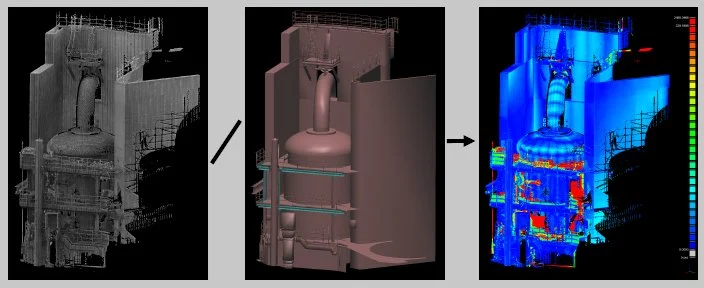
CloudCompare is a downloadable application for viewing, editing, and processing 3D point clouds and triangular meshes. Its original focus was comparing point clouds, and the project documents workflows including registration, resampling, segmentation, and statistics.
The project runs on Windows, macOS, and Linux. It is free to use for business or education under the GPL. The source license matters if an organization plans to distribute modified software or reuse project code.
CloudCompare is primarily a processing environment, not a verified scanner-capture or hosted collaboration service. Its command-line mode and optional Python plugin provide automation paths for technical users.
A quick way to understand who this product may suit, where its limits matter, and which facts are most relevant before you compare alternatives.
Technical users who need a free desktop tool to inspect, align, segment, process, or compare point clouds and meshes across common scanning formats.
Teams that need a turnkey scanner-capture workflow, managed cloud collaboration, or a vendor-backed service agreement may prefer a commercial reality-capture suite, and should evaluate alternatives such as Autodesk ReCap Pro instead.
CLI, Desktop, Linux, macOS, Windows
6.7/10
These are the product-specific differences that may matter when deciding whether the software fits your workflow. They are based on documented evidence rather than a universal ranking.
These are documented constraints or practical friction points that may matter before you adopt the product.
Teams that require a stable build should distinguish the beta from the stable download before standardizing deployments.
Evidence source ↗Free project software under the GPL, for personal, business, or educational use. GPL conditions apply to distribution and source-code reuse.
Check current pricing →Pricing may change. Verify current plans on the vendor's website.
Compare similar products directly, then see which alternatives may make more sense when your requirements differ.
| Decision factor | CloudCompare | Autodesk ReCap Pro | PDAL |
|---|---|---|---|
| Core workflow | Desktop point-cloud and mesh processing, including registration, segmentation, and comparison. | Reality-capture workflows with scan and photo processing, registration, project management, and cloud collaboration. Source ↗ | Point-cloud data translation and processing library designed around command-line tools and pipelines. Source ↗ |
| Automation and extensibility | Command-line processing and an optional Python plugin are documented. | The reviewed Autodesk material documents product workflows and a Revit plugin, rather than an equivalent Python scripting interface. Source ↗ | Command-line tools, Python processing, and a direct C++ API are documented. Source ↗ |
| Pricing model | Free project software under the GPL. | Paid subscription product; Autodesk’s US product page lists monthly and annual subscription prices. Source ↗ | Open-source project; the OSGeo project page identifies PDAL as a library and provides access to source code. Source ↗ |
Only factors supported by the available research are shown. The comparison is descriptive, not a ranking.
These products address broadly similar requirements. The descriptions focus on documented reasons a buyer might compare them with CloudCompare.
| License | GPL |
|---|---|
| Deployment | Downloadable desktop software |
| Operating systems | Windows, macOS, Linux |
| Automation | Command line; optional Python plugin |
| Input formats | Includes LAS, E57, PLY, ASCII, FARO, PTX, and other documented formats |
| Latest stable release listed | 2.13.2 |
| Latest beta listed | 2.14.beta |
Verified installation, hosting, administration, or environment details that can affect implementation.
| Installation or hosting | Downloadable desktop software for Windows, macOS, and Linux; no hosted SaaS deployment was verified. Source ↗ |
|---|---|
| Automation | Command-line mode supports ordered processing commands; a Python plugin supports scripts through the GUI or command line. Source ↗ |
Documented portability, standards, export, or switching considerations. No switching-cost score is shown unless the evidence supports one.
The documented file I/O table includes LAS, E57, PLY, OBJ, STL, VTK, and CloudCompare BIN formats, with read and write support varying by format.
Evidence source ↗A proprietary editorial score based on product capabilities, usability, value, performance, support and user sentiment evidence.
Official documentation verifies desktop processing, point-cloud comparison, file formats, plugins, command-line workflows, and Python scripting. The software is free to use, but public review evidence was not verified; usability, performance, and support scores are cautious editorial assessments, not user ratings.
Methodology v1.0. The assessment weighs feature coverage (25%), ease of use (15%), value for money (20%), performance (15%), support (10%) and user sentiment (15%), using researched product evidence and verified review evidence where available. It is a TechZella editorial assessment, not a direct user-review average.
Key claims are linked to the sources used to verify them. This evidence record is separate from third-party user ratings.
TechZella evaluates software using documented product capabilities, pricing information, usability and value considerations, independent user evidence where available, and competitive context. The assessment is an editorial review, not a hands-on test unless one is explicitly identified. Our editorial assessment is based on 4 documented sources.
The official project homepage lists all three operating systems.
View source ↗Verified 2026-11-10The project homepage says use is permitted for business and education and points to the GPL terms.
View source ↗Verified 2026-11-10The presentation page describes point-cloud processing and lists registration, resampling, segmentation, statistics, and related functions.
View source ↗Verified 2026-11-10The official wiki explains command-line mode and lists commands for file loading, processing, and output.
View source ↗Verified 2026-11-10The official downloads page describes Python bindings and script execution through both interfaces.
View source ↗Verified 2026-11-10The page labels 2.14.beta as the latest beta and 2.13.2 as the latest stable release.
View source ↗Verified 2026-11-10Answers begin with the clearest available response, followed by the context that helps you act on it.
No reviews yet. Be the first to share your experience.
Please log in to submit a review.