Editorial overview
Aggregated Overview
The assessment reflects documented error monitoring, replay, integrations, API, and AI-assisted investigation features, plus public G2 evidence. Reviewers praise setup and integrations, while some report inconsistent grouping.
This profile combines documented product information and independent evidence where available. It is not a hands-on test unless TechZella explicitly identifies one.
Overview
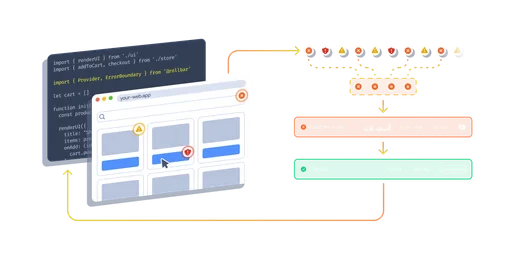
Rollbar collects application errors through SDKs and presents them with diagnostic context such as stack traces, telemetry, and affected-user information. Teams can connect alerts to issue trackers, source control, chat, and incident-response tools.
The service is aimed at software development teams investigating production issues. Its documented features also include session replay, deploy tracking, a REST API, and AI-assisted root-cause analysis.
Rollbar Decision Snapshot
A quick way to understand who this product may suit, where its limits matter, and which facts are most relevant before you compare alternatives.
Best suited toDevelopment and SRE teams that need production error context, release tracking, alerting, and issue-management workflows across supported application stacks.
Look elsewhere ifTeams requiring self-hosted deployment should compare alternatives; Rollbar's documented service is SaaS-hosted. Teams using unsupported or community-only SDKs should verify maintenance and feature coverage before rollout, and should evaluate alternatives such as Sentry u2014 compare when error tracking, traces, transaction events, and performance analysis are part of the same observability evaluation. or Bugsnag u2014 compare when application error monitoring, performance spans, and an on-premises enterprise option matter. instead.
PlatformsAndroid, API, SaaS, Web
TechZella assessment8.1/10
Rollbar — What Sets It Apart?
These are the product-specific differences that may matter when deciding whether the software fits your workflow. They are based on documented evidence rather than a universal ranking.
- Usage-based plans are not priced per seat and include unlimited users.
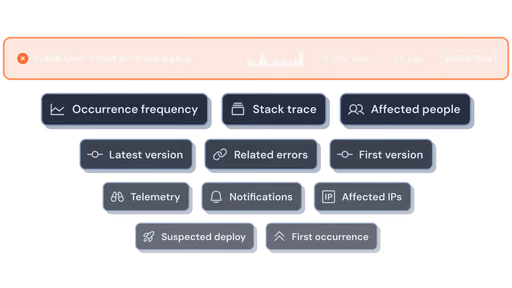
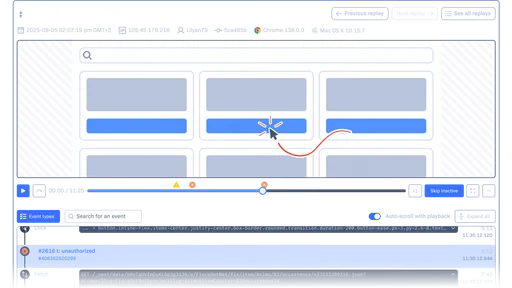
- Error items can include stack traces, telemetry, session replay, and deployment context.
- AI Root Cause Analysis and Resolve can investigate errors and propose a code fix through a pull request; Resolve is documented as open beta.
- Project-level integrations connect error items with issue trackers, source control, chat, and incident tools.
Editorial assessmentRollbar Pros & Cons
Pros
- Free plan includes ongoing error monitoring with stated monthly event and replay allowances.
- Plans include unlimited users, avoiding per-seat pricing.
- Integrations connect error records with issue tracking, source control, chat, and incident response.
- API, Terraform provider, and SDKs support automation across development workflows.
- Offers session replay and AI-assisted error investigation.
Cons
- Event, replay, and AI-credit limits require active usage monitoring.
- SDK support levels vary, and some frameworks are community-supported or unsupported.
- G2 review examples report that error grouping and rule configuration can be inconsistent or difficult.
- Resolve is in open beta, so buyers should account for its evolving status.
Rollbar Gotchas & Operational Limits
These are documented constraints or practical friction points that may matter before you adopt the product.
The free plan stops processing new events after its included monthly occurrence limit unless the account changes its overage behavior.
A sudden error spike can leave new events unprocessed; teams should set a budget or choose an intentional stop-versus-on-demand policy.
Evidence source ↗SDK and framework support levels vary, and some listed integrations are community-maintained or unsupported.
A supported language name alone does not guarantee the same vendor support or feature coverage as a flagship SDK.
Evidence source ↗Resolve is in open beta and uses AI credits.
Teams should review the beta status, credit allocation, and proposed pull requests before depending on automated fixes in production workflows.
Evidence source ↗Rollbar Pricing & Plans
Free
$0
month
5,000 occurrences and 1,000 session replays monthly; 30-day maximum data retention.
Check current pricing →Essentials
From $9
month
Starts at 10,000 monthly occurrences; includes up to 90-day retention and 4,000 AI credits at the starting tier.
Check current pricing →Advanced
From $13
month
Starts at 10,000 monthly occurrences; includes up to 180-day retention, adaptive alerts, SCIM, and 8,000 AI credits at the starting tier.
Check current pricing →Enterprise
Custom
month
Custom pricing for high-volume teams; includes custom retention, enterprise security controls, and priority support.
Check current pricing →Pricing may change. Verify current plans on the vendor's website.
Cost contextTotal Cost & Hidden Costs
Additional costs or implementation requirements that are documented in the available evidence.
Implementation and onboarding
Rollbar's setup guide requires creating projects, instrumenting applications with SDKs, configuring notifications, and connecting source control or deployment tracking. The reviewed public pricing page does not list a mandatory onboarding fee.
Evidence source ↗Hosting and infrastructure
Rollbar is hosted on Google Cloud Platform, so the vendor operates the service infrastructure. The reviewed pricing page does not list a separate customer hosting charge.
Evidence source ↗Usage, replay, and AI credits
Plans have monthly occurrence and replay allowances. Paid plans include stated AI-credit amounts, while additional replay or AI-credit usage can require add-ons; over-limit event handling can also incur on-demand charges.
Evidence source ↗Quick Comparison
Compare the product with documented alternatives across the factors that can change a buying decision. Each row is evidence-backed rather than a generic feature checklist.
Rollbar vs. Sentry
Documented comparisonRollbar vs. Bugsnag
Documented comparisonOnly factors supported by the available research are shown. The comparison is descriptive, not a ranking.
CapabilitiesRollbar Features
Error monitoring
- Real-time error feed and alerts
- Intelligent error grouping
- Stack traces and telemetry
- Custom fields and tags
Investigation and debugging
- Session replay
- Source maps and symbolication support
- Version and deploy tracking
- AI Root Cause Analysis
- Resolve proposed fix pull requests in open beta
Integrations and administration
- Jira, GitHub, GitLab, Slack, PagerDuty, and other documented integrations
- REST API
- Terraform provider
- SCIM provisioning on Advanced
Rollbar Specifications
| Deployment | Cloud SaaS hosted on Google Cloud Platform |
|---|
| Primary data region | Iowa region, according to Rollbar's security documentation |
|---|
| API | REST API |
|---|
| Infrastructure as code | Terraform provider |
|---|
| Free plan retention | Up to 30 days |
|---|
| Essentials retention | Up to 90 days |
|---|
| Advanced retention | Up to 180 days |
|---|
| Free monthly limits | 5,000 occurrences; 1,000 replays |
|---|
| Security | Rollbar documents SOC 2 Type I and II, SOC 3, TLS in transit, and encryption at rest for its compliant SaaS accounts |
|---|
Alternatives
Consider Sentry when your comparison centers on its documented error, transaction, trace, and performance-analysis APIs. Consider Bugsnag when you need its published performance-span monitoring or its enterprise on-premises deployment option. Rollbar may suit teams prioritizing error-centered workflows, its integrations, and its AI investigation features.
Migration & Lock-In
Documented portability, standards, export, or switching considerations. No switching-cost score is shown unless the evidence supports one.
Data portability
The REST API provides access to Rollbar data and can support integrations or data extraction. The documentation describes token scopes and API limits; it does not establish a one-click migration path to another service.
Evidence source ↗Our evidence-based assessmentTechZella Score
A proprietary editorial score based on product capabilities, usability, value, performance, support and user sentiment evidence.
8.1/10Moderate confidence
The assessment reflects documented error monitoring, replay, integrations, API, and AI-assisted investigation features, plus public G2 evidence. Reviewers praise setup and integrations, while some report inconsistent grouping.
Methodology v1.0. The assessment weighs feature coverage (25%), ease of use (15%), value for money (20%), performance (15%), support (10%) and user sentiment (15%), using researched product evidence and verified review evidence where available. It is a TechZella editorial assessment, not a direct user-review average.
Editorial transparency
Our Review Methodology
Key claims are linked to the sources used to verify them. This evidence record is separate from third-party user ratings.
TechZella evaluates software using documented product capabilities, pricing information, usability and value considerations, independent user evidence where available, and competitive context. The assessment is an editorial review, not a hands-on test unless one is explicitly identified. Our editorial assessment is based on 7 documented sources.
What TechZella adds- Usage-based plans are not priced per seat and include unlimited users.
- Error items can include stack traces, telemetry, session replay, and deployment context.
- AI Root Cause Analysis and Resolve can investigate errors and propose a code fix through a pull request; Resolve is documented as open beta.
- Project-level integrations connect error items with issue trackers, source control, chat, and incident tools.
Important limitations- Monthly usage limits apply to occurrences, replays, and AI credits; additional usage or capacity can affect cost.
- Rollbar distinguishes its maintained SDK support from community-supported and unsupported integrations, so framework coverage is not uniform.
- G2 reviewer examples include reports of inconsistent error grouping and difficulties configuring rules or querying with RQL.
Evidence-backed claimsRollbar's Free plan includes 5,000 occurrences and 1,000 session replays per month.The official pricing page lists the Free plan allowances and $0 monthly price.
View source ↗Verified 2026-11-08Essentials starts at $9 per month and Advanced starts at $13 per month at 10,000 occurrences.Rollbar's machine-readable pricing page lists the starting monthly prices and occurrence thresholds.
View source ↗Verified 2026-11-08Rollbar provides a REST API for reporting and managing error-related data.The API documentation describes its REST interface, SDK use, token authentication, and use for integrations and data extraction.
View source ↗Verified 2026-11-08Rollbar supports integrations including GitHub, Jira, Slack, PagerDuty, and Terraform.The official integrations directory lists these connections and describes example workflows.
View source ↗Verified 2026-11-08Rollbar's SDK support levels differ by language and framework.The SDK directory separates supported, community-supported, and unsupported entries.
View source ↗Verified 2026-11-08Rollbar introduced rule-triggered AI investigation through Agent Automation.Rollbar's October 14, 2026 product post explains rules that can start root-cause analysis or a proposed fix PR when matching errors occur.
View source ↗Verified 2026-11-08G2 displays Rollbar at 4.5 out of 5 based on 172 reviews.The G2 seller profile displays the aggregate rating and review count.
View source ↗Verified 2026-11-08 Independent review sources
Rollbar Ratings & Reviews
Ratings are published by the respective review platforms and may change over time.
Common questionsRollbar FAQs
Answers begin with the clearest available response, followed by the context that helps you act on it.
Does Rollbar have a free plan?
Yes. Its Free plan includes 5,000 occurrences and 1,000 session replays per month.
Does Rollbar offer a free trial?
Yes. Rollbar lists a 14-day full-access trial of the Advanced feature set.
Does Rollbar have an API?
Yes. Its REST API supports reporting and accessing Rollbar data, and the vendor also lists a Terraform provider.
Does Rollbar integrate with Jira and Slack?
Yes. Rollbar documents integrations for both, including issue creation or syncing with Jira and alerts and status actions through Slack.
Can Rollbar be self-hosted?
The reviewed product and security documentation describes Rollbar as a Google Cloud-hosted SaaS service; it does not document a self-hosted deployment option.
Community feedback
Reviews
No reviews yet. Be the first to share your experience.
Write a Review
Please log in to submit a review.
Recently added Developer Tools