
Self Transcription
$20
year
Annual license with integrated player and editor, unlimited voice typing, keyboard shortcuts, foot-pedal support, text expansion, and playback loops. Includes a seven-day free trial.
Check current pricing →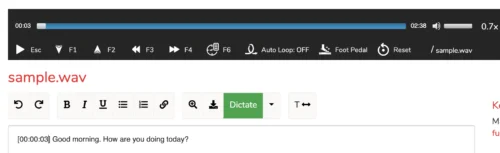
Web-based transcription software combining automatic speech-to-text, dictation, manual transcription tools, and subtitle export.
The product combines automatic transcription, dictation, manual editing, playback controls, foot-pedal support, offline editing, and subtitle exports. Pricing is comparatively simple, while independent review evidence is limited to a small Trustpilot sample.
This profile combines documented product information and independent evidence where available. It is not a hands-on test unless TechZella explicitly identifies one.
A quick way to understand who this product may suit, where its limits matter, and which facts are most relevant before you compare alternatives.
API, Firefox, Google Chrome, Linux, macOS, Microsoft Edge
8.0/10
Transcribe by Wreally is a browser-based transcription platform with two primary modes. Automatic Transcription converts uploaded audio or video into machine-generated text, while Self Transcription combines a media player, editor, dictation, keyboard shortcuts, and playback controls.
The service is designed for interviews, meetings, lectures, phone recordings, podcasts, research projects, and other spoken-audio workflows. Self Transcription can play local media without uploading it, while automatic processing requires media uploads to the service.
Annual license with integrated player and editor, unlimited voice typing, keyboard shortcuts, foot-pedal support, text expansion, and playback loops. Includes a seven-day free trial.
Check current pricing →Requires the annual license and adds machine transcription, automatic timecodes, speaker identification, subtitle creation, and one-minute previews.
Check current pricing →Centralized group licensing with administrator controls for assigning, revoking, and reusing user licenses. Automatic-transcription credits can be shared by the group.
Check current pricing →Pricing may change. Verify current plans on the vendor's website.
Compare similar products directly, then see which alternatives may make more sense when your requirements differ.
These products address broadly similar requirements. The descriptions focus on documented reasons a buyer might compare them with Transcribe by Wreally.
| Deployment | Web application |
|---|---|
| Supported operating systems | Windows, macOS, Linux through supported browsers |
| Primary browser support | Google Chrome |
| Automatic transcription browsers | Chrome, Firefox, Microsoft Edge |
| Self transcription browsers | Chrome primarily; recent Firefox and Safari reported to work with many features |
| Automatic transcription pricing | $6 per hour plus $20 annual license |
| Self transcription pricing | $20 per user annually |
| Free trial | Seven days for Self Transcription |
| Automatic preview | One-minute previews; terms page states 30 previews during trial |
| Integrations | OneDrive upload; Zoom, Teams, Skype, and YouTube workflows documented |
| API | No public API documentation verified |
| Audio and video input | MP3, MP4, M4A, WAV, AAC, FLAC, MOV, OGG, WEBM, WMA, and additional listed formats |
| Subtitle output | SRT and WebVTT |
| Data handling | Self-transcription typed text remains in browser storage; automatic transcription requires uploaded media |
A proprietary editorial score based on product capabilities, usability, value, performance, support and user sentiment evidence.
The product combines automatic transcription, dictation, manual editing, playback controls, foot-pedal support, offline editing, and subtitle exports. Pricing is comparatively simple, while independent review evidence is limited to a small Trustpilot sample.
Methodology v1.0. The assessment weighs feature coverage (25%), ease of use (15%), value for money (20%), performance (15%), support (10%) and user sentiment (15%), using researched product evidence and verified review evidence where available. It is a TechZella editorial assessment, not a direct user-review average.
No reviews yet. Be the first to share your experience.
Please log in to submit a review.
Yes. Self Transcription has a seven-day free trial with access to its self-transcription features. Automatic Transcription also provides one-minute previews, and the terms page states that trial users receive 30 one-minute previews during the seven-day period.
No public developer API was verified in the official product, pricing, or help documentation reviewed for this profile.
Transcribe is delivered as a web application. Self Transcription is primarily supported in Google Chrome on Windows, macOS, and Linux. Automatic transcription supports Chrome, Firefox, and Edge. The vendor reports that many features also work in recent Safari versions.
Yes. The vendor documents uploading automatic-transcription files from OneDrive. This is an upload option rather than a broad, verified integration marketplace.
Yes. Automatic transcripts can be exported in SRT and WebVTT subtitle formats.
The vendor states that self-transcription audio is played from the user’s computer and typed text is stored in browser storage. Dictation sends voice samples to external servers, and automatic transcription requires uploaded media.