Editorial overview
Aggregated Overview
The assessment reflects documented numerical and simulation tools, cross-platform downloads, a free GPLv2 distribution, and public G2 reviews. Scilab's optional AI coding assistant requires a separately installed agent and account.
This profile combines documented product information and independent evidence where available. It is not a hands-on test unless TechZella explicitly identifies one.
Overview
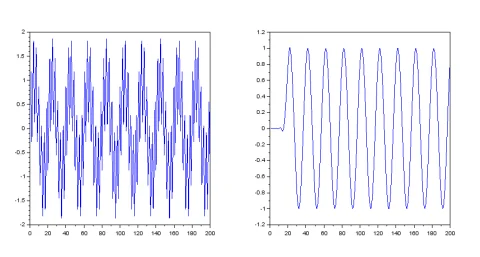
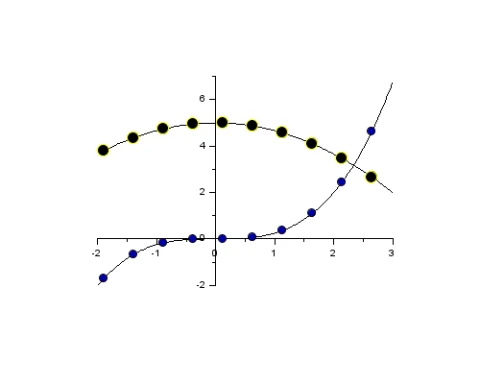
Scilab is a free, open-source environment for numerical computation and scientific programming. Its capabilities include numerical analysis, data visualization, algorithm development, and application development.
Xcos, distributed with Scilab, provides a graphical workspace for modeling and simulating dynamic systems. Scilab also supports extensions through the ATOMS toolbox repository and C/C++ interfaces for integration with native applications.
The 2027.0.0 release adds a web-based SciNotes editor with debugging tools and an AI assistant. The assistant depends on a separately installed external agent; Scilab does not include an AI model.
Scilab Decision Snapshot
A quick way to understand who this product may suit, where its limits matter, and which facts are most relevant before you compare alternatives.
Best suited toStudents, researchers, and engineering teams needing a free desktop environment for numerical analysis, algorithm development, plotting, or dynamic-system simulation.
Look elsewhere ifTeams that require vendor-published support prices, a managed cloud deployment, or an AI assistant with a bundled model and included AI subscription, and should evaluate alternatives such as GNU Octave or MATLAB instead.
PlatformsLinux, macOS, Windows
TechZella assessment8.4/10
Scilab — What Sets It Apart?
These are the product-specific differences that may matter when deciding whether the software fits your workflow. They are based on documented evidence rather than a universal ranking.
- Xcos is distributed with Scilab and provides graphical modeling and simulation for hybrid dynamic systems.
- The 2027.0.0 release adds an editor-based AI assistant that can work with supported external agents, run Scilab code, inspect plots, and edit the open file.
Editorial assessmentScilab Pros & Cons
Pros
- Free GPLv2 software with downloads for Windows, Linux, and macOS.
- Combines numerical computation, programming, visualization, and algorithm development.
- Includes Xcos for graphical dynamic-system modeling and simulation.
- Supports extensions through ATOMS and C/C++ integration interfaces.
Cons
- The optional AI assistant requires a separate supported agent and its own account or credentials.
- ATOMS installation behind a proxy requires manual configuration.
- Public standard prices for professional support and services were not found.
- The vendor says previous versions are no longer maintained.
Scilab Gotchas & Operational Limits
These are documented constraints or practical friction points that may matter before you adopt the product.
The SciNotes AI assistant relies on a separately installed, signed-in AI agent and does not ship an AI model.
Buyers should account for the agent's separate setup and account or API requirements; agent providers may process requests on their servers.
Evidence source ↗Installing ATOMS modules through a proxy requires manual configuration.
Users on managed networks may need IT assistance before they can install extensions through the package manager.
Evidence source ↗Previous Scilab versions are no longer maintained.
Organizations pinned to older releases should review the impact of lacking ongoing maintenance before standardizing on them.
Evidence source ↗Scilab Pricing & Plans
Scilab
Free
N/A
Free downloadable software under GPLv2. Optional professional support and services are available; public rates were not found.
Check current pricing →Pricing may change. Verify current plans on the vendor's website.
Cost contextTotal Cost & Hidden Costs
Additional costs or implementation requirements that are documented in the available evidence.
Core software
The downloadable software is free and open source under GPLv2. Users install it on their own supported computers; a vendor-hosted Scilab subscription is not documented on the download page.
Evidence source ↗Implementation and onboarding
The reviewed public pages do not state onboarding duration or a standard implementation fee. The publisher offers professional services and support, but does not publish their prices on the pages reviewed.
Evidence source ↗Extensions and support
Scilab provides the ATOMS toolbox repository. The public materials reviewed do not establish a universal fee for third-party toolboxes; separately purchased support or services may add cost, and public rates were not found.
Evidence source ↗Scilab Competitors & Alternatives
Compare similar products directly, then see which alternatives may make more sense when your requirements differ.
At a glance
Developer ToolsOnly factors supported by the available research are shown. The comparison is descriptive, not a ranking.
Direct competitors
These products address broadly similar requirements. The descriptions focus on documented reasons a buyer might compare them with Scilab.
CapabilitiesScilab Features
Numerical computation
- Matrix computation and linear algebra
- Interpolation and regression
- Fourier analysis
- Differentiation and integration
- Ordinary differential equation solvers
Modeling and visualization
- 2-D and 3-D data visualization
- Xcos graphical modeling and simulation
- Hybrid dynamic-system modeling
Extensibility and development
- ATOMS packaged toolbox repository
- C/C++ interfaces to the Scilab engine
- SciNotes editor and debugger
- Optional external-agent AI assistant in version 2027.0.0
Scilab Specifications
| License | GNU GPL version 2.0 |
|---|
| Deployment | Locally installed desktop software |
|---|
| Supported operating systems | Windows 10/11 64-bit, listed GNU/Linux distributions, and macOS |
|---|
| API | C/C++ call_scilab interface and API_Scilab |
|---|
| Extensions | ATOMS toolboxes |
|---|
| Windows ARM64 | Experimental distribution listed on the download page |
|---|
Exit planningMigration & Lock-In
Documented portability, standards, export, or switching considerations. No switching-cost score is shown unless the evidence supports one.
Data portability
Scilab exposes C/C++ interfaces for calling the Scilab engine from native applications and accessing Scilab variables. The reviewed sources do not specify a turnkey migration service or general migration path from competing products.
Evidence source ↗Our evidence-based assessmentTechZella Score
A proprietary editorial score based on product capabilities, usability, value, performance, support and user sentiment evidence.
8.4/10Moderate confidence
The assessment reflects documented numerical and simulation tools, cross-platform downloads, a free GPLv2 distribution, and public G2 reviews. Scilab's optional AI coding assistant requires a separately installed agent and account.
Methodology v1.0. The assessment weighs feature coverage (25%), ease of use (15%), value for money (20%), performance (15%), support (10%) and user sentiment (15%), using researched product evidence and verified review evidence where available. It is a TechZella editorial assessment, not a direct user-review average.
Editorial transparency
Our Review Methodology
Key claims are linked to the sources used to verify them. This evidence record is separate from third-party user ratings.
TechZella evaluates software using documented product capabilities, pricing information, usability and value considerations, independent user evidence where available, and competitive context. The assessment is an editorial review, not a hands-on test unless one is explicitly identified. Our editorial assessment is based on 5 documented sources.
What TechZella adds- Xcos is distributed with Scilab and provides graphical modeling and simulation for hybrid dynamic systems.
- The 2027.0.0 release adds an editor-based AI assistant that can work with supported external agents, run Scilab code, inspect plots, and edit the open file.
Important limitations- The AI assistant does not include an AI model; users must install and sign in to a supported external agent or configure its credentials.
- Scilab's system requirements say that installing ATOMS modules behind a proxy requires manual ATOMS proxy configuration.
- The vendor's public pages reviewed describe support and services but do not give their prices.
Evidence-backed claimsScilab 2027.0.0 was released on October 15, 2026, under GPLv2.The official download page lists the release date, supported downloads, and GNU GPL v2.0 license.
View source ↗Verified 2026-11-10Scilab includes numerical analysis, visualization, scientific programming, and Xcos.The official features page describes mathematical functions, 2-D and 3-D graphics, algorithm development, and Xcos modeling and simulation.
View source ↗Verified 2026-11-10Scilab's AI assistant uses an external AI agent rather than a bundled model.The official help says Scilab ships no AI model and requires users to install and log in to an agent program.
View source ↗Verified 2026-11-10Scilab supports calling its engine from C/C++ applications.The official help documents call_scilab as an interface for calling Scilab from native C/C++ applications.
View source ↗Verified 2026-11-10G2 displayed a 4.5/5 average from 64 Scilab reviews.The public G2 product review page displayed the average and review count when accessed.
View source ↗Verified 2026-11-10 Independent review sources
Scilab Ratings & Reviews
Ratings are published by the respective review platforms and may change over time.
Common questionsScilab FAQs
Answers begin with the clearest available response, followed by the context that helps you act on it.
Is Scilab free?
Yes. Scilab is available as a free download under GPLv2.
Which operating systems does Scilab support?
The current download page lists Windows, Linux, and macOS distributions.
Does Scilab include an AI coding assistant?
Yes. Version 2027.0.0 includes a SciNotes assistant, but users must install and sign in to a supported external AI agent; Scilab does not ship a model.
Can developers extend or integrate Scilab?
Yes. Scilab supports packaged ATOMS toolboxes and C/C++ interfaces for calling its engine or accessing its data.
Community feedback
Reviews
No reviews yet. Be the first to share your experience.
Write a Review
Please log in to submit a review.
Recently added Developer Tools