
Free and open source
$0
one-time
The complete desktop application is available without subscription fees under GPL-3.0-or-later.
Check current pricing →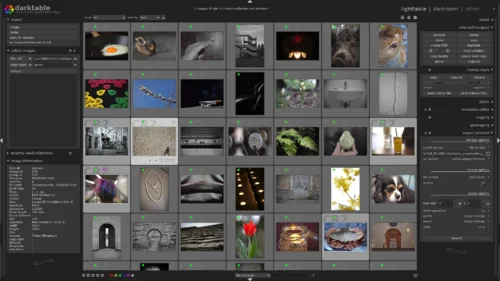
Darktable is free, open-source software for RAW development, non-destructive photo editing, image organization and photography workflow automation.
Darktable provides extensive RAW processing, cataloging, color management, tethering, export, scripting and new AI tools. It is free under GPL-3.0-or-later, but its large feature set, hardware requirements and platform-specific packaging create a steeper learning curve.
This profile combines documented product information and independent evidence where available. It is not a hands-on test unless TechZella explicitly identifies one.
Darktable is an open-source photography workflow application and RAW developer. It combines a database-backed lighttable for organizing images with a darkroom for non-destructive development and enhancement.
The project began in 2009 and is maintained by a distributed community. Darktable runs locally rather than as a hosted web service, and it stores image metadata and processing history through its database and XMP sidecar files.
Version 5.6 introduced optional AI features, including interactive object masking, neural denoising and image upscaling. These features depend on the package build, model downloads and available hardware.
A quick way to understand who this product may suit, where its limits matter, and which facts are most relevant before you compare alternatives.
API, BSD, Linux, macOS, Solaris, Windows
8.5/10
The complete desktop application is available without subscription fees under GPL-3.0-or-later.
Check current pricing →Pricing may change. Verify current plans on the vendor's website.
Compare similar products directly, then see which alternatives may make more sense when your requirements differ.
These products address broadly similar requirements. The descriptions focus on documented reasons a buyer might compare them with Darktable.
| Latest stable version | 5.6.1 |
|---|---|
| License | GNU GPL version 3 or later |
| Deployment | Desktop application |
| Platforms | Linux, Windows, macOS, BSD and Solaris |
| API | Lua API and scripting environment |
| Integrations | Piwigo, email attachments, HTML galleries, external commands and Lua extensions |
| Free trial | Not applicable; full application is free |
| AI availability | Optional in version 5.6 and later; package-dependent |
| Database | SQLite-based image library with XMP sidecars |
| Supported workflows | RAW development, photo cataloging, tethering, geotagging and batch export |
A proprietary editorial score based on product capabilities, usability, value, performance, support and user sentiment evidence.
Darktable provides extensive RAW processing, cataloging, color management, tethering, export, scripting and new AI tools. It is free under GPL-3.0-or-later, but its large feature set, hardware requirements and platform-specific packaging create a steeper learning curve.
Methodology v1.0. The assessment weighs feature coverage (25%), ease of use (15%), value for money (20%), performance (15%), support (10%) and user sentiment (15%), using researched product evidence and verified review evidence where available. It is a TechZella editorial assessment, not a direct user-review average.
Yes. Darktable is free and open-source software distributed under GPL-3.0-or-later.
Yes. The official project provides Windows installers and macOS disk images. Current macOS bundles support specified recent macOS versions.
Yes. Darktable includes a Lua scripting environment and a documented Lua API for working with images, collections, metadata, the database and application events.
Recent versions include optional AI object masking, neural denoising and upscaling. Availability depends on the build, enabled preferences, downloaded models and hardware.
Its export system supports Piwigo web albums, local disk storage, email attachments and generated HTML galleries. Lua extensions can add workflows for tools and services such as GIMP, Hugin and external commands.
A free trial is not needed because the complete application is available without a paid plan or time limit.
Yes. Darktable supports standard formats such as JPEG alongside RAW and high-dynamic-range formats, although its workflow is especially focused on RAW development.
No reviews yet. Be the first to share your experience.
Please log in to submit a review.