
Babylon.js packages and Babylon.js Editor are separate project components; the Editor requires Node.js as a prerequisite.
Teams should account for both their runtime dependency setup and the Editor's local development requirements.
Evidence source ↗
Babylon.js is an open-source 3D engine for building interactive web experiences with WebGL or WebGPU, JavaScript, or TypeScript.
Documentation describes broad rendering, scene, asset, physics, debugging, and XR capabilities. It is free and open source, but requires development expertise and a suitable browser and graphics stack. No verified third-party rating or review sample was available.
This profile combines documented product information and independent evidence where available. It is not a hands-on test unless TechZella explicitly identifies one.
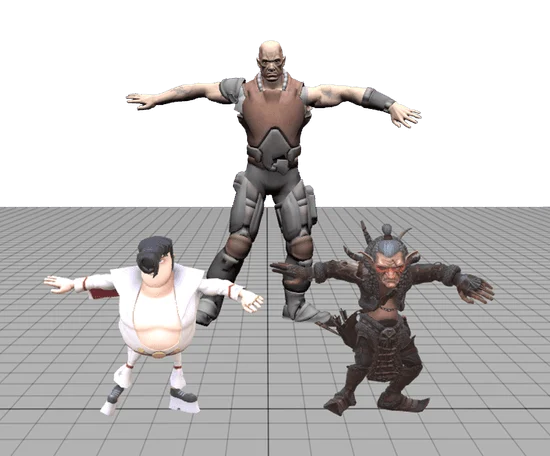
Babylon.js is an open-source engine for rendering interactive 3D content on the web. It supports WebGL and WebGPU and offers APIs for scenes, cameras, materials, meshes, animation, audio, and physics-related workflows.
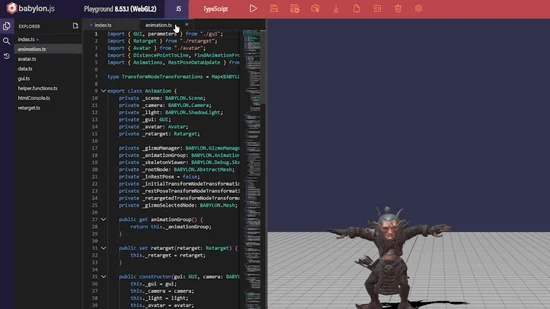
Developers can install modular packages through npm or prototype in the browser-based Playground. Babylon.js Editor is a separate desktop application for editing scenes and projects.
A quick way to understand who this product may suit, where its limits matter, and which facts are most relevant before you compare alternatives.
Developers building browser-based 3D games, interactive product views, and WebXR experiences who want a comprehensive engine and developer tools.
Teams seeking a no-code 3D authoring workflow or a managed hosting service; Babylon.js is an engine and does not provide a paid hosted application platform, and should evaluate alternatives such as Three.js or PlayCanvas Engine instead.
JavaScript, Linux, macOS, Web, Windows
8.4/10
These are the product-specific differences that may matter when deciding whether the software fits your workflow. They are based on documented evidence rather than a universal ranking.
These are documented constraints or practical friction points that may matter before you adopt the product.
Teams should account for both their runtime dependency setup and the Editor's local development requirements.
Evidence source ↗Applications with strict download-size budgets may need to investigate custom builds and test their production bundle.
Evidence source ↗Babylon.js is available as free and open-source software. Application hosting and any separately selected dependencies are managed by the developer.
Check current pricing →Pricing may change. Verify current plans on the vendor's website.
Compare similar products directly, then see which alternatives may make more sense when your requirements differ.
| Decision factor | Babylon.js | Three.js | PlayCanvas Engine |
|---|---|---|---|
| Core scope | Babylon.js presents itself as a web rendering engine with integrated scene, camera, material, animation, audio, physics, and debugging capabilities. | Three.js describes itself as a 3D library; it provides scene, camera, renderer, lights, materials, and related rendering building blocks. Source ↗ | PlayCanvas Engine supports WebGL 2 and WebGPU and is the foundation of PlayCanvas Editor, React, and Web Components. Source ↗ |
| Rendering APIs | Babylon.js supports WebGL and WebGPU through its engine. | Three.js documentation covers a WebGL renderer and a separate WebGPU renderer. Source ↗ | PlayCanvas Engine supports WebGL 2 and WebGPU. Source ↗ |
| Project setup | Babylon.js offers maintained npm packages, TypeScript declarations, and a browser Playground for prototyping. | Three.js documents npm or CDN installation and recommends using a build tool for many projects. Source ↗ | PlayCanvas offers an engine plus a browser-based collaborative Editor and related web components. Source ↗ |
| Pricing model | Babylon.js describes itself as free and open source. | Three.js is available as an open-source library; its official site provides code and documentation without listing a paid engine plan. Source ↗ | PlayCanvas states its engine is free for personal and commercial projects under the MIT license. Source ↗ |
Only factors supported by the available research are shown. The comparison is descriptive, not a ranking.
These products address broadly similar requirements. The descriptions focus on documented reasons a buyer might compare them with Babylon.js.



| Software type | Open-source web 3D rendering engine |
|---|---|
| Rendering | WebGL 1.0, WebGL 2.0, WebGPU |
| Languages | JavaScript and TypeScript |
| Installation | npm packages or browser distributions |
| Desktop editor availability | Windows, macOS, Linux |
| API | JavaScript and TypeScript engine APIs |
| Free trial | Not applicable; the engine is free and open source |
| Hosting | Application hosting is managed by the developer |
Verified installation, hosting, administration, or environment details that can affect implementation.
| Installation or hosting | Install as npm packages or load browser distributions. The engine is embedded in the developer's web application; the application needs its own web hosting. Source ↗ |
|---|---|
| Desktop editor | Babylon.js Editor is downloadable for Windows, macOS, and Linux. Source ↗ |
Documented portability, standards, export, or switching considerations. No switching-cost score is shown unless the evidence supports one.
Official specifications list exporters for glTF, USDZ, OBJ, and Babylon formats; the documentation also describes loaders including glTF, OBJ, and STL.
Evidence source ↗A proprietary editorial score based on product capabilities, usability, value, performance, support and user sentiment evidence.
Documentation describes broad rendering, scene, asset, physics, debugging, and XR capabilities. It is free and open source, but requires development expertise and a suitable browser and graphics stack. No verified third-party rating or review sample was available.
Methodology v1.0. The assessment weighs feature coverage (25%), ease of use (15%), value for money (20%), performance (15%), support (10%) and user sentiment (15%), using researched product evidence and verified review evidence where available. It is a TechZella editorial assessment, not a direct user-review average.
Key claims are linked to the sources used to verify them. This evidence record is separate from third-party user ratings.
TechZella evaluates software using documented product capabilities, pricing information, usability and value considerations, independent user evidence where available, and competitive context. The assessment is an editorial review, not a hands-on test unless one is explicitly identified. Our editorial assessment is based on 4 documented sources.
The official specifications list WebGL 1.0, WebGL 2.0, and WebGPU support.
View source ↗Verified 2026-11-13The product specifications enumerate a scene graph, animations, audio, physics integration, and WebXR support.
View source ↗Verified 2026-11-13The documentation explains that Playground code can be written in either language and run in an interactive editor.
View source ↗Verified 2026-11-13Official npm documentation describes core and modular packages and TypeScript support.
View source ↗Verified 2026-11-13The Editor download page describes it as free and open source and provides downloads for these desktop systems.
View source ↗Verified 2026-11-13The npm documentation says tree shaking is not very effective for the core module and points to custom builds as an option.
View source ↗Verified 2026-11-13Answers begin with the clearest available response, followed by the context that helps you act on it.
No reviews yet. Be the first to share your experience.
Please log in to submit a review.