You want your AI assistant to do more than answer questions. You want it to find customer records, create support tickets, update CRM data, and run workflows across your SaaS tools.
But in order to make it work like that, you need a way to connect AI to the systems your team already uses.
That’s exactly where REST APIs and the Model Context Protocol (MCP) come in and get such work done!
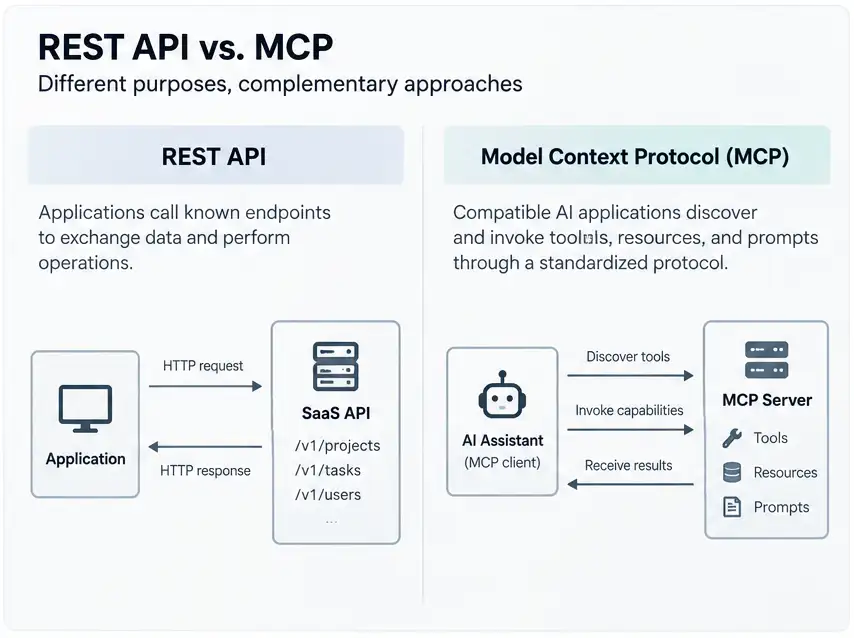
For basics, REST APIs let applications exchange data through defined endpoints. Whereas MCP gives compatible AI applications a standard way to discover and use tools and access context.
They can work together, but they solve different problems.
But the right choice depends on your application. REST is a practical option for established integrations and predictable data exchange. MCP is worth considering when AI applications need a consistent way to discover and invoke tools across services.
In this guide, we compare both approaches, explain their trade-offs, and walk you through the decisions involved in connecting them to your SaaS stack.
You’ll also learn what to consider when evaluating security, performance, and implementation effort.
TL;DR: Keep REST APIs for conventional application integrations. Add MCP when AI applications need standardized access to your tools. If you’re extending an existing SaaS platform with AI capabilities, using both may be the most practical approach.
Key Findings
MCP and REST serve different purposes, so you don’t necessarily need to choose one over the other. These are the main points to consider when connecting AI to your SaaS products.
- REST APIs suit conventional application integrations. They’re useful when software calls known endpoints with defined inputs.
- MCP standardizes AI-facing tool access. Compatible applications can discover and invoke capabilities exposed by MCP servers.
- MCP doesn’t automatically replace REST. An MCP server can call existing APIs or shared backend services.
- Neither approach guarantees security or performance. Both depend on implementation, authorization, validation, and operational controls.
- A hybrid architecture can serve both audiences. You can retain REST for existing clients and add MCP for suitable AI workflows.
- Measure results before expanding. Compare task success, latency, token use, failures, and cost per successful task.
MCP vs. REST APIs: What’s the Difference?
REST commonly defines how applications request resources and perform operations. MCP defines how compatible AI applications communicate with servers that expose tools and context.
And that difference matters when connecting AI to SaaS products.
Your existing REST API may already handle core operations. MCP can provide an additional interface for selected AI workflows without requiring you to rebuild the backend.
MCP vs. REST: Quick Comparison
| Feature | REST APIs | MCP |
|---|---|---|
| Primary purpose | Application and service communication | Standardized AI access to tools and context |
| Interface | Resources, endpoints, HTTP methods | Tools, resources, prompts, protocol messages |
| Capability discovery | Documentation, OpenAPI, or application configuration | Protocol-level discovery |
| Invocation | Clients call defined endpoints | Compatible clients discover and invoke capabilities |
| Common consumers | Web apps, mobile apps, backend services | AI assistants and agentic applications |
| Transport | Commonly HTTP | Standard input/output or Streamable HTTP, among supported transports |
| Business logic | Usually resides in backend services | Can reuse existing backend services |
| Security | Authentication, authorization, validation, and gateway controls | MCP security plus tool-level authorization and policy controls |
| Best starting point | Conventional application integrations | AI workflows benefiting from standardized tool access |
The main difference: REST is an architectural style, while MCP is a protocol. They’re not competing transport technologies. MCP can communicate over HTTP.
The official MCP architecture documentation explains the protocol’s components and communication model. OpenAI’s MCP integration guide also describes how applications connect to remote MCP servers and invoke their tools.
Why this difference matters for SaaS teams
Consider a project management platform with a REST API. Its web application already uses endpoints to retrieve projects, update tasks, and manage users.
Now imagine adding an AI assistant. A user asks, “Which projects have overdue tasks, and what should I prioritize?”
The assistant needs more than a network address. It must identify suitable capabilities, supply valid parameters, interpret the results, and follow access rules.
MCP can standardize the tool interface for this workflow. The application still needs suitable reasoning, reliable backend logic, and security controls, however. MCP alone doesn’t provide those things.
What Is a REST API, and When Does It Work Best?
A REST API provides a conventional interface for applications to exchange data and perform operations. It commonly uses HTTP methods, resource URLs, status codes, and representations such as JSON.
For example, a project management service might expose this endpoint:
GET /v1/projects/123/tasks
Authorization: Bearer <token>
The client sends a defined request, and the server checks it before returning an appropriate response. This makes REST a practical choice when an application already knows which operation it needs.
Where REST APIs excel
REST APIs fit several common SaaS workflows:
- Web and mobile applications that call known endpoints.
- Service-to-service integrations between backend systems.
- Payment and billing workflows with explicit operations.
- Scheduled data synchronization between SaaS platforms.
- Reporting pipelines that process defined datasets.
- Public developer platforms serving different clients.
REST also benefits from established development practices. Teams can use client libraries, API gateways, authentication middleware, logging, and monitoring tools.
The OpenAPI Specification describes HTTP API endpoints, parameters, request bodies, and responses in a machine-readable format. Teams can use it to support documentation and tooling.
Why REST can require extra work for AI agents
An API may be easy for a developer to understand but less convenient for an AI agent. The agent still needs to determine which endpoint fits the user’s request.
Suppose a customer asks, “Check my latest order and explain its status.” The workflow might require retrieving an order, checking shipping information, and reading delivery events.
A custom integration can coordinate these calls. Developers must design that orchestration and make the relevant information available to the model.
OpenAPI helps describe an API, but it doesn’t provide the complete MCP interaction model by itself.
What REST doesn’t guarantee?
REST doesn’t automatically make an API fast, secure, scalable, or easy to maintain. Those outcomes depend on implementation and operational choices.
A poorly designed REST API can have unclear errors, excessive network calls, weak authorization, and inconsistent data. A well-designed API can avoid many of these problems.
Practical takeaway: If your application already knows which endpoint to call, REST may be all you need.
What Is MCP, and How Does It Connect AI to SaaS?
The Model Context Protocol (MCP) standardizes communication between AI applications and servers that expose tools, resources, and prompts. It gives compatible clients a common way to discover and use these capabilities.
Instead of building a different tool interface for every AI application, developers can expose selected capabilities through an MCP server. This can simplify integration, provided the client supports the required protocol features.
How MCP’s architecture works
MCP has three core participants:
- MCP host: The AI application managing the overall interaction.
- MCP client: The component communicating with an MCP server.
- MCP server: The component exposing capabilities to the client.
These are distinct roles, even when users see only one AI application. The host can manage interactions with one or more MCP servers through its clients.
For example, an AI assistant might connect to separate servers for project management, customer support, and document search. Each server can expose capabilities relevant to its service.
MCP tools, resources, and prompts
MCP defines several capability types. Each serves a different purpose.
| Capability | Purpose | SaaS example |
|---|---|---|
| Tools | Expose operations an AI application can invoke | Create a support ticket |
| Resources | Provide context or data | Retrieve an order record |
| Prompts | Provide reusable prompt templates | Prepare a support response |
These examples illustrate possible designs. An MCP server doesn’t automatically make every exposed operation suitable for every AI workflow.
How MCP communicates
MCP uses JSON-RPC messages and supports different transports. Standard input/output can support local server processes, while Streamable HTTP supports remote communication.
For implementation details, consult the official MCP architecture documentation. The current specification should guide decisions about supported transports and protocol behavior.
What MCP adds, and what it doesn’t
MCP standardizes how compatible AI applications discover and invoke capabilities. It doesn’t guarantee that a model chooses the right tool or interprets every result accurately.
Developers still need useful tool descriptions, clear input schemas, appropriate outputs, and backend validation. They must also enforce authorization rather than trusting the model to follow instructions.
Practical takeaway: MCP is most useful when an AI application benefits from a standardized tool interface.
When Should You Choose REST Instead of MCP?
Choose REST when your application already knows which operation to call and doesn’t need AI-driven capability discovery. This can help you avoid adding another layer to a workflow that already works.
Your application has a fixed workflow
Suppose a checkout service must calculate a price and create an order. The application already knows which operations to perform and what information each requires.
A conventional API may be the simplest fit. Adding MCP solely to execute those same fixed operations could introduce unnecessary complexity.
You need predictable application-to-application integration
REST works well when developers define the request structure, response format, and error-handling behavior. It also fits applications that rely on established client libraries and API contracts.
That doesn’t mean REST guarantees deterministic business outcomes. The underlying service still needs reliable validation and error handling.
Your workload is primarily scheduled or data-oriented
Batch jobs, reporting pipelines, and scheduled synchronization may not need a model to select tools dynamically. A direct API or dedicated data interface may be easier to operate.
Evaluate throughput, retries, observability, and data consistency for these workloads. Unless an AI-facing protocol solves a real problem, you may not need to add one.
You don’t have a compatible AI client
MCP only helps when the intended client supports the relevant protocol and capabilities. Without a suitable consumer, an MCP server may add maintenance without providing practical value.
Recommendation: Keep REST as your starting point for conventional integrations. Consider MCP when a specific AI workflow justifies it.
When Should You Choose MCP for AI Agent Integrations?
MCP is worth considering when compatible AI applications need to discover and invoke tools across services. It provides a consistent interface without requiring each client to implement every integration separately.
Your AI application needs to discover tools
An AI assistant may need different capabilities depending on the user’s request. MCP provides a standardized mechanism for discovering capabilities exposed by connected servers.
For example, a customer support assistant might access order lookup, ticket search, and knowledge retrieval tools. The application can then select from the capabilities available to it.
Users need natural-language access to SaaS workflows
MCP can help expose task-oriented operations for requests such as:
- “Find this customer’s latest invoice.”
- “Summarize the open support tickets.”
- “Check the order status and explain the delay.”
- “Prepare a draft response using recent account activity.”
These workflows still require suitable tools and application logic. MCP doesn’t guarantee that an AI model will complete them correctly.
You want a consistent interface across services
A company may connect its AI application to several SaaS systems. Each server can expose its own capabilities through the same protocol.
This can reduce the need to build a completely different integration interface for every compatible client. Each service still needs its own permissions, business rules, and operational controls.
Your SaaS product is adding agent-facing features
A SaaS vendor can expose selected operations through an MCP server while keeping its public REST API. This may help compatible AI applications use the product without requiring a complete backend rewrite.
For example, a project management platform might expose tools for searching tasks, summarizing projects, and creating approved updates.
Many SaaS platforms use APIs to connect with other applications and automate workflows. For example, when comparing CoSchedule alternatives by reason for switching, consider how each tool fits your existing marketing workflow and integration requirements.
When MCP adds little value
MCP may not be worthwhile when:
- A simple integration calls one known endpoint.
- The workload has no model-driven tool selection.
- No intended client supports the required capabilities.
- Security or operational requirements aren’t yet understood.
- The expected benefits don’t justify the added maintenance.
Recommendation: Consider MCP for a clear AI-facing use case, rather than adopting it simply because it’s available.
Why Many SaaS Products Should Use Both MCP and REST APIs
For many SaaS products, a sensible approach is to retain REST and add MCP for selected AI workflows. The existing API continues serving conventional applications, while the MCP server provides an interface suited to compatible AI clients.
This can preserve existing investments and avoid forcing every application to use the same interface.
A practical hybrid architecture
Consider a customer relationship management platform. Its web application already uses REST to manage contacts, deals, and customer records.
Now the company wants an AI assistant to summarize accounts and prepare follow-up tasks. It can expose selected capabilities through an MCP server while retaining the existing API.
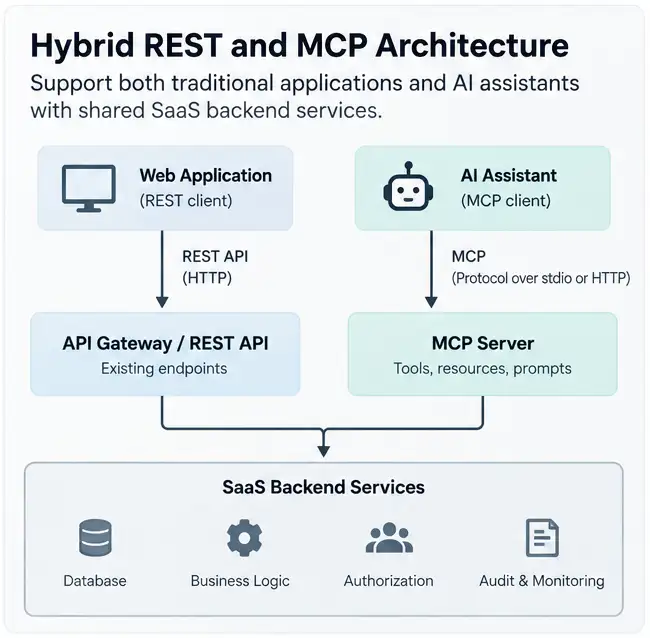
The architecture might work like this:
- The web application sends requests through the REST API.
- The AI assistant connects to an MCP server.
- The MCP server invokes approved service methods or existing API endpoints.
- The backend enforces business rules and authorization.
- Each interface returns suitable results to its client.
The MCP server may call existing REST endpoints or shared service methods directly. The best choice depends on your architecture and operational requirements.
What belongs in each layer?
| Responsibility | Recommended location |
|---|---|
| Web and mobile application requests | Existing application API |
| Public developer integrations | REST API, where appropriate |
| AI-facing tool discovery | MCP server |
| Tool descriptions and input schemas | MCP server |
| Core business rules | Shared backend services |
| Tenant isolation and authorization | Backend and relevant interface layers |
| Audit trails and operational monitoring | Shared governance infrastructure |
This separation helps keep the system easier to maintain. It also reduces the risk of implementing business rules differently for AI and non-AI clients.
Why this approach can reduce duplication
Your existing backend may already handle pricing, billing, permissions, and data validation. The MCP server can reuse that logic instead of implementing another version.
Adding MCP isn’t always necessary, though. A small product may reasonably begin with REST alone and introduce MCP when a suitable AI workflow emerges.
The guiding principle: Use each interface for the clients and workflows it serves best.
MCP vs. REST Performance: Latency, Reliability, and Cost
Neither MCP nor REST is universally faster or cheaper. The outcome depends on the complete workflow, including network calls, model inference, tool design, and backend processing.
A useful comparison measures successful task completion, not just protocol overhead.
Is MCP faster than REST?
Not necessarily. MCP can introduce additional tool discovery or orchestration steps. An AI workflow may also require model inference before and after a tool call.
A direct REST request may complete a fixed operation without those additional steps. An MCP workflow, however, may simplify how an AI application accesses multiple capabilities.
These scenarios aren’t equivalent unless they perform the same task. Compare them under the same conditions before drawing conclusions.
What affects latency and cost?
| Factor | Why it matters |
|---|---|
| Network round trips | Additional calls can increase response time |
| Model inference | Reasoning and generation can dominate total latency |
| Tool definitions | Large descriptions and schemas can increase input tokens |
| Payload size | Excessive context can increase transfer and processing costs |
| Backend performance | Slow services affect both approaches |
| Caching | Reusing suitable results can reduce repeated work |
| Retries and failures | Failed operations can increase cost and completion time |
| Tool orchestration | Unnecessary calls can create extra work |
MCP doesn’t automatically reduce token consumption. Poorly designed tools may expose excessive information or encourage unnecessary calls.
How to run a fair performance test
Compare three approaches using the same SaaS workflow:
- Direct REST integration: The application calls the required endpoints.
- Custom AI tool adapter: The model uses application-defined tools that call the APIs.
- MCP integration: The compatible AI application discovers and invokes equivalent MCP tools.
Keep the underlying business logic, dataset, and model configuration consistent wherever possible. Document any differences you can’t control.
Measure these outcomes:
- Median and p95 end-to-end latency.
- Successful task completion rate.
- Model token consumption.
- Backend request count.
- Failure and retry rates.
- Cost per successful task.
- Recovery behavior after errors.
What should you publish as evidence?
A useful benchmark includes the test environment, model and SDK versions, number of runs, workload, concurrency, and measurement method.
Don’t report performance percentages until the tests have actually been run. The available research establishes architectural trade-offs, but it doesn’t establish that one approach is universally faster.
MCP Security vs. REST Security: What Changes?
MCP doesn’t automatically make an integration secure. It provides a standardized interface, but developers still need to control identity, permissions, tool execution, and access to sensitive data.
The security question isn’t simply whether to use MCP or REST. It’s whether the complete system enforces the right controls.
Identity, permissions, and tenant isolation
Every request should operate within the caller’s permitted access. An AI assistant shouldn’t gain broader privileges simply because it can invoke a tool.
Consider a customer support assistant. It may need permission to read order status, but not to issue refunds or change billing details.
A secure implementation can enforce these boundaries through:
- Authentication and token validation.
- Least-privilege permissions.
- Per-user and per-tenant access checks.
- Appropriate token scopes and audience validation.
- Server-side business rules.
- Secure credential storage.
Prompt injection and unsafe tool calls
An AI agent may encounter malicious instructions inside documents, messages, or retrieved content. Those instructions could attempt to influence the agent’s tool choices.
The model shouldn’t be the only security boundary. Validate tool inputs and enforce permissions in the application itself.
For sensitive operations, you may also require explicit approval before execution.
Human approval for high-impact actions
Some operations carry greater risk than others. Reading an order status differs from deleting a customer record or issuing a refund.
Consider requiring approval for actions such as:
- Deleting records or changing account permissions.
- Issuing refunds or changing billing settings.
- Sending external messages.
- Making irreversible changes to customer data.
The appropriate approval policy depends on the operation and its consequences.
Monitoring and incident response
Logging can help teams investigate unexpected tool calls and failed operations. Logs shouldn’t expose credentials or unnecessary personal data, however.
Useful controls include rate limits, timeouts, request tracing, audit records, anomaly detection, and credential revocation.
The OWASP MCP Top 10 identifies security risks relevant to MCP implementations. OpenAI’s MCP documentation also discusses safety considerations for remote MCP servers.
Pre-launch security checklist
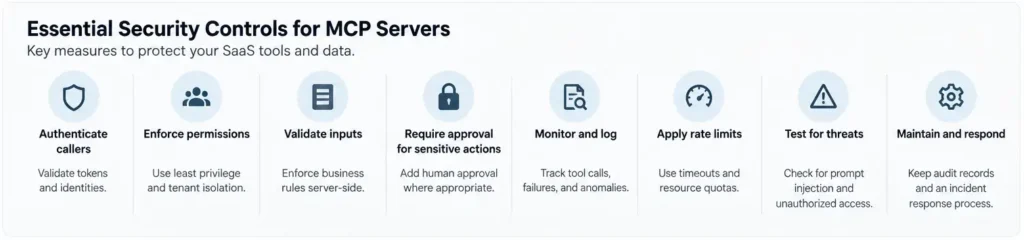
Before exposing MCP tools, review these controls:
- Authenticate callers and validate tokens.
- Enforce tenant isolation and user permissions.
- Apply least privilege to every operation.
- Validate inputs and enforce business rules server-side.
- Require approval for sensitive actions where appropriate.
- Protect credentials and sensitive information in logs.
- Apply rate limits, timeouts, and resource quotas.
- Review third-party servers and their data handling.
- Test prompt injection and unauthorized tool access.
- Maintain audit records and an incident response process.
Practical takeaway: Both MCP and REST need security controls. An AI-facing interface also requires careful attention to tool selection and potentially unsafe actions.
How to Connect an Existing REST API to MCP
You can often add MCP without rewriting your existing SaaS backend. The main task is to expose selected operations through well-designed tools while preserving established business rules and security controls.
Step 1. Audit your existing REST API
Identify the endpoints that support useful customer workflows. Review authentication, permissions, rate limits, request schemas, and error responses.
If you maintain an OpenAPI specification, use it to understand the available endpoints. It may also help generate client code or inform the design of your MCP tools.
Step 2. Choose high-value AI workflows
Start with a few tasks that have clear inputs and expected results. Avoid exposing every endpoint at once.
For example, a project management SaaS might begin with these tasks:
- Search projects and retrieve their status.
- Find overdue tasks for a specific user.
- Summarize recent project activity.
- Prepare a draft task update for approval.
These workflows are easier to evaluate than a broad instruction such as “manage my entire workspace.”
Step 3. Design task-oriented MCP tools
Give each tool a clear name, description, input schema, and expected output. The model should be able to distinguish similar operations and understand their requirements.
For example, a track_order tool might accept an order identifier and return the current status, shipping information, and relevant delivery events.
That tool could coordinate several internal operations. The AI client would receive a focused result instead of handling every low-level request separately.
Combine operations only when doing so improves reliability and clarity. Tool descriptions should reflect actual behavior, rather than promise capabilities the backend doesn’t provide.
Step 4. Connect tools to existing business logic
Two common approaches are available:
| Approach | How it works | Considerations |
|---|---|---|
| MCP server calls REST endpoints | The server invokes existing API operations | Reuses established contracts, but may add network hops |
| MCP server calls shared service methods | The server invokes internal backend logic | May reduce unnecessary hops, but requires suitable service boundaries |
Neither approach is universally better. Choose based on your architecture, authorization model, and operational requirements.
Step 5. Implement authorization and approval controls
Ensure each tool operates within the caller’s permissions. Keep validation and critical business rules in the backend.
You can also require approval for destructive or sensitive actions. The policy should reflect the risk associated with each operation.
Step 6. Test with a compatible MCP client
Check that the client can discover tools and supply valid inputs. Then test successful calls, invalid parameters, permission failures, timeouts, and server errors.
Test realistic workflows rather than isolated tool calls alone. A tool can work correctly in isolation but still fail during a multi-step task.
Step 7. Monitor results before expanding
Track task completion, latency, failures, token consumption, and security events. Review user feedback and identify recurring problems.
Add more tools only when the existing integration performs reliably and the next workflow has a clear purpose.
For implementation details, consult the official MCP architecture documentation and OpenAI’s MCP integration guide.
MCP vs. OpenAPI vs. Function Calling: What’s the Difference?
MCP, OpenAPI, and function calling are related, but they solve different problems. Understanding these distinctions can help you avoid unnecessary development work.
MCP vs. OpenAPI
OpenAPI describes HTTP APIs, while MCP defines a protocol for AI-facing capabilities.
OpenAPI can document REST endpoints, parameters, authentication schemes, and response structures. Developers can use that description to generate documentation or client libraries.
MCP provides a standardized interaction model for compatible AI applications and servers. A team can use OpenAPI for its existing API and expose selected operations through MCP.
Neither technology automatically replaces the other.
MCP vs. function calling
Function calling allows a model or AI platform to request structured tool invocations. The application determines how those calls are executed and how results return to the model.
MCP standardizes communication with servers exposing tools and other capabilities. An application can use function calling without MCP, or connect an MCP integration to its broader tool-calling workflow.
The distinction is between the model’s ability to request a tool call and the protocol used to expose and communicate with tools.
Do you need to convert every REST endpoint into an MCP tool?
No. Expose capabilities that support meaningful AI workflows.
A large collection of low-level tools may create unnecessary complexity. Focus on clear descriptions, useful outputs, appropriate permissions, and well-defined tasks.
Managed MCP Servers vs. Self-Hosting
Managed MCP infrastructure and self-hosting can both work. The right choice depends on operational responsibilities, network requirements, security policies, and available engineering resources.
When managed MCP infrastructure makes sense
A managed service may reduce some infrastructure administration. It can also fit organizations already using a provider’s API gateway or AI platform.
Confirm which responsibilities the provider actually handles. Managed hosting doesn’t remove the need for access policies, monitoring, or application-level validation.
When self-hosting makes sense
Self-hosting may provide greater control over deployment, networking, observability, and operational customization. It can suit teams with established infrastructure and security practices.
The trade-off is additional responsibility for upgrades, availability, incident response, and ongoing maintenance.
What to evaluate before choosing a provider
| Evaluation area | Questions to ask |
|---|---|
| Identity | Can it integrate with your existing identity provider? |
| Authorization | Can you enforce user and tenant permissions? |
| Networking | Can it meet your private connectivity requirements? |
| Monitoring | Are tool calls and failures observable? |
| Compatibility | Which specification and SDK versions are supported? |
| Maintenance | Who handles upgrades and incident response? |
| Data handling | Where does data travel, and how is it retained? |
| Cost | What are the hosting, usage, and operational costs? |
For a concrete enterprise example, Google Cloud’s Apigee MCP coverage discusses exposing governed APIs through MCP.
Provider capabilities vary by implementation. Before choosing a service, confirm that its current documentation supports your requirements.
How the July 2026 MCP Specification Affects Your Decision
The MCP specification dated July 28, 2026, introduced changes that developers should consider when evaluating new implementations. These updates matter for compatibility, transport behavior, and implementation planning.
According to the official MCP specification announcement, the release notes describe a stateless protocol core, Multi Round-Trip Requests, header-based routing, cacheable list results, authorization hardening, an extensions framework, and SDK updates.
What should developers verify before implementation?
Before adopting new specification features, check these details:
- Specification version: Confirm which protocol version your implementation targets.
- SDK compatibility: Check whether your selected SDK supports the required features.
- Client support: Verify that your intended AI application supports the relevant capabilities.
- Transport behavior: Confirm that your deployment uses a supported transport and handles connection behavior correctly.
- Authorization: Review the current requirements for authentication and protected operations.
- Testing: Validate the implementation against the client and server versions you plan to deploy.
Don’t assume every MCP client or SDK supports every recent feature. Compatibility depends on the specific implementation.
Does the latest specification make MCP the default choice?
No. Protocol improvements can make some implementations more practical, but they don’t eliminate the need to evaluate the use case.
A conventional application may still work best with REST. An AI assistant may benefit from MCP. A SaaS platform serving both may need both interfaces.
Decision Matrix: Which Integration Approach Should You Choose?
The best approach depends on your consumers, workflow, and security requirements. Use this matrix as a starting point, then validate the decision against your actual architecture.
| Your situation | Recommended starting point | Why |
|---|---|---|
| Web or mobile application calls known endpoints | REST | Direct application integration |
| Scheduled data synchronization | REST or a dedicated data interface | Predictable execution |
| AI assistant needs to discover tools | MCP | Standardized capability discovery |
| AI agent performs multi-step SaaS tasks | MCP over existing services | Task-oriented tool access |
| Existing API serves applications and AI agents | REST + MCP | Different interfaces for different consumers |
| Enterprise agents need governed access | Governed MCP plus existing APIs | Consistent tool access with appropriate controls |
| No compatible MCP client or clear AI use case | REST initially | Avoid unnecessary complexity |
Five questions to make the decision
Before committing to either approach, consider these questions:
- Who will consume the interface? A conventional application and an AI application may have different needs.
- Does the consumer need capability discovery? If tools must be discovered dynamically, MCP may help.
- Does the workflow involve model-driven tool selection? If not, direct REST calls may be sufficient.
- Can you enforce appropriate security controls? Consider identity, permissions, validation, and monitoring.
- Have you measured the results? Compare task success, latency, failures, and cost before expanding.
A practical rule: Keep REST for conventional application integrations. Add MCP when compatible AI clients need a standardized way to discover and invoke capabilities. Use both when the architecture benefits from separate interfaces.
People Also Ask
-
Is MCP replacing REST APIs?
No. MCP and REST serve different purposes and can coexist. Many SaaS products can retain their existing REST APIs while exposing selected capabilities through MCP.
-
Is MCP faster than REST?
Not universally. End-to-end performance depends on network calls, model inference, tool orchestration, payload size, caching, and backend processing. Benchmark equivalent workflows before choosing.
-
Can an MCP server use an existing REST API?
Yes. An MCP server can call existing REST endpoints or shared backend service methods. The implementation should preserve authorization, validation, and established business rules.
-
Does MCP require HTTP?
No. MCP supports multiple transports, including standard input/output for local processes and Streamable HTTP for remote communication. Consult the current specification for implementation details.
-
What is the difference between MCP and OpenAPI?
OpenAPI describes HTTP APIs in a machine-readable format. MCP standardizes communication between compatible AI applications and servers exposing tools and other capabilities. They can complement each other.
-
Can AI agents use REST APIs without MCP?
Yes. AI applications can use custom integrations or model tool-calling mechanisms to invoke REST endpoints. MCP is an option when a standardized tool interface provides value.
-
Is MCP secure enough for enterprise SaaS applications?
It can be used in enterprise environments, but security depends on implementation. Authentication, authorization, tenant isolation, tool restrictions, monitoring, and data-handling policies remain essential.
-
Should every SaaS product build an MCP server?
No. A SaaS product should consider MCP when it has a clear AI-facing use case and the expected benefit justifies the additional development and maintenance.
Final Thoughts: Choose the Interface That Fits Your Workflow
REST remains a practical foundation for conventional application integrations. MCP offers a standardized way for compatible AI applications to discover and invoke tools and access context.
For many SaaS products, an incremental approach makes sense. Keep existing REST endpoints and business logic where they work well. Add MCP for selected AI workflows, enforce appropriate permissions, and measure the results before expanding.
The decision isn’t about which technology wins. It’s about choosing the interface that serves each consumer and workflow effectively.
Final verdict: Choose REST for conventional application integration. Add MCP when AI-facing tool access solves a real problem. Use both when your SaaS stack needs stable application APIs and a standardized interface for AI agents.