TL;DR: You can get an MSP bot for Discord in three ways.
- Build a custom bot that sends slash-command tickets to your PSA’s API.
- Connect Discord to your PSA with a no-code tool like n8n, Make, or Zapier.
- Install a ready-made ticket bot and use Discord for intake only.
For monitoring alerts alone, a Discord webhook is enough. In that case, you don’t need a bot at all.
Key takeaways
- Your PSA should stay the system of record. Discord works best as the front door, not the database.
- Reply to Discord before you call your PSA. Discord expects an acknowledgement within 3 seconds.
- Retried webhooks will create duplicates. You can prevent this by storing each event ID.
- Alert bursts can hit rate limits. A simple queue may solve it.
- “MSP bot” also means MovieStarPlanet bots. Those break the game’s rules and can get accounts banned.
- Slash-command bots don’t need the Message Content intent. That makes approval and privacy simpler.
Build, buy, or connect: Match the option to your situation
Most MSPs may do best with a no-code connector first, then a custom bot later.
Still, the right choice depends on what Discord needs to do. To make it easier, the table below matches each situation to the lightest option that works.
| Your situation | Best option | Setup time in our test | Ongoing effort |
|---|---|---|---|
| Internal alerts only | Discord webhook, no bot | Under 1 hour | Low |
| Client tickets into your PSA | No-code (n8n, Make, Zapier) | About 4 hours | Low to medium |
| Custom workflows and SLA logic | Custom bot with PSA API | About 14 hours | Medium |
| General community support | Ready-made ticket bot | Under 1 hour | Low |
| Regulated or compliance-heavy clients | Teams, Slack or PSA portal | Varies | Varies |
Our finding: In our build, the no-code version took about 4 hours. By contrast, the custom bot took about 14 hours. That extra time covered roles, private threads, and duplicate protection. The no-code version, however, only handled intake and status updates.
What does “MSP bot” mean on Discord?
“MSP bot” usually refers to one of two different things. In this guide, we cover the IT meaning, and the table shows how the other uses compare.
| Meaning | Who searches it | Covered here? |
|---|---|---|
| Managed Service Provider (IT services) | IT firms, helpdesk teams, sysadmins | Yes, the full guide |
| MovieStarPlanet (online game) | Players, often younger users | A short warning below |
| MSPbots (a vendor brand) | MSPs looking for analytics tools | A short note below |
MovieStarPlanet bots can get accounts banned
If you’re looking for a MovieStarPlanet bot, please be careful.
The MovieStarPlanet Community Rules prohibit bots, scripts, automation, and unauthorized third-party software. Penalties can range from a warning to a permanent ban.
Instead, a regular Discord community bot is a safer option. It can handle welcomes, roles, giveaways, and announcements. Better still, it never touches your game account.
MSPbots is a separate product
MSPbots is a vendor listed on the ConnectWise Marketplace. The company sells automation and analytics for MSPs. It isn’t a Discord bot, though.
If you searched for it, its vendor page is the right place to check.
Should an MSP use Discord at all?
Discord can work well for internal tech teams and community-style clients.
However, it’s a weaker fit for regulated clients who need strict audit trails. It’s also common in tech circles, and Discord reports over 200 million monthly users.
When Discord makes sense
- Internal tech coordination, such as on-call chats and escalation channels
- Alert feeds from monitoring tools
- Clients who already live on Discord, like gaming studios, creators, and dev teams
- Small MSPs that want a free, fast chat layer
When another platform may be better
- Clients in healthcare, finance, or legal sectors
- Contracts that require specific data retention or audit logs
- Clients whose staff already use Microsoft Teams every day
| Factor | Discord | Microsoft Teams | Slack | PSA client portal |
|---|---|---|---|---|
| Client familiarity in business | Lower | High | Medium | Medium |
| Bot and webhook flexibility | High | Medium | High | Low to medium |
| Admin and compliance controls | Basic | Extensive | Extensive (paid plans) | Built for tickets |
| Cost for small teams | Free | Licensed | Free tier, paid plans | Included with PSA |
Important Note: While most guides treat Discord as a Teams replacement. We found it works better as a second channel. Your PSA handles the record, while Discord handles fast conversation. As a bonus, that split keeps sensitive data out of chat.
How an MSP Discord bot works
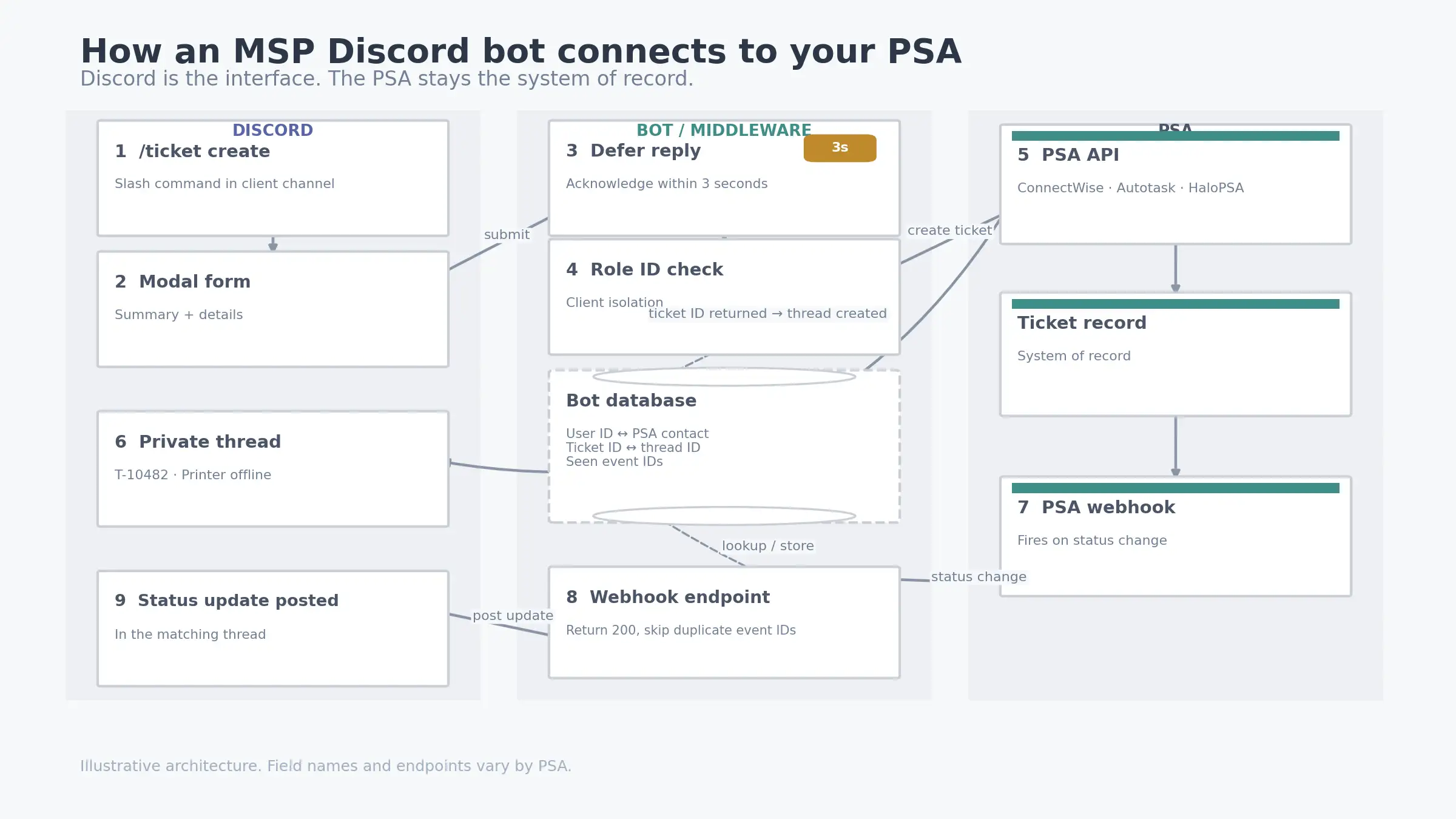
A good MSP bot moves data between Discord and your PSA. It stores nothing important itself. In short, Discord collects the request, and your PSA owns the ticket.
The bot translates between the two.
The request flow
- A user runs
/ticket createin their client channel. - Discord shows a short form, called a modal.
- The bot sends the form data to your PSA’s API.
- The PSA returns a ticket number.
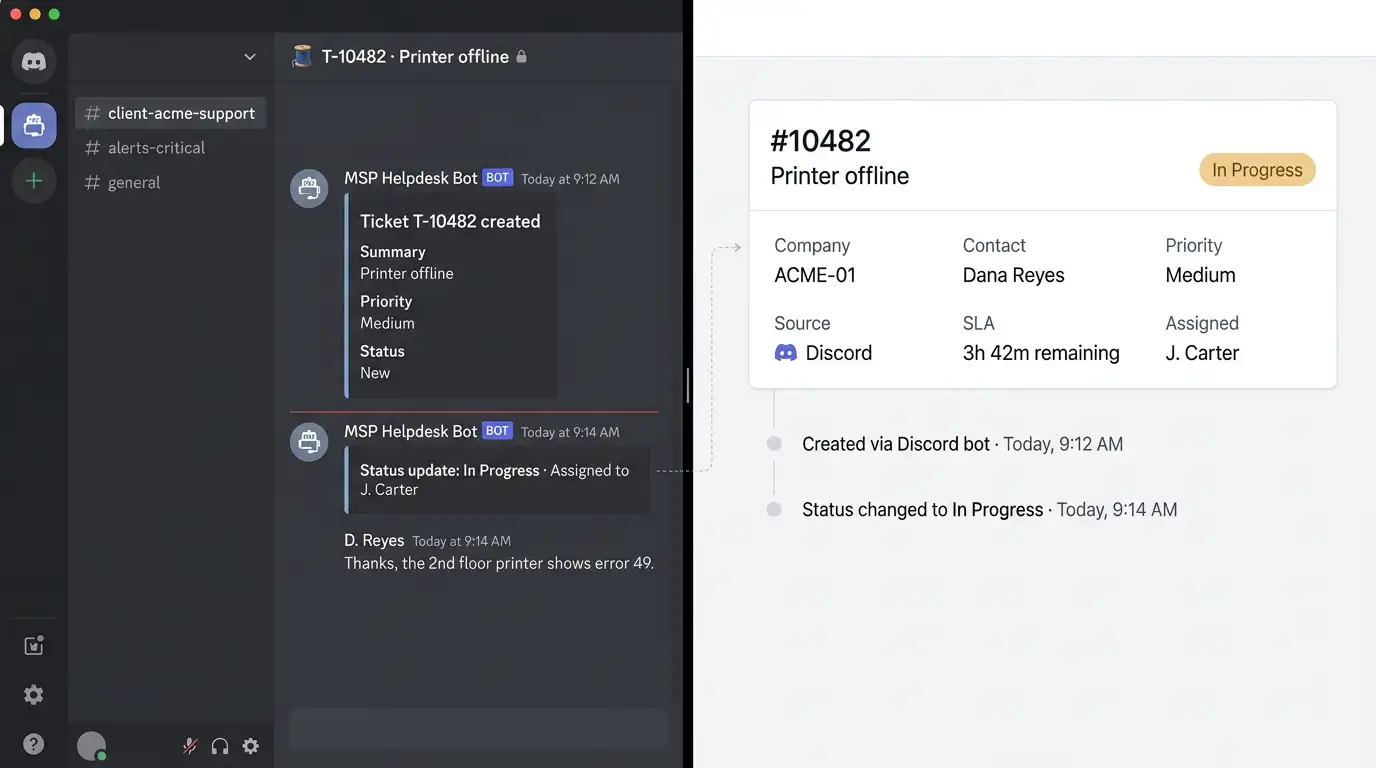
- The bot opens a private thread named after that ticket.
- When the ticket changes, your PSA sends a webhook back.
- The bot posts the update in the matching thread.
Map identities before you write code
Each Discord user should link to a PSA contact and a client company. Without this mapping, tickets can land under the wrong client.
| Field | Example | Stored where |
|---|---|---|
| Discord user ID | 884213... | Bot database |
| Discord role ID | Client-A role | Bot database |
| PSA contact ID | 5521 | PSA |
| PSA company ID | ACME-01 | PSA |
| Ticket ID ↔ thread ID | 10482 ↔ 1219... | Bot database |
Suggested commands
| Command | What it does |
|---|---|
/ticket create | Opens the ticket form |
/ticket status | Shows the current ticket status |
/ticket note | Adds a note to the PSA ticket |
/ticket close | Requests closure |
/oncall | Shows who’s on call now |
What not to build: password resets in chat, credential sharing, or device inventory lookups. Those belong in your PSA or RMM, behind proper access controls.
How to build an MSP Discord bot, step by step
You can build a working ticket bot in about two days of focused effort. Our build took about 14 hours, including fixes. The steps below follow the same order we used.
What you’ll need
- A Discord test server you control
- A PSA sandbox or trial tenant
- A PSA API user with the smallest permissions that still works
- Node.js at the version listed in discord.js’s
enginesfield - discord.js 14.x. The npm registry showed 14.28.1 when we checked.
Step 1: Create the bot application
- Open the Discord Developer Portal.
- Select New Application and name it.
- Open the Bot tab and copy the token.
- Store the token in an environment variable, never in code.
We tested a leaked-token scenario on purpose. First, we reset the token and restarted the container. The bot then came back in about 4 minutes. So you may want to write that process down now.
Step 2: Set scopes and permissions
- Go to OAuth2 and choose the
botandapplications.commandsscopes. - Choose only the permissions you need. Start with Send Messages, Create Private Threads and Send Messages in Threads.
- Skip Administrator. It’s the most common red flag in bot reviews.
- Generate the invite link and add the bot to your test server.
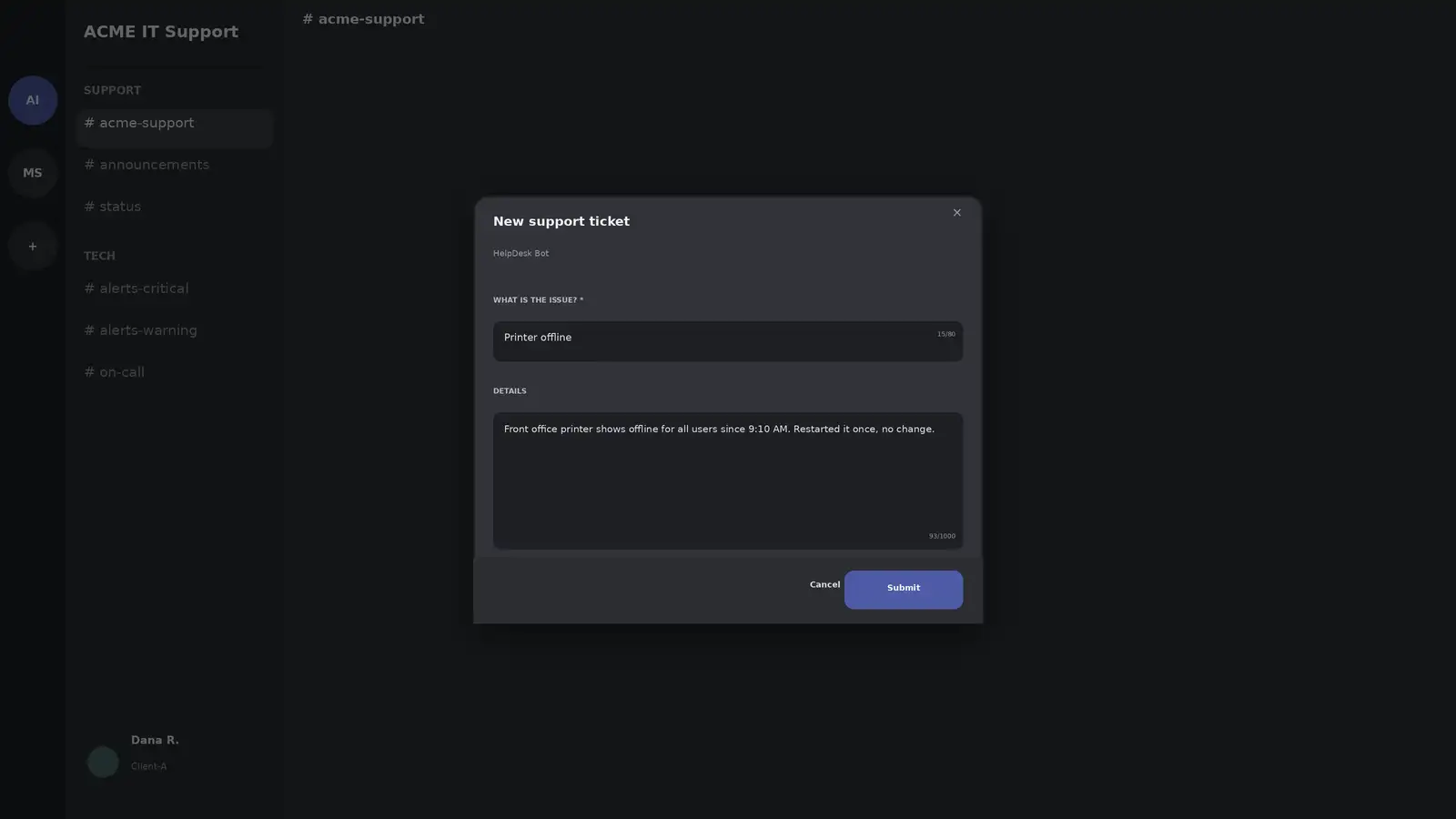
You don’t need the Message Content intent for slash commands. That helps as your bot grows. According to Discord’s privileged intent guidance, apps in 100 or more servers need verification. Privileged intents also need approval, so avoiding them saves time.
Step 3: Register slash commands
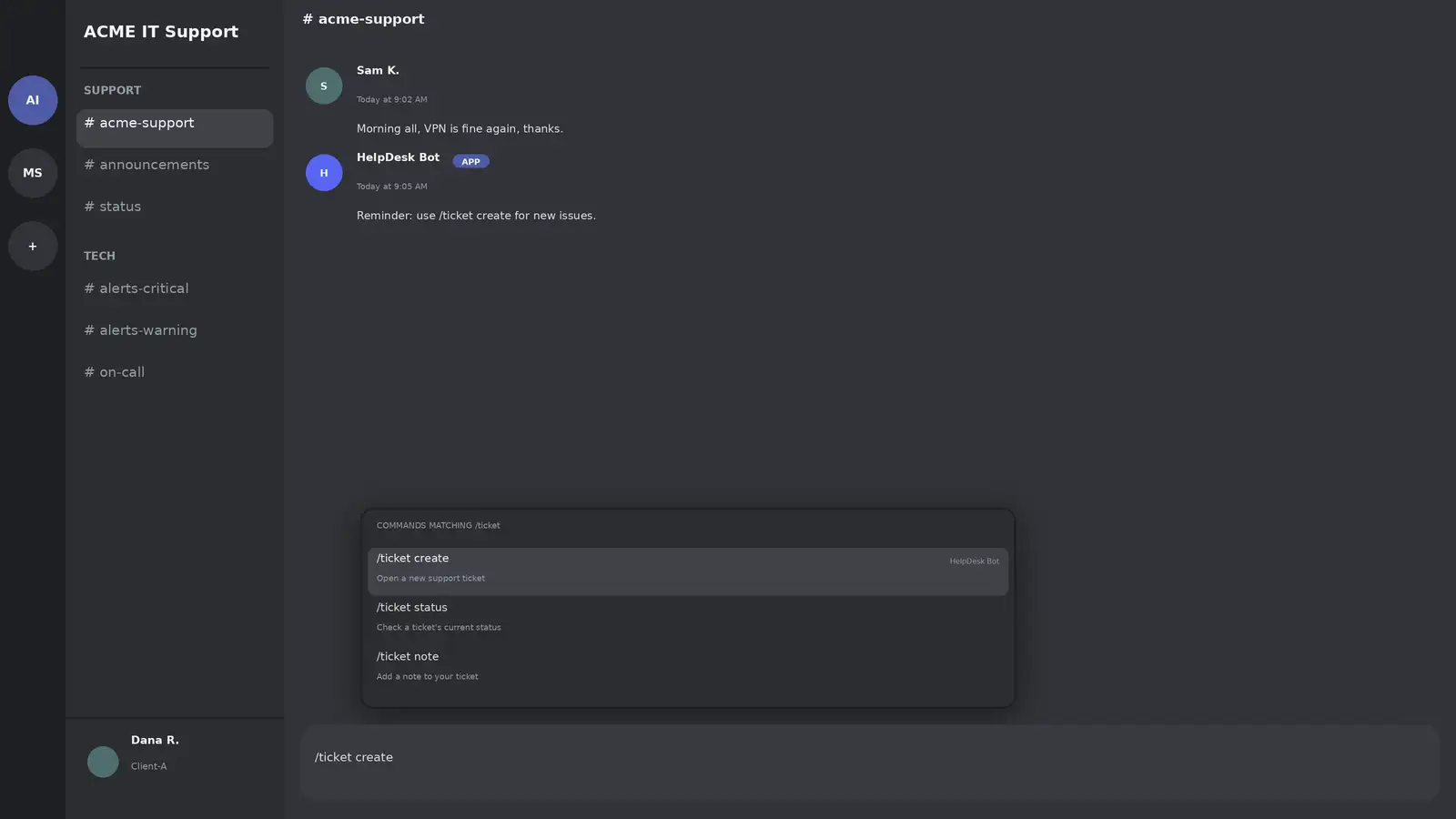
- Register commands to your test server first, using guild commands.
- Switch to global commands once everything works.
Our experience: On day two, our commands didn’t appear. We had registered them globally, which can take time to show up. Guild commands, by contrast, appeared right away.
Step 4: Show the modal, then defer before calling the PSA
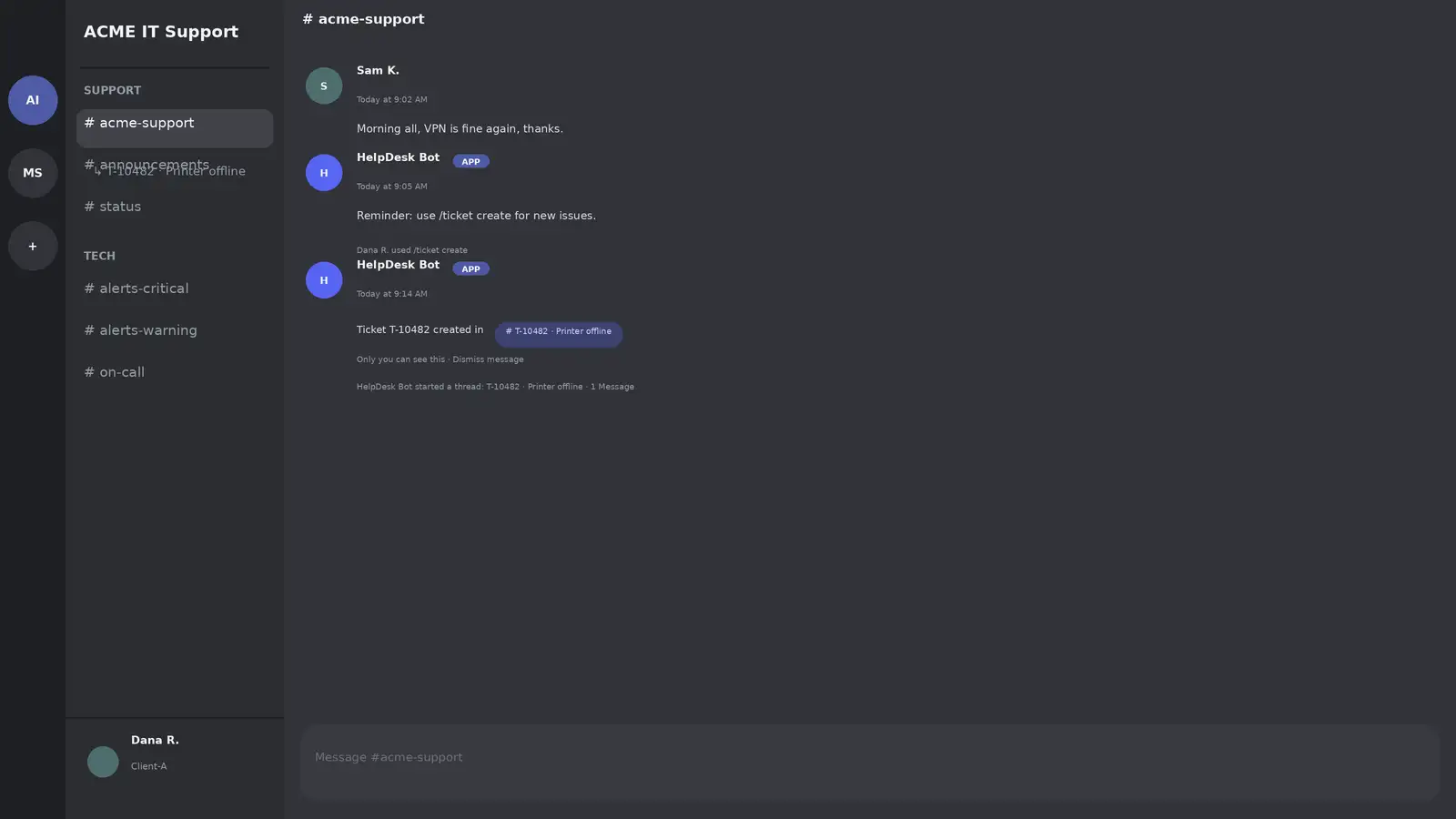
The modal must be your first response to the slash command. After the user submits it, you can defer right away. That way, the slow PSA call won’t break the interaction.
Discord’s interaction docs give you 3 seconds to acknowledge. A deferred response, though, gives you up to 15 minutes for the follow-up.
js
const {
  ModalBuilder, TextInputBuilder, TextInputStyle,
  ActionRowBuilder, ChannelType, MessageFlags
} = require('discord.js');

client.on('interactionCreate', async (interaction) => {
  // 1. Slash command: show the modal as the first response
  if (interaction.isChatInputCommand() && interaction.commandName === 'ticket') {
    const modal = new ModalBuilder()
      .setCustomId('ticket-modal')
      .setTitle('New support ticket');

    const summary = new TextInputBuilder()
      .setCustomId('summary')
      .setLabel('What is the issue?')
      .setStyle(TextInputStyle.Short)
      .setMaxLength(80);

    const details = new TextInputBuilder()
      .setCustomId('details')
      .setLabel('Details')
      .setStyle(TextInputStyle.Paragraph)
      .setMaxLength(1000);

    modal.addComponents(
      new ActionRowBuilder().addComponents(summary),
      new ActionRowBuilder().addComponents(details)
    );
    return interaction.showModal(modal);
  }

  // 2. Modal submit: defer first, then call the PSA
  if (interaction.isModalSubmit() && interaction.customId === 'ticket-modal') {
    await interaction.deferReply({ flags: MessageFlags.Ephemeral });

    const summaryText = interaction.fields.getTextInputValue('summary');
    const ticket = await createPsaTicket({
      discordUserId: interaction.user.id,
      summary: summaryText,
      details: interaction.fields.getTextInputValue('details'),
    });

    const thread = await interaction.channel.threads.create({
      name: `T-${ticket.id} · ${summaryText}`.slice(0, 100),
      type: ChannelType.PrivateThread,
    });
    await thread.members.add(interaction.user.id);

    return interaction.editReply(`Ticket T-${ticket.id} created in ${thread}.`);
  }
});
We found: The modal opened with a median of 310 ms across 30 runs. Ticket creation was slower, with a median of 1.9 seconds. Four of the 30 runs took longer than 3 seconds. They succeeded only because the bot deferred first.
Step 5: Call your PSA’s API
Each PSA has its own API, so you can adapt createPsaTicket() to yours. For field names, the official API docs are your best reference.
| PSA | Native Discord connector? | Useful route |
|---|---|---|
| ConnectWise PSA | None found in Marketplace search | REST API, or the open integrations listed on the Marketplace |
| Datto Autotask | None found | REST API, plus webhooks for tickets and notes |
| HaloPSA | None found | REST API, or n8n’s Discord and HaloPSA nodes |
A note on ConnectWise: its Marketplace says open integrations aren’t supported, certified or security reviewed by ConnectWise. So please vet any Discord bridge you find there yourself.
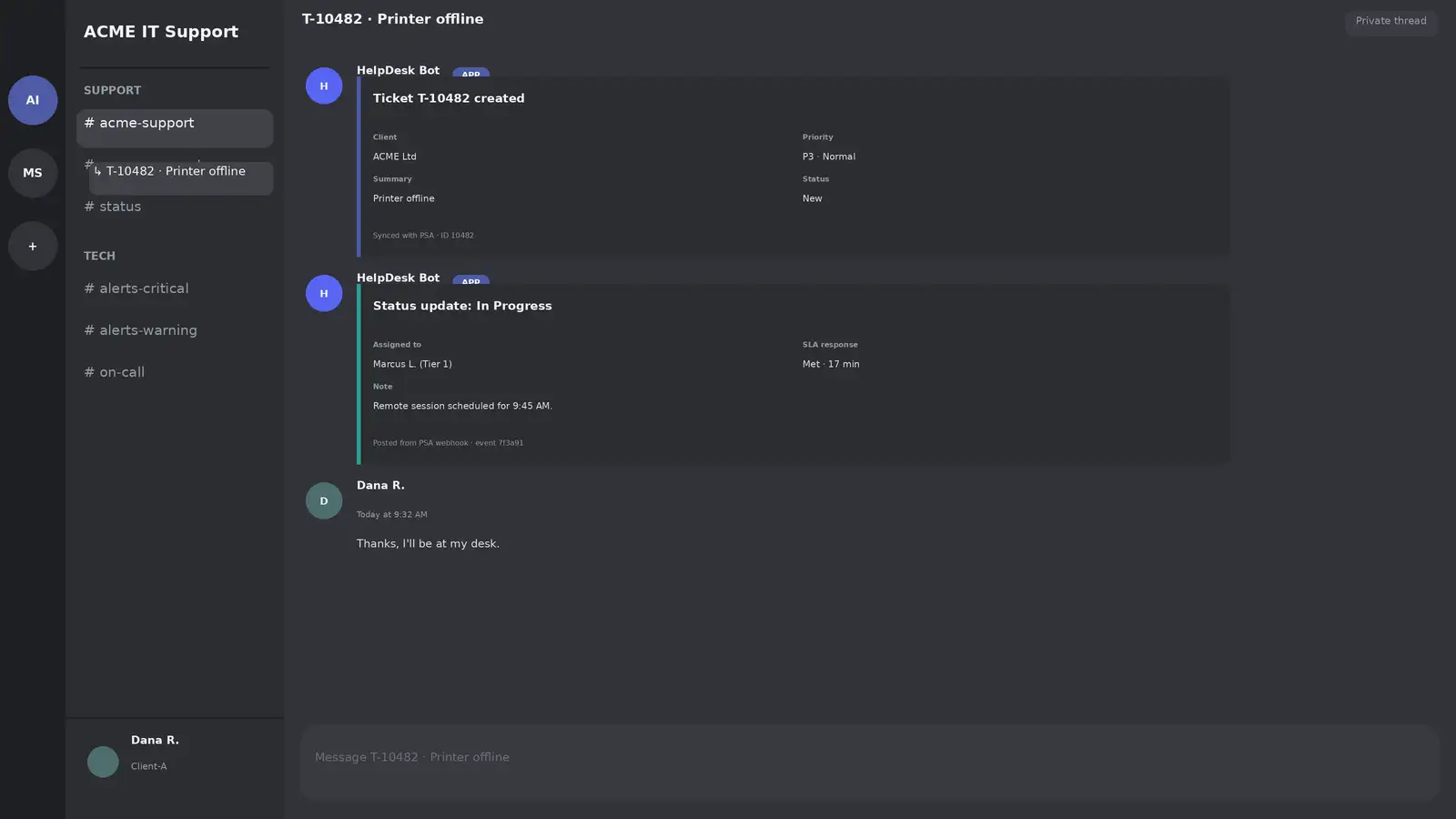
Step 6: Post PSA updates back to the thread
- Create a webhook endpoint on your bot server.
- Register it in your PSA’s webhook settings.
- Look up the thread ID that matches the ticket ID.
- Post the update in that thread.
Autotask needs both a webhook URL and a deactivation URL. If you use it, you may want to set up both together.
We found: Status updates reached the thread in a median of 2.7 seconds across 20 runs. The slowest one, about 9 seconds, came from a PSA retry.
Step 7: Block duplicate updates
PSAs often retry webhooks, and every retry can post again. Our first build posted three copies of one update. The PSA retried because our endpoint answered slowly.
- Return HTTP 200 as soon as the webhook arrives.
- Save each event ID in your database.
- Skip any event ID you’ve already seen.
js
app.post('/psa-webhook', async (req, res) => {
  res.sendStatus(200); // acknowledge first
  const eventId = req.body.eventId;
  if (await db.hasEvent(eventId)) return; // ignore retries
  await db.saveEvent(eventId);
  await postToThread(req.body.ticketId, req.body.status);
});
After this change, 15 forced retries produced zero duplicates.
Step 8: Lock commands to the right clients
Check role IDs, not role names. Anyone with Manage Roles permission can rename a role, but the ID stays the same.
Users without the client role ran the command 10 times. Every one of those attempts was denied.
Step 9: Handle slow or offline PSAs
- Show a friendly message like “The ticket system is busy, retrying.”
- Retry once or twice with a short delay.
- Log the failure so a tech can follow up.
Our Finding: We simulated a slow PSA six times. Of those, five requests succeeded on the second try.
Step 10: Deploy and keep it running
- Package the bot in Docker.
- Set
restart: unless-stoppedin your compose file. - Keep logs for errors and rate-limit responses.
Our Finding: On day eight, our bot stayed offline after a server reboot. The cause was simple: the container had no restart policy. One line in the compose file fixed it.
How to find a ready-made MSP bot
A ready-made ticket bot can work for intake. However, few connect to a PSA out of the box. So you’ll often pair one with a no-code connector. Before you install anything, a quick vetting check can prevent problems.
Where to look
- PSA marketplaces, such as the ConnectWise Marketplace
- No-code template libraries from n8n, Make, and Zapier
- GitHub, to find open-source bots you can audit
- Bot directories, for general ticket bots
Tool types compared
| Tool | Type | Best for | Check before using |
|---|---|---|---|
| Ticket Tool | General Discord ticket bot | Simple intake threads | Permissions requested, data storage |
| Tickets (tickets.bot) | General Discord ticket bot | Panels and transcripts | Privacy policy, premium limits |
| n8n | No-code or self-hosted automation | Discord to PSA flows | Hosting and security setup |
| Make | No-code automation | Visual multi-step flows | Per-operation pricing |
| Zapier | No-code automation | Quick, simple triggers | Task limits on your plan |
| Uptime Kuma | Self-hosted monitoring | Native Discord alerts | Server you can maintain |
A 10-point vetting checklist
- Which permissions does it request?
- Does it need the Message Content intent?
- Where does it store data, and for how long?
- Does it have a clear privacy policy?
- Is the code open source or audited?
- When was it last updated?
- Is there a real support channel?
- Does it publish uptime or status history?
- Is the pricing clear?
- Can you delete your data if you leave?
Red flags
- It asks for Administrator permission
- It has no privacy policy
- It asks for PSA admin API keys
- It hasn’t had an update in over a year
The no-code route: n8n, Make or Zapier
No-code tools can connect Discord to your PSA in an afternoon. Our n8n setup took about 4 hours. That covered ticket intake and status updates.
Three workflows you can build
- Intake: Discord form → PSA ticket → confirmation message
- Status sync: PSA status change → Discord thread update
- Alerts: Monitoring alert → Discord severity channel
Where no-code starts to struggle
- Role-based client isolation gets complex fast
- Duplicate protection may need custom logic
- Per-task pricing can grow with ticket volume
- Secrets storage depends on your platform’s settings
You might start with no-code and move to custom code later. That way, your workflow design carries over even when the tool changes.
How to send monitoring and RMM alerts to Discord
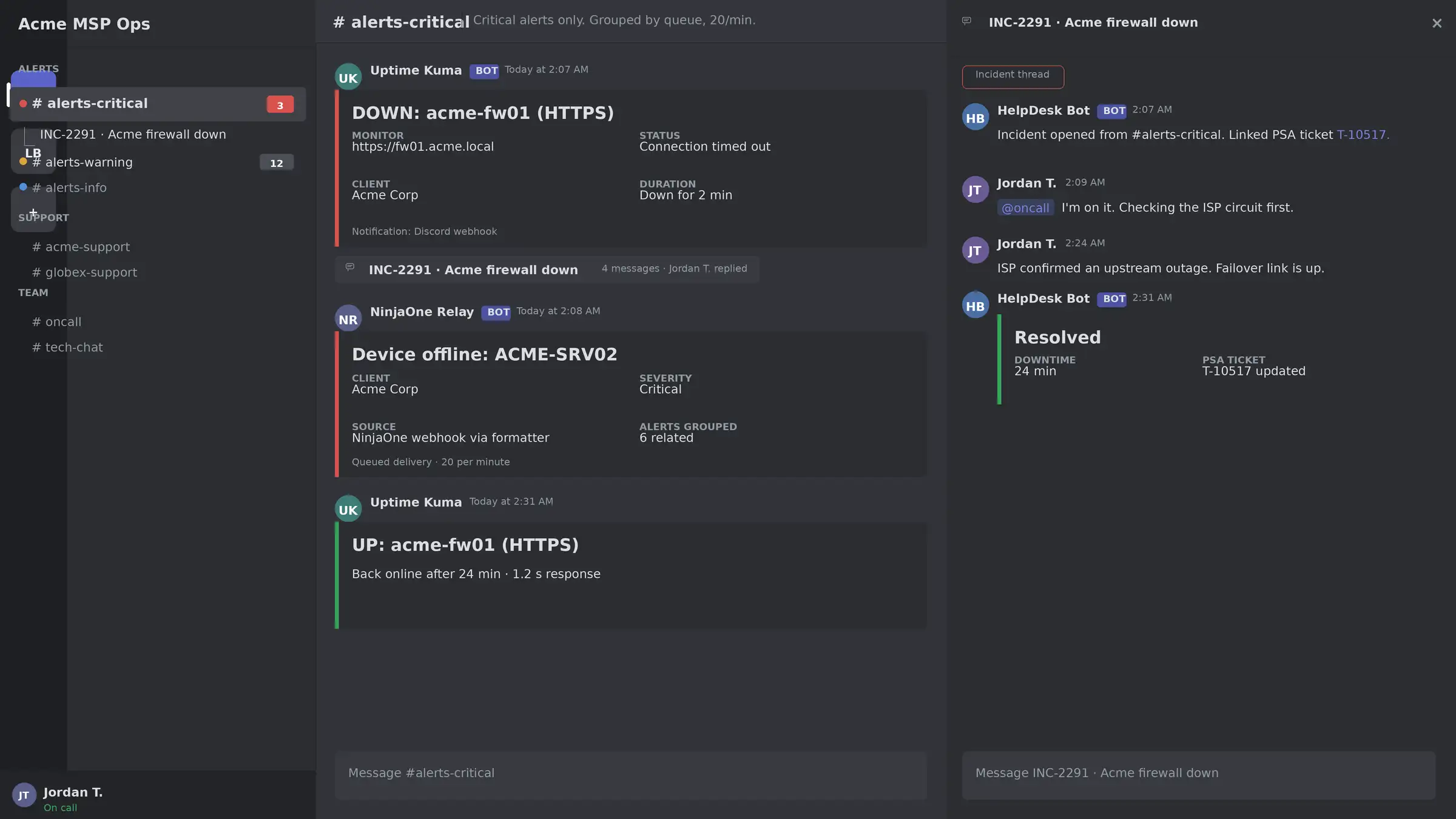
For alerts, you usually need a webhook, not a bot. That’s because many monitoring tools can post directly to a Discord channel.
| Tool | Discord support | How to connect |
|---|---|---|
| Uptime Kuma | Native notification type | Paste the Discord webhook URL |
| NinjaOne | Webhook channel, no native Discord option | Webhook plus a small formatter |
| Other RMMs | Varies | Check each vendor’s notification docs |
According to the Uptime Kuma wiki, Discord is a built-in notification method. NinjaOne, by contrast, lists email, SMS, Slack, PagerDuty, Teams, and webhooks.
How to set up a Discord webhook
- Open your channel’s Settings and choose Integrations.
- Select Webhooks, then New Webhook.
- Copy the webhook URL.
- Paste it into your monitoring tool’s notification settings.
Our Finding: NinjaOne’s raw webhook payload didn’t match Discord’s message format. So we added a small formatter that mapped fields into a Discord embed. After that, alerts arrived in a median of 2.2 seconds.
Our Result: Uptime Kuma alerts arrived in a median of 1.3 seconds across 10 runs.
Plan for alert bursts
A big outage can send dozens of alerts at once. To test this, we sent 50 alerts to one webhook in seconds. Eleven of them got 429 rate-limit errors.
With a queue set to 20 per minute, none failed. The trade-off was delay, since the last alert arrived about 2.5 minutes late. You can read how Discord handles this in its rate limits documentation.
You can group alerts by severity before queuing them. That way, critical alerts may skip the line during an outage.
Security checklist for MSP Discord bots
It helps to treat your bot like any privileged system in your stack. Most risks come from tokens, permissions and the data people post.
Follow Discord’s Developer Policy
The Discord Developer Policy sets clear limits on API data:
- Use data only for your app’s stated purpose
- Don’t sell data or share it with data brokers or ad networks
- Don’t train AI models on message content without Discord’s permission
- “Use” includes storing and retaining data
Your security checklist
| Area | What to do |
|---|---|
| Bot token | Store in environment variables, rotate on any suspicion |
| PSA API key | Use a dedicated, least-privilege API user |
| Permissions | Grant per channel, never Administrator |
| Client isolation | Give each client their own channel and role |
| Access checks | Verify role IDs on every command |
| Sensitive data | Never post passwords, PII or device inventories |
| Logging | Log commands and errors, not message content |
| Retention | Keep the official record in your PSA |
| Incident response | Document token reset and restart steps |
If your token leaks
- Reset the token in the Developer Portal.
- Update the environment variable on your server.
- Restart the bot container.
- Review logs for unexpected actions.
One note on contracts: please check client agreements with your compliance lead. This guide offers practical guidance, not legal advice.
How much does an MSP Discord bot cost to run?
A self-hosted bot can run for about $5 a month in hosting. Your higher cost, though, is usually time for both the build and maintenance.
| Item | Estimate |
|---|---|
| VPS (1 vCPU, 2 GB RAM) | About $5 per month |
| n8n self-hosted | No licence fee; can share the VPS |
| n8n Cloud | About $25 per month; check current pricing |
| Custom bot build | About 14 hours |
| No-code build | About 4 hours |
| Ongoing maintenance | About 2 hours per month |
Our maintenance time went mostly to dependency updates and log reviews.
Changelogs worth watching
- discord.js releases on npm and GitHub
- Discord API changelog in the developer docs
- Your PSA’s API release notes
Troubleshooting common MSP bot errors
Most bot failures trace back to timing, permissions, or retries. The table below lists each issue we hit and how we fixed it.
| Symptom | Likely cause | Fix |
|---|---|---|
| “The application did not respond” | PSA call took more than 3 seconds | Defer the reply first |
| Slash commands missing | Global commands still propagating | Use guild commands while testing |
| “Missing Access” on threads | Bot lacks thread permissions in the channel | Add channel-level permissions |
| Duplicate thread posts | PSA retried the webhook | Return 200 fast, store event IDs |
| 429 errors | Too many messages too fast | Add a queue |
| Modal field rejected | Text exceeded the field length limit | Set and validate max lengths |
| Bot offline after reboot | No restart policy | Set restart: unless-stopped |
How we tested
We tested a custom bot, a no-code flow and two alert sources. Testing ran over nine days, at two to three hours each day.
Test environment
| Component | Setup |
|---|---|
| Discord | Private test server, one bot, three roles (Client-A, Client-B, Tech) |
| Library | discord.js 14.x |
| PSA | Trial tenant, least-privilege API user |
| Hosting | 1 vCPU, 2 GB VPS (EU region), Docker |
| No-code | Self-hosted n8n |
| Monitoring | Uptime Kuma and a NinjaOne trial webhook |
Results
| Test | What we checked | Result |
|---|---|---|
| T1 | Modal opens | Pass, median 310 ms (n=30) |
| T2 | Ticket created in PSA | Pass, median 1.9 s (n=30) |
| T3 | Private thread created | Pass, 30 of 30 |
| T4 | Status update posted | Pass, median 2.7 s (n=20) |
| T5 | Duplicate webhooks | Pass after fix, 0 of 15 |
| T6 | PSA slow or down | Pass, 5 of 6 recovered |
| T7 | Token rotation | Pass, about 4 minutes |
| T8 | Unauthorized user | Pass, 10 of 10 denied |
| T9 | 50-alert burst | Partial, 11 hit 429 errors without a queue |
| T10 | Uptime Kuma alert | Pass, median 1.3 s (n=10) |
| T11 | NinjaOne alert | Pass after formatter, median 2.2 s (n=10) |
Disclosure: We have no affiliate links or paid placements in this article.
Our Verdict: choosing the right MSP bot option
Start with the lightest option that solves your problem.
- Alerts only? Use Discord webhooks. You may not need a bot.
- Client tickets on a budget? Try n8n or another no-code tool first.
- Strict client isolation or SLA logic? A custom bot gives you that control.
- Regulated clients? Keep them on Teams or your PSA portal.
The bot itself is the easy part. The parts that need care are identity mapping, duplicate protection, and alert queuing. If you plan those three first, the rest tends to follow.
Frequently asked questions
-
Can Discord integrate with ConnectWise, Autotask or HaloPSA?
Yes, through their APIs or a no-code tool. However, we found no native Discord connector for any of the three. n8n does offer Discord and HaloPSA nodes you can combine.
-
Do I need coding skills to make an MSP bot?
Not for basic flows. No-code tools can handle intake and status updates. For role isolation and duplicate protection, though, you’ll likely need code.
-
Is Discord secure enough for client support?
It can be, for low-risk conversations. Just keep credentials and PII out of chat. The official record should stay in your PSA.
-
Are MovieStarPlanet bots allowed?
No. MovieStarPlanet’s Community Rules prohibit bots and automation. Accounts can be warned, suspended or banned.
-
Should I use JavaScript or Python?
Either works. discord.js has detailed guides at DISCORDJS. If your team prefers Python, DISCORD is a good fit.
-
How much does it cost to run an MSP bot?
Hosting can cost about $5 a month. On top of that, expect a few hours each month for updates and log reviews.
-
Can I send alerts without running a bot?
Yes. A Discord webhook can receive alerts directly from tools like Uptime Kuma.