
You can easily replace 3uTools with Apple Devices, Finder, iMazing, or AOMEI FoneTool today. Admittedly, no single program replaces every feature inside 3uTools at once. Instead, you can match your specific daily task to a safer, dedicated utility.
With that in mind, we’ve evaluated 17 verified alternatives across Windows, macOS, and Linux systems. You have the option to start with 100% free Apple tools first. From there, you may add specialized backup managers, hardware diagnostic tools, or firmware repair software.
Full encrypted backups, browsable snapshots, or exporting SMS/WhatsApp to PDF.
Replacing “Smart Flash,” fixing Recovery Mode loops, or flashing signed firmware.
Checking battery cycles, factory vs. current serials, and swapped internal parts.
Moving camera rolls, converting HEIC to JPG, or adding MP3s without iTunes wipes.
Restoring multiple iPhones simultaneously over a USB hub or applying MDM profiles.
Managing iOS 27 on Ubuntu/Fedora or restoring classic 32-bit iPhones with SHSH blobs.
Which 3uTools Alternative Should You Pick First? (Quick Answer by Task)
You’ll get the best results when you choose your 3uTools replacement based on the exact job you perform. After all, most people only need one or two core functions from the 3uTools dashboard. Plus, using a dedicated tool reduces bloatware and keeps your hardware identifiers private.
Here’s the fastest way you can replace each major 3uTools feature:
- Best Free Windows Replacement for Backups and Flashing: You can use Apple Devices from the Microsoft Store for free.
- Best Free Mac Replacement for Syncing and Restores: Meanwhile, Mac users can use the built-in macOS Finder app without downloading extra software.
- Best Free Multi-Device Flashing Tool for Repair Shops: For bulk setups, you may run Apple Configurator on macOS to restore multiple iPhones simultaneously.
- Best Paid Manager for Versioned Backups and Message Exports: If you need more control, you have the option to choose iMazing for browsable snapshots and PDF chat exports.
- Best Windows Tool for Selective Backups and Photo Transfers: Alternatively, you can install AOMEI FoneTool to move photos and contacts on a free tier.
- Best Free Used-iPhone Diagnostic Replacement: Before buying a secondhand phone, you may run Tenorshare iCareFone to generate a free hardware diagnostic report.
- Best Guided System Repair Tool for Boot Loops: When an update fails, you can try Tenorshare ReiBoot or Dr.Buho BuhoRepair for guided firmware recovery.
- Best Open-Source Linux Replacement: Finally, Linux users have the option to use libimobiledevice and idevicerestore right in the terminal.
| 3uTools Feature You Use | Best Free Replacement | Best Paid Replacement | Important Limitation to Know |
|---|---|---|---|
| Full Local Backups & Restores | Apple Devices (Win) / Finder (Mac) | iMazing or AOMEI FoneTool | Native Apple backups overwrite older snapshots unless you archive them manually. |
| Smart Flash / IPSW Restore | Finder / Apple Devices (Shift or Option + Restore) | Tenorshare ReiBoot (Guided GUI repair) | No software tool can downgrade to an unsigned iOS version. |
| Batch Flashing & Multi-Device Setup | Apple Configurator (macOS) | iMazing Business (Win / Mac) | Apple Configurator restores erase user data and require a Mac computer. |
| Verification Report (Used iPhone Check) | Tenorshare iCareFone (Free Diagnostic) | iMazing (Device Profile & Battery Stats) | Software tools can’t directly read the screen serial number to prove swaps. |
| Photo, Music & Ringtone Transfers | AOMEI FoneTool (Free Tier, Windows) | WinX MediaTrans or iMobie AnyTrans | You’ll need to download iCloud Photos locally before USB tools can export them. |
| Text Message / WhatsApp Legal Exports | None (Native backups aren’t browsable) | iMazing (PDF, CSV, and RSMF exports) | Legal RSMF exports require an iMazing Business plan starting at $89/year. |
| 1-Click Enter / Exit Recovery Mode | Tenorshare ReiBoot (Free Tier) / BuhoRepair | Tenorshare ReiBoot Pro (Standard Repair) | Corrupted operating systems still require a full firmware re-flash to boot properly. |
| Linux Device Management & Flashing | libimobiledevice & idevicerestore | None needed (Open-source is standard) | This requires basic terminal commands and installing the usbmuxd pairing daemon. |
Why Are Users Moving Away From 3uTools in 2026?
Many technicians and everyday iPhone owners are leaving 3uTools due to privacy questions, fake download domains, and platform gaps. At the same time, competitor blogs often publish false claims about how 3uTools works just to scare buyers. Because of this, you’ll make a much better software choice once you separate those myths from real risks.
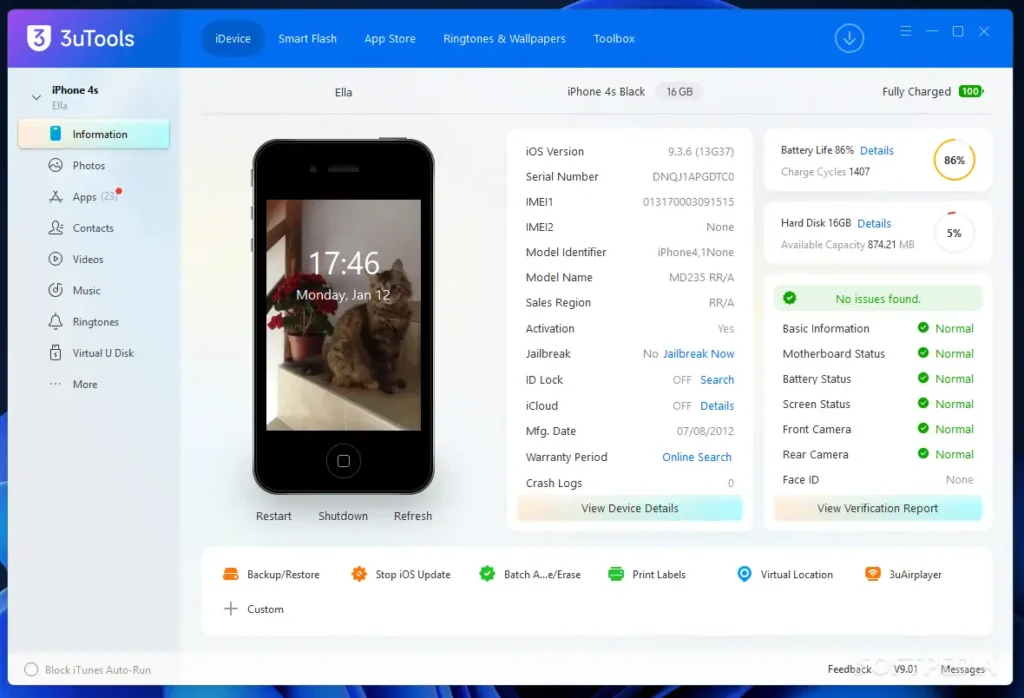
For starters, several competitor websites claim that 3uTools only works on Windows or requires jailbreaking. However, according to the official 3U, both claims are outdated.
As of November 2026, the developer offers a flagship Windows build (V9.13, released November 3, 2026), a legacy Windows edition (V3.30, released February 10, 2026), and a native macOS version (V9.07 for Intel and Apple Silicon, released September 20, 2026).
What’s more, you can run standard features like photo exports, battery diagnostics, and signed IPSW flashing on non-jailbroken iPhones.
Still, our documentation review highlights three verified reasons why you might prefer an alternative:
- Unverified Server Connections and Hardware Identifiers: Security discussions on community forums regularly point out that 3uTools contacts remote servers while reading device identifiers like your UDID, ECID, and serial numbers. Although the settings menu includes a “Turn off report” checkbox, published guides indicate this toggle only controls verification report pop-ups rather than acting as a verified telemetry shutoff.
- Rampant Clone Websites and Fake Android APKs: Since 3uTools is widely searched, with Softonic reporting roughly 7.2 million downloads +1, clone websites frequently impersonate the brand. Even worse, scammers promote fake “3uTools APK” files for Android, even though 3uTools only builds desktop software for managing iOS hardware.
- Missing Linux Builds and Uneven Mac Features: Currently, the macOS version (V9.07) lacks several toolbox utilities found in Windows V9.13. Additionally, while the official site shows a Linux navigation tab, an official Linux binary remains unconfirmed.
How We Evaluated and Researched These 17 Alternatives
We evaluated these 17 alternatives using official vendor documentation, verified store pricing, and published technical reports between October 8 and November 5, 2026.
To keep things fair, we don’t accept sponsored placements or affiliate payments to alter our rankings. Instead, we’ve organized every tool by the real-world job it performs best.
Specifically, when we examine how these tools handle modern setups like iOS 27.2, macOS 27.2, and Windows 11 25H2, we look at five core benchmarks:
- Data Safety and Privacy Transparency: First, does the tool process your backups locally, and does the developer publish clear corporate ownership and privacy terms?
- Backup and Export Reliability: Second, can you back up an 80 GB to 100 GB iPhone over USB-C without corrupted databases or missing message attachments?
- Firmware Flashing Integrity: Third, does the software respect Apple signing checks, and does it clearly warn you when an action erases user data?
- True Total Cost: Next, does the vendor offer a usable free tier, a one-time lifetime license, or a recurring annual subscription tied to hardware slots?
- Clean Driver Handling: Finally, can you install and remove the software on Windows without breaking
Apple Mobile Device Service(AMDS) USB connections?
How Much Do 3uTools Alternatives Cost? (Verified Pricing Comparison)
You can replace most 3uTools functions for $0, or you may spend between $24.99 and $162.95 for specialized commercial software. Unfortunately, many software companies advertise low monthly rates while hiding annual auto-renewals or strict device limits.
That’s why we checked official checkout pages and verified pricing records in November 2026, so you can compare the real costs upfront.
| Tool | Free Version / Trial | Starting Paid Plan | One-Time / Lifetime Option | Device / Computer Limits |
|---|---|---|---|---|
| Apple Devices | 100% Free | None ($0) | Free forever | Unlimited iOS devices |
| macOS Finder | 100% Free (built into macOS) | None ($0) | Free forever | Unlimited iOS devices |
| Apple Configurator | 100% Free (Mac App Store) | None ($0) | Free forever | Unlimited iOS devices (batch-capable) |
| iMazing | Free trial (unlimited backups; exports capped at 25 messages / 50 photos) | $29.99/year (1 device) or $49.99/year (5 devices); Business from $89/year (2 slots) | None (subscription-only since June 2025) | Priced per connected iOS device (1 to 20 devices on Personal plans; unlimited Macs/PCs) |
| AOMEI FoneTool | Free tier (basic local backups and file transfers) | $39.95/year (Pro) | $59.95 (Lifetime Pro, often discounted to ~$44.95) | Unlimited iOS devices / up to 5 PCs |
| EaseUS MobiMover | Free tier (capped daily file transfers) | $23.95/month or $39.95/year (Windows); $29.95/month or $39.95/year (Mac) | $69.95 (Windows Lifetime) / $79.95 (Mac Lifetime); $399.00 (Technician) | 1 license covers up to 3 computers (Pro) |
| iMobie AnyTrans | Free trial (30 items over 3 days) | $39.99/year | $59.99 (Lifetime, 1 computer) / $79.99 (Family Lifetime, 5 computers) | Unlimited iOS devices / 1 computer (Standard) or 5 computers (Family) |
| Syncios Manager | Free tier (basic file transfer and media management) | $34.95/year (Ultimate) | $44.95 (Lifetime Ultimate); Business at $249/year | 1 to 5 iOS/Android devices on 1 PC (Ultimate); unlimited devices on Business |
| WinX MediaTrans | Free trial (capped daily exports) | $29.95/year (often $19.95 first-year promo) | $39.95 (Ultimate Lifetime) | 1-Year plan covers 3 PCs; Lifetime plan covers 1 PC |
| Tenorshare iCareFone | Free diagnostic/test report; trial caps transfers at 10 files | $29.95/month or $49.95/year (Windows); $35.95/month or $55.95/year (Mac) | $59.95 (Windows Lifetime) / $69.95 (Mac Lifetime) | 5 devices on 1 PC or Mac (Personal plans) |
| MobiKin Assistant for iOS | Free trial / limited free version | $29.95/year (Windows promo; $49.95 list) / $39.95/year (Mac promo; $69.95 list) | $39.95 to $69.95 (Lifetime License, varies by OS and active promo) | 1 PC or Mac / unlimited iOS devices (multi-PC tiers available) |
| ThinkSky iTools | Free trial (restricted feature uses and transfers) | Optional GPX/multi-device add-on: $4.99/month or $29.99/year ($14.99 promo) | $34.95 (Premium Lifetime) / $69.95 (Platinum Lifetime) / $59.95 (AirPlayer Bundle) | Premium covers up to 5 PCs/Macs; Platinum covers 15 to 30 PCs/Macs |
| Tenorshare ReiBoot | Free 1-click Enter/Exit Recovery Mode | $24.95/month or $49.95/year (Windows); $39.95/month or $59.95/year (Mac) | $79.95 (Windows Lifetime) / $89.95 (Mac Lifetime) | 1 to 5 devices on 1 PC or Mac |
| Wondershare Dr.Fone | Free download and diagnostic scan | System Repair (iOS): $19.95 to $24.95/mo or $49.95 to $59.95/yr; Basic: $39.95/yr (Win) / $55.95/yr (Mac); Full Toolkit: $99.95/yr (Win) / $139.95/yr (Mac) | System Repair (iOS): $69.95 to $79.95 Perpetual; Basic: $49.95 (Win) / $69.95 (Mac); Full Toolkit: $115.95 (Win) / $162.95 (Mac) | 1 to 5 mobile devices across 2 to 5 computers (varies by module and OS) |
| Dr.Buho BuhoRepair | Free Enter/Exit Recovery Mode and initial scan | No recurring plan required (sold primarily as a one-time license) | $24.99 (Single Lifetime) / $34.99 (Family Lifetime) | 3 iOS/iPadOS devices (Single) or 6 devices (Family) |
| libimobiledevice / idevicerestore | 100% Free (Open-source GPL/LGPL) | None ($0) | Free forever | Unlimited devices and computers |
| Legacy iOS Kit | 100% Free (Open-source GitHub project) | None ($0) | Free forever | Unlimited supported legacy iOS devices |
What Are the Best Free Official Apple Replacements for 3uTools?
You can use Apple Devices, macOS Finder, and Apple Configurator to handle backups and firmware restores for $0. Better yet, these official utilities install genuine USB drivers and never send your hardware serial numbers to third-party servers.
In fact, you may find that Apple’s native software already solves 80% of your daily maintenance needs.
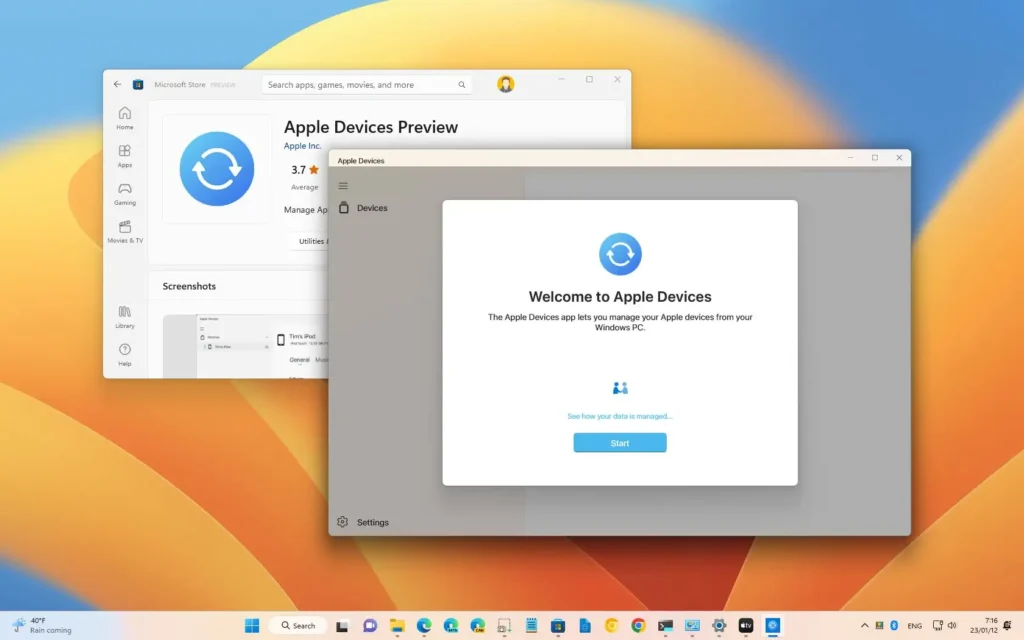
1. Apple Devices App (Best Free Windows Tool for Backups and IPSW Restores)
Apple Devices is the best free Windows replacement for 3uTools if you need reliable local backups and manual firmware flashing. Available through the Microsoft Store for Windows 10 and Windows 11, this standalone app replaces the sluggish device management screens of older iTunes builds.
You have the option to run it on 64-bit Windows 10 build 19045.0 or later and Windows 11. (On the other hand, if you still use a 32-bit Windows PC, you can keep using legacy iTunes instead.)
Key Features You Can Use:
- Encrypted Local Backups: Preserves your saved passwords, Wi-Fi networks, Health records, and Call History on your local drive.
- Manual IPSW Firmware Selection: Lets you install a specific signed
.ipswpackage stored on your PC. - Official Driver Packaging: Automatically installs verified
Apple Mobile Device SupportUSB drivers without third-party wrappers.
Hands-On Workflow and Published Documentation Findings: When you check Apple Support documentation for backing up and restoring on Windows, you’ll notice that Apple kept the classic keyboard shortcut from iTunes. Specifically, holding the
Shiftkey while clicking Update or Restore opens a standard Windows File Explorer window so you may pick a local.ipswfile. Still, you’ll want to keep one important caveat from Apple’s guide in mind: if you turn on Encrypt local backup and forget your password, you can’t recover that backup without resetting the iPhone.
How You Can Flash a Local IPSW File in Apple Devices:
- First, you can download a currently signed
.ipswfirmware file for your exact iPhone model. - Next, connect your iPhone to your Windows PC using a direct USB cable.
- From there, open the Apple Devices app and select your iPhone in the sidebar.
- Then, hold down the
Shiftkey on your keyboard and click Update (to keep data) or Restore iPhone (to wipe data). - Finally, select your downloaded
.ipswfile and allow the Apple server verification to complete.
Verdict: You may want to pick Apple Devices first if you use Windows 10 or 11 and want safe, zero-cost backups and firmware updates.
2. macOS Finder (Best Built-In Mac Tool for Everyday Syncing and Restores)
Meanwhile, if you’re on a Mac, macOS Finder is the safest built-in replacement for 3uTools when you want local backups and signed firmware restores. Ever since macOS Catalina through macOS 27.2, Apple has integrated iPhone management directly into the Finder window. That means you don’t need to install any external software or grant third-party accessibility permissions to manage your phone.
Key Features You Can Use:
- Native Sidebar Integration: Shows your connected iPhone under Locations as soon as you plug in a USB cable.
- Option-Click IPSW Flashing: Allows manual selection of downloaded firmware packages for clean updates or restores.
- Direct Drag-and-Drop File Sharing: Lets you move documents directly into supported iOS apps under the Files tab.
Hands-On Workflow and Published Documentation Findings: In daily use on macOS, Finder behaves identically to the Windows Apple Devices app for firmware management. According to Apple Support’s guide on updating and restoring in Finder, you have the option to hold the
Optionkey while clicking Check for Update or Restore iPhone to browse for a local.ipswpackage. However, while Finder works reliably for whole-device backups, you can’t open a Finder backup to browse individual photos or export a single text thread without restoring the entire phone.
Verdict: You can rely on macOS Finder for all standard Mac backups and firmware restores before considering any paid utility.
3. Apple Configurator (Best Free Mac Utility for Batch Flashing and Repair Shops)
While Finder handles one phone at a time, Apple Configurator is the best free 3uTools replacement for repair shops and IT admins who flash multiple iPhones at once. Available free on the Mac App Store, this official utility replaces 3uTools’ batch flashing screen and live console viewer. For example, you can connect a multi-port powered USB hub to a Mac and prepare dozens of devices in parallel.
Key Features You Can Use:
- Parallel Multi-Device Restores: Flashes current signed iOS firmware across multiple connected iPhones simultaneously.
- Automated Blueprints: Applies preset Wi-Fi profiles, MDM enrollment settings, and app packages automatically.
- Live Console Log and Device Revival: Reads real-time system logs and revives unresponsive Apple hardware in DFU mode.
Hands-On Workflow and Published Documentation Findings: According to the official Apple Configurator User Guide, highlighting multiple devices and selecting Actions > Restore downloads the signed IPSW once and deploys it across every selected port. Even so, repair technicians should pay attention to two documented behaviors that differ from 3uTools. First, restoring a device in Apple Configurator always erases user data, so it doesn’t offer a “Retain User Data” batch mode. Second, restoring a supervised corporate iPhone removes its supervision status unless you re-apply it through a Blueprint or Automated Device Enrollment.
Verdict: You have the option to choose Apple Configurator if your repair shop or school manages multiple iPhones on macOS and needs an official batch tool.
Which Third-Party Device and Backup Managers Replace 3uTools Best?
You can choose iMazing, AOMEI FoneTool, EaseUS MobiMover, iMobie AnyTrans, or Syncios when you need selective backups and browsable files.
As mentioned earlier, Apple’s free tools overwrite your previous local backup each time you sync and hide your individual files inside unreadable folders.
Overall, these five commercial managers let you view, search, and export specific items whenever you want.
4. iMazing (Best for Versioned Snapshots, Legal Message Exports, and Battery Stats)
To start with, iMazing is the most thorough commercial alternative to 3uTools for versioned backups, battery diagnostics, and text message exports. Built by DigiDNA in Switzerland, the software runs on both Windows and macOS (V3 series).
Unlike 3uTools, iMazing operates under strict European privacy standards and processes your encrypted backup snapshots locally on your computer.
Key Features You Can Use:
- Snapshot-Based Backup Archiving: Saves incremental versions of your iPhone backups so you can recover files from months ago.
- Formatted iMessage and WhatsApp Exports: Saves conversations into printable PDF, CSV, TXT, or legal RSMF formats with timestamps.
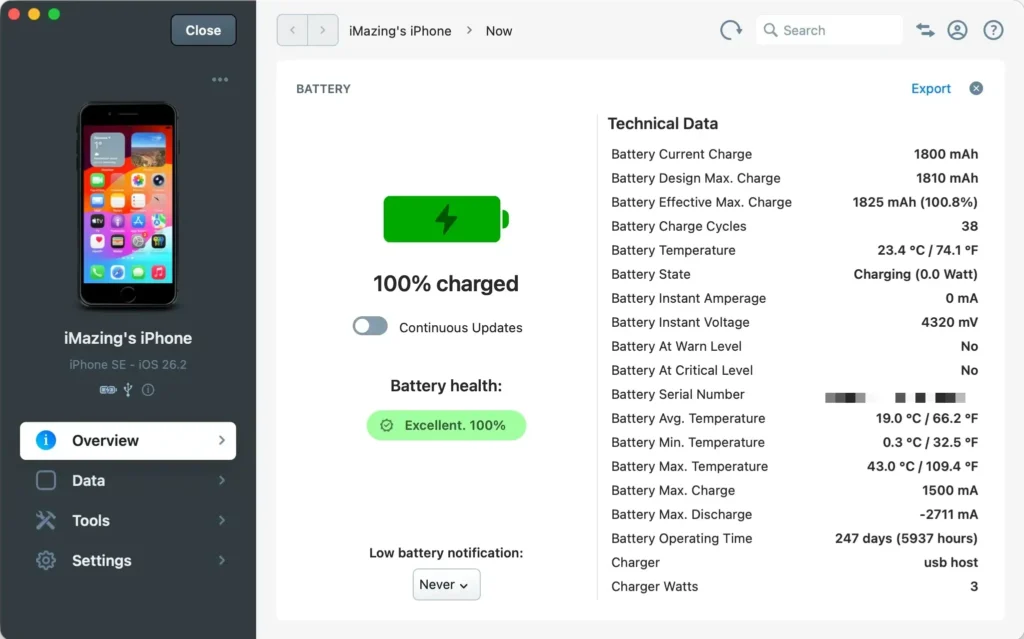
- Detailed Battery and Hardware Diagnostics: Displays battery charge cycles, effective mAh capacity vs. factory design capacity, battery temperature, and live system logs.
Hands-On Workflow and Published Documentation Findings: When evaluating iMazing’s current store terms, you’ll find a major licensing change: DigiDNA moved to a subscription-only model in June 2025, retiring one-time perpetual purchases for new buyers. According to iMazing’s pricing and licensing FAQ, Personal plans start at $29.99/year for 1 iOS device or $49.99/year for 5 devices, and each slot locks to a specific hardware UDID. Notably, you may only release an unused Personal device slot after 270 days. Furthermore, while Personal plans let you export messages to PDF and CSV (capped at 25 messages and 50 photos on the free trial), exporting to the RSMF e-discovery format requires an iMazing Business subscription starting at $89/year for 2 slots.
How You Can Export iMessages or WhatsApp Chats to PDF in iMazing:
- First, connect your iPhone via USB and allow iMazing to complete an initial backup snapshot.
- Next, click the Messages or WhatsApp icon in the iMazing device dashboard.
- After that, select one or more conversation threads from the left column.
- Finally, click Export to PDF at the bottom of the window and choose whether to include media attachments and timestamps.
Verdict: You may want to invest in iMazing if you need court-ready message exports, historical backup snapshots, or deep battery diagnostics without privacy risks.
5. AOMEI FoneTool (Best Windows Alternative for Selective Backups and Free File Transfers)
On the other hand, if you’d rather skip per-device subscriptions on a PC, AOMEI FoneTool is the best Windows alternative to 3uTools for selective backups and fast photo exports.
Currently maintained at around V4.2.1 on AOMEI’s official FoneTool website, this utility lets you choose specific folders to back up rather than copying your entire hard drive.
Best of all, you can use its generous free tier for basic local backups and USB file transfers without paying a cent.
Key Features You Can Use:
- Selective and Incremental Backups: Lets you back up only your Photos, Contacts, Messages, or Music to a PC folder or NAS drive.
- Bidirectional Media Transfer: Moves camera roll videos, ringtones, and music files between Windows and iPhone without iTunes sync wipes.
- Built-In HEIC Converter and Photo Deduplicator: Converts Apple
.heicphotos into standard.jpgfiles and removes duplicate shots.
Hands-On Workflow and Published Documentation Findings: During our platform verification, we found an important detail that many roundup blogs miss: FoneTool’s full desktop suite only runs on Windows. When you search the Mac App Store for FoneTool, that listing is actually an iPadOS mobile app running in compatibility mode on Apple Silicon Macs for basic wireless transfers. Additionally, while AOMEI’s product page advertises transfer speeds over 40 MB/s (or 1,000 photos in under two minutes), real-world speeds depend on your iPhone port. For instance, older Lightning iPhones and standard USB-C models operate at USB 2.0 speeds (around 35 to 40 MB/s), whereas Pro USB-C models can transfer faster with a 10 Gbps cable.
Verdict: You can download AOMEI FoneTool if you run Windows and want a free or one-time lifetime ($59.95 list, often ~$44.95) replacement for 3uTools’ file and backup screens.
6. EaseUS MobiMover (Best for Cross-Platform Transfers and Social Media Backups)
If you need full Mac compatibility alongside Windows, EaseUS MobiMover is a strong option for moving files between iPhones, Android phones, and computers. Listed on the official EaseUS MobiMover store, it runs natively on both Windows and macOS.
You have the option to try its free tier for small daily file transfers, or you may upgrade to a paid license for unlimited migrations.
Key Features You Can Use:
- Phone-to-Phone Direct Migration: Copies contacts, photos, and media directly between two connected handsets.
- WhatsApp and Social Chat Backup: Archives and restores WhatsApp messages and attachments locally on your computer.
- Batch HEIC Image and Video Conversion: Converts iPhone media into widely compatible formats during export.
Hands-On Workflow and Published Documentation Findings: When checking EaseUS checkout options, you’ll notice that Windows and Mac licenses carry different price tags. Specifically, Windows Pro costs $23.95/month, $39.95/year, or $69.95 for a Lifetime license, while Mac Pro costs $29.95/month, $39.95/year, or $79.95 Lifetime (covering up to 3 computers). Repair businesses also have the option to buy a $399.00 Technician license. Because EaseUS packs additional modules like video downloaders and screen unlockers into the installer, you might want to stick strictly to the core transfer and backup tabs for regular maintenance.
Verdict: You may choose EaseUS MobiMover on an annual or lifetime plan if you frequently move data between different mobile operating systems and desktop PCs.
7. iMobie AnyTrans (Best for One-Time Lifetime Licensing and Media Organization)
Similarly, iMobie AnyTrans is an appealing 3uTools alternative if you prefer a one-time lifetime purchase on Mac or Windows without device caps. Available through iMobie’s official AnyTrans portal, it offers a visual interface for organizing music, photos, ringtones, and home screen layouts. Plus, you can test the software with a 3-day, 30-item trial before buying.
Key Features You Can Use:
- Unlimited-Device Computer Licensing: Ties your license to your PC or Mac rather than restricting how many iPhones you connect.
- Non-Destructive Music and Ringtone Manager: Imports MP3s and custom ringtones without erasing existing tracks on your iPhone.
- Home Screen App and Icon Arranger: Lets you group and organize iPhone home screen pages using your computer mouse.
Hands-On Workflow and Published Documentation Findings: Based on verified store data, you have the option to buy AnyTrans for $39.99/year, $59.99 for a 1-computer Lifetime license, or $79.99 for a 5-computer Family Lifetime plan. However, if you use iCloud Photos with “Optimize iPhone Storage” enabled on your handset, you’ll run into one common hurdle: USB transfer tools like AnyTrans can only read local files stored on the iPhone flash storage, or else they’ll prompt you to sign into iCloud inside the app. For the safest privacy workflow, you can simply download your originals onto the iPhone first and export them purely over USB.
Verdict: You might pick iMobie AnyTrans at the $59.99 Lifetime tier if your household connects many different iPhones to one computer for media management.
8. Syncios Mobile Manager (Best for Mixed iOS and Android Households)
Rounding out the all-in-one managers, Syncios Mobile Manager works well if your family or office manages both iPhones and Android phones on the same desktop.
Maintained by SYNCIOS, the utility offers a free tier for basic media imports and exports on Windows and macOS. Later on, you have the option to unlock one-click full backups by purchasing its Ultimate edition.
Key Features You Can Use:
- Dual-OS Device Support: Reads both iOS and Android file directories inside one application window.
- Free Built-In Ringtone Maker and Audio Converter: Trims audio tracks and pushes them directly to your iPhone ringtone list.
- Affordable Lifetime Upgrade: Costs $34.95/year or $44.95 Lifetime for 1 to 5 devices (with a $249/year Business option for unlimited devices).
Verdict: You can consider Syncios Mobile Manager if you want a low-cost lifetime tool ($44.95) that handles basic media transfers across both iOS and Android.
Which Specialized Tools Replace 3uTools for Media, Used-iPhone Checks, and File Browsing?
You can use WinX MediaTrans, Tenorshare iCareFone, MobiKin Assistant, or ThinkSky iTools when you only need one targeted utility from 3uTools.
In many cases, people keep 3uTools installed just to check a used iPhone’s hardware report or copy offline music folders. Fortunately, these four specialized tools solve those narrow tasks directly.
9. WinX MediaTrans (Best Lightweight Windows Tool for Large Video and Music Transfers)
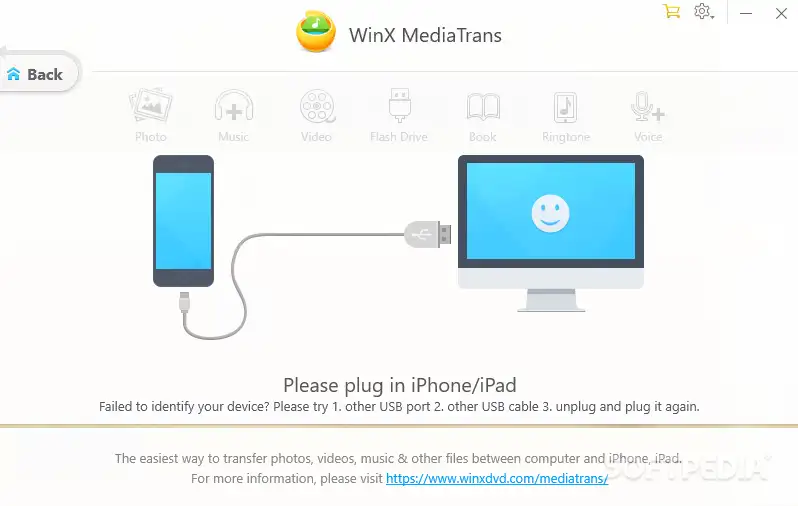
First up, WinX MediaTrans is the best specialized Windows alternative when you want fast, encrypted photo and video exports without full suite bloat. Contrary to older forum rumors claiming it was abandoned, developer Digiarty updated WinX MediaTrans to V8.6 in October 2026 to support recent iOS releases. You have the option to buy a 1-year plan for $29.95 (often $19.95 on promotion for 3 PCs) or an Ultimate Lifetime license for $39.95 (1 PC).
Key Features You Can Use:
- Fast 4K Video and Photo Export: Moves massive camera roll folders to Windows drives without crashing mid-transfer.
- Local File Encryption: Password-protects exported iPhone photos and videos stored on your PC hard drive.
- USB Flash Drive Mode: Turns unused iPhone storage into a portable USB folder for carrying general computer files.
Hands-On Workflow and Published Documentation Findings: Although WinX MediaTrans lets you manage music and videos without opening iTunes, published documentation confirms that Windows still requires Apple’s underlying
Apple Mobile Device SupportUSB drivers to communicate with the iPhone. Therefore, if you set up a clean Windows 11 PC and don’t want bloated iTunes installed, you may install the lightweight Apple Devices app from the Microsoft Store first so WinX MediaTrans detects your phone right away.
Verdict: You can use WinX MediaTrans if your main priority is offloading gigabytes of iPhone videos and managing offline MP3s on a Windows PC.
10. Tenorshare iCareFone (Best Free Diagnostic Replacement for 3uTools’ Verification Report)
Beyond media transfers, Tenorshare iCareFone is the closest commercial replacement for 3uTools’ Verification Report ’cause it includes a free iPhone Diagnostic and Hardware Test on its unpaid tier.
Available for Windows and macOS on Tenorshare’s official iCareFone page, this tool checks internal component serials and battery statistics.
While its paid backup and transfer plans cost $29.95 to $35.95/month, $49.95 to $55.95/year, or $59.95 to $69.95 Lifetime, you don’t have to pay anything to view the hardware test report.
Key Features You Can Use:
- Free Hardware Diagnostic Report: Compares factory vs. current serial identifiers for the battery, front/rear cameras, and logic board.
- Battery Health and Cycle Readout: Shows battery life percentage, charge count, and hardware details on one printable screen.
- Selective File Management (Paid Tier): Unlocks full media exports beyond the 10-file free trial cap.
Hands-On Workflow and Published Documentation Findings: When checking a used iPhone before buying it, it’s best not to rely solely on software verification scores from either 3uTools or iCareFone. After all, some vendor blogs claim an “85% accuracy rate” without publishing any verifiable laboratory methodology. Even more importantly, 3uTools’ own official technical FAQ on verification reports explicitly states that software can’t directly read the screen serial number, meaning a desktop report can’t prove whether an iPhone display was replaced. On top of that, skilled refurbishers can use EEPROM programmers to copy original battery or camera serial numbers onto aftermarket parts.
How You Can Properly Inspect a Used iPhone (Software + On-Device Checklist):
- First, you can open Settings > General > About directly on the iPhone and check Parts and Service History (available on iPhone XR/XS and newer running iOS 15.2 through iOS 27.2) to see Apple’s official record of Genuine vs. Unknown parts.
- Second, connect the iPhone to your computer and run the free diagnostic test in iCareFone (or check hardware stats in iMazing) to inspect actual battery cycle counts and factory identifiers.
- Next, test True Tone in Control Center and verify Face ID / Touch ID enrollment to catch uncalibrated replacement screens.
- Finally, check Settings > General > Transfer or Reset iPhone > Erase All Content and Settings before handing over cash to make sure the phone has no hidden MDM profile or iCloud Activation Lock.
Verdict: Feel free to run the free diagnostic inside Tenorshare iCareFone to check battery cycles and camera serials, and then pair it with Parts and Service History on the iPhone itself.
Why You Need Both On-Device & Desktop Checks to Spot Refurbished Parts
Desktop software alone cannot read display serial numbers directly—always combine these two screens.
11. MobiKin Assistant for iOS (Best Simple Table-View Browser for Contacts and SMS)
If hardware diagnostics aren’t your focus, MobiKin Assistant for iOS is a practical choice when you want a clean, spreadsheet-style folder tree to export contacts, SMS messages, and notes.
Sold through MOBIKIN for Windows and macOS, it avoids complex repair menus and focuses strictly on readable data tables. You have the option to purchase an annual plan at $29.95/year (Windows promo; $49.95 list) or $39.95/year (Mac promo; $69.95 list), or select a Lifetime license between $39.95 and $69.95.
Key Features You Can Use:
- Sortable Table Views: Displays Contacts, Messages, Notes, Safari Bookmarks, and Calendar events in clean columns.
- Multi-Format Text Exports: Exports contacts and text histories into CSV, HTML, TXT, XML, or vCard files.
- One-Click iTunes Backup Manager: Lets you create, import, and delete iTunes-compatible backup archives from one dialog box.
Verdict: You can pick MobiKin Assistant for iOS if you want a straightforward, distraction-free file browser for exporting office contacts and text logs.
12. ThinkSky iTools (Best Veteran Alternative for Virtual Location and Ringtone Tools)
Meanwhile, ThinkSky iTools is one of the oldest iTunes alternatives on the market and remains maintained for users who miss 3uTools’ extra toolbox widgets. According to ThinkSky’s official website (thinkskysoft.com), the software was updated to V4.5.1.9 in July 2026 for Windows and macOS.
You can buy a Premium Lifetime license for $34.95 (covering up to 5 computers) or a Platinum Lifetime license for $69.95 (15 to 30 computers), with optional GPX virtual location add-ons at $4.99/month.
Key Features You Can Use:
- Virtual Location GPS Spoofer: Simulates custom GPS coordinates and GPX movement routes for testing location-based apps.
- Ringtone Maker and Battery Master: Replicates 3uTools’ audio trimming tool and detailed battery hardware readouts.
- File Explorer and Icon Manager: Browses accessible app document directories and organizes home screen layouts.
Hands-On Workflow and Published Documentation Findings: It’s a good idea to be careful when searching for iTools online ‘cause lookalike domains (such as
itools4.com) frequently redistribute unauthorized installers. For safety, you should only download directly fromthinkskysoft.com, and don’t confuse ThinkSky with the unnamed developers behind3u.com. Also, keep in mind that using GPS spoofing features inside online games or region-restricted apps may trigger account bans under those apps’ terms of service.
Verdict: You have the option to use ThinkSky iTools from its official domain if you specifically need desktop GPS simulation and classic toolbox widgets under a one-time license.
Which iOS System Repair Tools Replace 3uTools’ Smart Flash Best?
You can use Tenorshare ReiBoot, Wondershare Dr.Fone, or Dr.Buho BuhoRepair when your iPhone freezes on the Apple logo or gets stuck in Recovery Mode.
Often, people open 3uTools’ Smart Flash tab just ’cause it offers a “Retain User Data” checkbox for repairing broken iOS updates. Similarly, these three dedicated repair programs automate that firmware recovery process with step-by-step visual prompts.
13. Tenorshare ReiBoot (Best Guided GUI Replacement for “Retain Data” Firmware Repairs)
Among repair utilities, Tenorshare ReiBoot is the most popular alternative to 3uTools when an iPhone loops in Recovery Mode or fails an update. Maintained in the V9.6.13 series on Tenorshare’s official ReiBoot page, it runs on both Windows and macOS.
You can use its free download to toggle Recovery Mode, or you may buy Pro for $24.95 to $39.95/month, $49.95 to $59.95/year, or $79.95 to $89.95 Lifetime.
Key Features You Can Use:
- Free 1-Click Enter and Exit Recovery Mode: Puts a phone into Recovery Mode (even with broken physical buttons) or kicks a soft-stuck device back to the lock screen.
- Standard Repair (Data-Retaining Flash): Re-flashes the signed iOS system partition without wiping user data, directly replacing 3uTools’ “Retain User Data” flash mode.
- Deep Repair (Clean Erase Flash): Performs a complete factory firmware wipe when system corruption is too severe for Standard Repair.
Hands-On Workflow and Published Documentation Findings: When reviewing community feedback and independent software tests on ReiBoot, we noticed conflicting user reports around its “Free Exit Recovery Mode” button. Here’s why that happens: if your iPhone entered Recovery Mode ’cause of a minor USB disconnect, the free button exits cleanly in seconds. However, if your iPhone is stuck in Recovery Mode ’cause an iOS update failed midway and corrupted the operating system, no software can boot the phone until valid firmware is flashed. At that point, ReiBoot directs you to its paid Standard Repair screen. Before paying $79.95+ for ReiBoot Pro, though, you always have the option to try a free Update (not Restore) inside Apple’s Finder or Apple Devices app first.
Verdict: You can keep the free version of Tenorshare ReiBoot handy for broken physical buttons, and consider Pro if you want a guided interface for data-retaining firmware repairs.
14. Wondershare Dr.Fone – System Repair (iOS) (Best Modular Suite for Guided DFU Recovery)
Alternatively, Wondershare Dr.Fone – System Repair (iOS) is a comprehensive visual toolkit for fixing iTunes restore errors, black screens, and DFU boot loops.
Available on Windows and macOS via Wondershare’s official Dr.Fone website, it provides animated on-screen countdowns that help beginners press the exact volume and side button timings for DFU mode.
Key Features You Can Use:
- Standard and Advanced Repair Modes: Offers a data-preserving Standard repair alongside a full-wipe Advanced repair and Anti-Recovery erase mode.
- Automated IPSW Matching and Verification: Downloads and checks the correct signed firmware package for your connected model automatically.
- Modular Toolkit Add-Ons: Integrates with optional modules for WhatsApp transfer, data recovery, and local backups.
Hands-On Workflow and Published Documentation Findings: You’ll want to inspect Wondershare’s pricing tiers carefully before checking out. For example, buying Dr.Fone Basic ($39.95/year or $49.95 Perpetual on Windows; $55.95/year or $69.95 Perpetual on Mac) only gives you file management and backups, not the System Repair tool. Instead, to unlock firmware repair, you can buy the System Repair (iOS) module standalone ($19.95 to $24.95/month, $49.95 to $59.95/year, or $69.95 to $79.95 Perpetual) or the Full Toolkit ($99.95 to $139.95/year or $115.95 to $162.95 Perpetual). Also, note that Wondershare’s “Perpetual” licenses historically cover the current major version rather than lifetime upgrades across future major releases.
Verdict: You may choose Dr.Fone – System Repair (iOS) if you want visual button-timing guides for DFU mode, or opt for the Full Toolkit if your shop needs all-in-one modules.
15. Dr.Buho BuhoRepair (Best Budget One-Time License for iOS System Repair)
If ReiBoot and Dr.Fone feel too pricey, Dr.Buho BuhoRepair is the most affordable commercial repair alternative to 3uTools with a simple one-time lifetime license.
Sold directly at DRBUHO for Windows and macOS, it costs $24.99 for a Single Lifetime license (covering 3 iOS devices) or $34.99 for a Family Lifetime license (covering 6 devices).
Key Features You Can Use:
- Low One-Time Lifetime Cost: Costs roughly one-third the price of competing lifetime repair licenses from ReiBoot or Dr.Fone.
- Free Recovery Mode Toggle: Lets you enter and exit Recovery Mode with one click at no cost.
- Guided Error-Code Troubleshooting: Targets common USB and update error codes (like Error 4013, 4005, and 1110) with automatic IPSW downloads.
Hands-On Workflow and Published Documentation Findings: Even though BuhoRepair is budget-friendly, we always check the vendor’s technical disclosures on data retention. In DRBUHO, the developer openly warns users that system recovery tools, including BuhoRepair, may erase data on the device during repair. Because of that, it’s safest to treat any firmware repair utility as potentially destructive if your iPhone lacks a recent local or iCloud backup.
Verdict: You can pick Dr.Buho BuhoRepair at $24.99 Lifetime if you want a clean, guided firmware repair wrapper without high subscription fees.
What Are the Best Open-Source 3uTools Alternatives for Linux and Vintage iPhones?
You can use libimobiledevice (paired with idevicerestore) and Legacy iOS Kit to manage, back up, and flash iPhones on Linux for $0. Although 3u.com shows a Linux tab on its website, no official Linux release has been verified.
The third-party websites advertising “3uTools for Linux” are unofficial clone domains that you’re better off avoiding.
16. libimobiledevice + idevicerestore (Best True Native Linux Replacement for 3uTools)
For modern Linux distributions, libimobiledevice and idevicerestore form the official open-source standard for managing iPhones natively (including on Ubuntu, Debian, Fedora, and Arch).
Hosted at LIBIMOBILEDEVICE and on GitHub under LGPL/GPL licenses, this toolkit talks directly to iOS devices (including iOS 26 and iOS 27.2 handsets) without needing Windows emulators or jailbreaks.
Key Commands That Replace 3uTools Screens on Linux:
ideviceinfo: Prints your iPhone’s complete hardware summary, serial numbers, UDID, ECID, and firmware version right in the terminal.idevicebackup2: Runs full or encrypted local backups and restores to any Linux directory.idevicerestore: Flashes signed.ipswfirmware files in either update (retain data) or full erase mode.ifuse: Mounts your iPhone’s camera roll (DCIM) and app sandbox folders directly inside your Linux desktop file manager.
How You Can Inspect and Back Up an iPhone on Linux Using libimobiledevice:
- First, you can open your Linux terminal and install the core packages (for example,
sudo apt install usbmuxd libimobiledevice6 libimobiledevice-utils ifuseon Ubuntu/Debian). - Next, connect your iPhone via USB, unlock the screen, and tap Trust This Computer.
- Then, run
idevicepair pairin the terminal to verify the cryptographic trust pairing. - At last, run
ideviceinfoto view your hardware identifiers, or runidevicebackup2 backup --full ~/iPhoneBackups/to save a complete local backup.
Verdict: You have the option to use libimobiledevice and idevicerestore as your primary 3uTools replacement on Linux rather than trusting unofficial binary downloads.
17. Legacy iOS Kit (Best Open-Source Toolkit for Vintage iPhones and SHSH Blobs)
While libimobiledevice handles modern iPhones, Legacy iOS Kit is the best open-source replacement for 3uTools when you restore, downgrade, or maintain vintage 32-bit and early 64-bit Apple devices.
Actively maintained by developer LukeeGD on GitHub (LukeeGD/Legacy-iOS-Kit) for Linux and macOS, it replaces abandoned legacy utilities like TinyUmbrella and iFunbox.
Key Features You Can Use:
- Vintage Device Downgrades (iOS 6, 8, 9, and 10): Uses hardware bootrom exploits and OTA signing paths available on older chips (like the iPhone 4s, iPhone 5, and iPad 2).
- Saved SHSH Blob Restores: Flashes custom and signed firmware packages onto classic devices (ranging from iPhone 2G up to iPhone X on older OS builds).
- Baseband and Jailbreak Utilities: Handles classic activation, tether booting, and baseband updates that modern commercial apps broke years ago.
Verdict: You can download Legacy iOS Kit from GitHub if you collect or repair vintage iPhones and iPads that modern desktop utilities no longer support.
Can Any 3uTools Alternative Downgrade iOS in November 2026? (Firmware Signing Reality Check)
No software tool can downgrade a modern iPhone to an unsigned iOS version. Even so, many commercial software pages advertise a “1-Click iOS Downgrade” feature that makes buyers think paying $60 bypasses Apple’s security checks.
In reality, every desktop flashing utility has to request a live cryptographic signature (an SHSH ticket) from Apple’s TSS servers during installation.
When we checked live firmware signing status on November 5, 2026 (via Apple TSS checks and trackers like IPSW), here’s how downgrading actually works on current hardware:
- iOS 27.2 Signing Status: For supported modern iPhones (iPhone 11 and newer, plus iPhone SE 2nd generation and later), iOS 27.2 is the active signed release. Once Apple closes the signing window for earlier builds like iOS 26.x or early iOS 27.0/27.1 versions, Apple’s servers reject the restore request across 3uTools, Finder, ReiBoot, and
idevicerestorealike. Furthermore, factory-new models that shipped with iOS 27 pre-installed can’t downgrade to iOS 26 at all. - Why You Shouldn’t Select “Retain User Data” During a Downgrade: Even during the brief overlap window when Apple still signs an older minor point release, you’ll want to perform a clean erase restore rather than retaining data. According to 3uTools’ own official downgrade tutorial, downgrading with “Retain User Data” checked causes severe boot loops ’cause older iOS system daemons can’t read newer SQLite databases for Messages, Photos, and Health.
- Backup Compatibility Limits: Similarly, a local backup created on iOS 27.2 can’t be restored directly onto an earlier iOS build. While some forum guides suggest editing the
Info.plistversion string inside a backup folder, doing so frequently breaks your Contacts, Call History, and Photos library.
| Downgrade Scenario | Is It Possible in Nov 2026? | Best Free Tool to Use | Will You Lose Device Data? |
|---|---|---|---|
| Rolling back to an iOS build Apple still signs | Yes (Only while the signing window stays open) | Finder (Mac) or Apple Devices (Windows) | Yes. You’ll need to perform a clean restore and load an older backup. |
| Downgrading to an unsigned iOS 26 or early iOS 27 build | No (Blocked by Apple TSS server check) | None (Paid tools can’t bypass Apple TSS) | Not applicable; the restore will fail before flashing. |
| Downgrading a vintage 32-bit iPhone (e.g., iPhone 4s / 5) | Yes (Via legacy OTA blobs or bootrom exploits) | Legacy iOS Kit (Linux / macOS) | Yes. Requires a full clean firmware flash. |
How Do 3uTools Versions Compare Across Windows, Mac, and Linux?
You may want to verify exact version numbers on 3U before downloading, or use platform-native alternatives where 3uTools falls short. Surprisingly, many technology blogs still claim 3uTools is stuck on Version 2 or Version 3, or claim it lacks macOS support. To clear that up, we recorded the exact platform status from the official portal and major software directories in early November 2026.
- Windows Flagship Branch (V9.13): Released November 3, 2026 (with directory listings like Neowin logging build V9.13.013 at ~200 MB and UpdateStar logging V9.12.5 on October 28, 2026). This 32-bit/64-bit build contains the full redesigned interface and complete toolbox.
- Windows Classic Legacy Branch (V3.30): Updated February 10, 2026. The developer maintains V3.30 alongside V9 for repair technicians who prefer the classic multi-tab layout or run older workshop PCs. Interestingly, UpdateStar’s user telemetry shows many users still sit on slightly older V9 builds like V9.10.6 (14% share) unless they manually check for updates.
- macOS Branch (V9.07): Released September 20, 2026, supporting both Intel and Apple Silicon Macs. It covers core flashing, backups, and diagnostics, though it omits several Windows-only utilities.
- Linux Status (Unconfirmed): Although the official
3u.comwebsite displays a Linux tab, no official verified Linux installer is confirmed there. Therefore, it’s best to treat third-party websites offering “3uTools Linux packages” as unsafe lookalike sites.
How Can You Safely Switch From 3uTools Without Breaking Windows USB Drivers?
You can easily prevent Windows USB detection errors by installing Apple Devices before you uninstall 3uTools. In fact, one of the most common complaints on repair forums is that removing 3uTools causes Windows 10 and 11 PCs to stop detecting connected iPhones. This issue happens ’cause 3uTools hooks into or modifies your Apple Mobile Device Service (AMDS) and USB driver bindings.
Thankfully, you have the option to follow these 5 steps to transition cleanly on a Windows PC:
- Install the Official Apple Devices App First: To begin, you can open the Microsoft Store on Windows 10 (build 19045+) or Windows 11 and install Apple Devices. Doing this first places Apple’s clean, signed USB driver package onto your system.
- Unplug All Connected iPhones and iPads: Next, disconnect your USB cables from your PC so no background process locks the USB driver during removal.
- Uninstall 3uTools via Windows Settings: From there, open Settings > Apps > Installed apps, find 3uTools, and click Uninstall. You may also select the option to delete leftover configuration files and caches.
- Check the Apple Mobile Device Service Status: After that, press
Win + R, typeservices.msc, and press Enter. Scroll down to Apple Mobile Device Service, confirm its Startup Type is set to Automatic, and right-click to select Restart if it isn’t currently Running. - Reconnect and Re-Trust Your iPhone: Finally, plug your iPhone into a direct motherboard USB port, unlock your phone screen, and tap Trust This Computer. Now, your new software (Apple Devices, iMazing, or FoneTool) can communicate smoothly over official Apple drivers.
People Also Ask
Is 3uTools safe to use in 2026, or is it malware?
3uTools isn’t destructive malware, but its network telemetry remains unverified by independent privacy audits. Millions of users run it without immediate harm, though security analysts note that it transmits hardware identifiers (UDID, ECID, serials) to remote servers. Because its in-app “Turn off report” setting only addresses verification report prompts rather than acting as a verified network shutoff, you may prefer Apple Devices, Finder, or iMazing for sensitive personal or corporate phones.
Is there an official 3uTools APK for Android phones?
No, an official 3uTools APK for Android doesn’t exist. After all, 3uTools only builds desktop software for managing Apple iOS devices from a computer. For that reason, you’ll want to avoid any website offering a “3uTools APK download,” as those files are fake installers bundled with adware or malware.
What’s the difference between 3uTools V9.13 and V3.30 on the official download page?
Version 9.13 (released November 3, 2026) is the current redesigned main branch, whereas Version 3.30 (updated February 10, 2026) is the classic legacy interface. You can use V9.13 for the newest iOS 26 and iOS 27.2 hardware compatibility and modernized UI menus. Meanwhile, technicians who prefer the older tab layout on workshop PCs still have the option to download V3.30 from 3u.com.
Can I replace 3uTools completely for free without paying for subscriptions?
Yes, you can replace almost every everyday 3uTools feature for $0 by combining two free tools. On Windows 10/11, for instance, you may pair the official Apple Devices app (for encrypted backups and Shift + Restore IPSW flashing) with the free tier of AOMEI FoneTool (for photo and file transfers) and Tenorshare iCareFone (for a free hardware diagnostic report). On macOS, on the other hand, you can combine built-in Finder with Apple Configurator for free batch restores and console logs.
Why did iMazing get rid of its one-time lifetime license?
DigiDNA transitioned iMazing to a subscription-only model in June 2025 to fund continuous updates for annual iOS and macOS security changes. As a result, Personal subscriptions now start at $29.99/year for 1 device or $49.99/year for 5 devices. However, if you strongly prefer a one-time lifetime payment for file and backup management, you have the option to look at AOMEI FoneTool Pro ($59.95 Lifetime) on Windows or iMobie AnyTrans ($59.99 Lifetime) on Windows and Mac.
Final Verdict: Which 3uTools Replacement Fits Your Workflow?
Ultimately, you don’t need to rely on a single unverified utility to manage your iPhone in 2026. By picking the right tool for your operating system and task, you can keep your backups secure and your USB drivers stable:
- If you want a 100% free everyday setup: You can use Apple Devices on Windows or Finder on Mac for encrypted backups and manual IPSW restores, and then add AOMEI FoneTool’s free tier on Windows for selective file transfers.
- If you want the best pro backup manager and legal message exporter: You may choose iMazing ($29.99/year Personal or $89/year Business) for versioned snapshots, deep battery health stats, and PDF/CSV/RSMF chat exports.
- If you run a repair desk or refurbish used iPhones: You have the option to use Apple Configurator (free on Mac) for parallel batch restores, pair Tenorshare iCareFone’s free diagnostic with on-device Parts and Service History checks, and keep Dr.Buho BuhoRepair ($24.99 Lifetime) or Tenorshare ReiBoot ready for Recovery Mode repairs.
- If you run Linux or restore vintage Apple hardware: Install open-source libimobiledevice and idevicerestore for modern iPhones on Linux, and use Legacy iOS Kit for classic 32-bit devices.