Editorial overview
Aggregated Overview
Official materials document interactive Java learning features, broad desktop availability, and free GPLv2-with-Classpath-Exception licensing. G2 displays a 4.0 score from 198 reviews, with praise for beginner accessibility and reservations about advanced development capabilities.
This profile combines documented product information and independent evidence where available. It is not a hands-on test unless TechZella explicitly identifies one.
Overview
BlueJ is a desktop development environment for learning and teaching Java. Its interface centers on class diagrams, an editor, and tools for interacting with running objects.
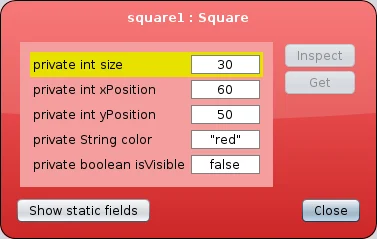
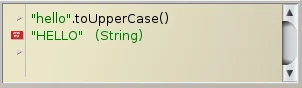
Users can create objects, inspect their fields, invoke methods, and evaluate Java expressions in a code pad. These interactions can help learners connect source code with object behavior.
The project began as an educational environment and was first released in 1999. Its current release, BlueJ 6.0.1, dates to September 4, 2026.
BlueJ Decision Snapshot
A quick way to understand who this product may suit, where its limits matter, and which facts are most relevant before you compare alternatives.
Best suited toStudents, instructors, and beginners who need a desktop environment for introductory Java and object-oriented programming exercises.
Look elsewhere ifTeams seeking a feature-rich professional Java environment should assess alternatives; BlueJ emphasizes a deliberately simpler interface and does not document an extensive built-in enterprise development toolset, and should evaluate alternatives such as Eclipse or IntelliJ IDEA instead.
TechZella assessment8.0/10
BlueJ — What Sets It Apart?
These are the product-specific differences that may matter when deciding whether the software fits your workflow. They are based on documented evidence rather than a universal ranking.
- The class diagram and object bench make classes, relationships, runtime state, and method calls visible in one learning-oriented workflow.
- The code pad allows Java expressions to be entered and evaluated interactively.
- The product is free to download, publishes source code, and is distributed under GPL version 2 with the Classpath Exception.
Editorial assessmentBlueJ Pros & Cons
Pros
- Visual and interactive tools expose object state and method behavior to learners.
- Designed specifically for introductory teaching rather than a broad professional IDE workflow.
- Free to download and distributed with source under a published open-source license.
- Available for major desktop operating systems and ARM64 Linux.
Cons
- Its intentionally simplified interface may not fit advanced or larger-scale development workflows.
- Some Kotlin features, including code completion, are not yet supported in BlueJ 6.
- Extensions written for BlueJ 4 and earlier may need changes for the version 5+ extension API.
BlueJ Gotchas & Operational Limits
These are documented constraints or practical friction points that may matter before you adopt the product.
BlueJ 6.0.1's current platform requirements include 64-bit systems; the official site points 32-bit users to an older BlueJ 4.1.4 release.
Older lab computers or operating-system images may need a legacy release rather than the current package.
Evidence source ↗BlueJ 5 changed the extensions mechanism, and older extensions do not work with the new API without changes.
Schools or users depending on older add-ons should confirm compatibility before upgrading.
Evidence source ↗BlueJ Pricing & Plans
BlueJ
$0
Free
Free-to-download desktop IDE distributed under GPL version 2 with the Classpath Exception.
Check current pricing →Pricing may change. Verify current plans on the vendor's website.
Cost contextTotal Cost & Hidden Costs
Additional costs or implementation requirements that are documented in the available evidence.
License
The official download page identifies GPL version 2 with the Classpath Exception. The application is free to download; distribution and modification remain subject to license terms.
Evidence source ↗BlueJ Competitors & Alternatives
Compare similar products directly, then see which alternatives may make more sense when your requirements differ.
Direct competitors
These products address broadly similar requirements. The descriptions focus on documented reasons a buyer might compare them with BlueJ.
CapabilitiesBlueJ Features
Teaching and interaction
- Visual class diagrams
- Interactive object creation
- Runtime object inspection
- Direct method invocation
- Java expression evaluation in the code pad
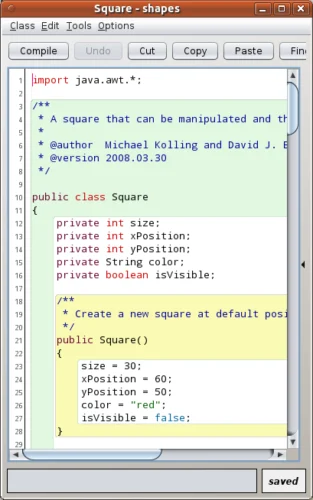
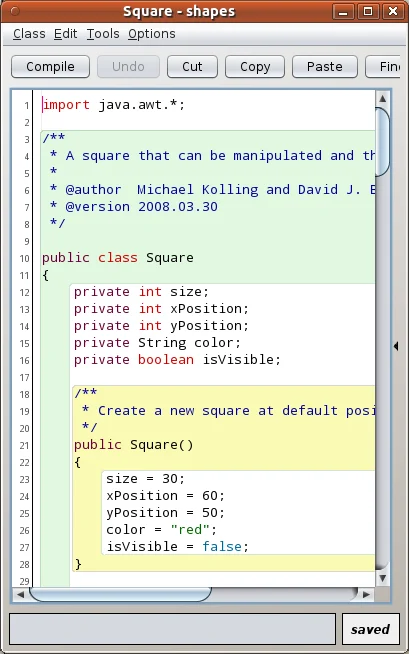
- Scope highlighting in the editor
Development and extensibility
- Java editing and execution
- Git teamwork support
- Extension API
- Kotlin editing and execution in version 6, with some features not yet supported
BlueJ Specifications
| Deployment | Desktop application |
|---|
| License | GPL version 2 with Classpath Exception |
|---|
| Current version | 6.0.1, released September 4, 2026 |
|---|
| Supported operating systems | Windows, macOS, Debian/Ubuntu Linux, and other compatible Java/JavaFX 21 environments |
|---|
| Supported architecture | 64-bit Intel and ARM64 packages; 32-bit users are directed to an older release |
|---|
| Integrations | Git teamwork support; additional functionality through extensions |
|---|
| API | Extension API for extending the desktop environment |
|---|
| Free trial | Not applicable; BlueJ is free to download |
|---|
Exit planningMigration & Lock-In
Documented portability, standards, export, or switching considerations. No switching-cost score is shown unless the evidence supports one.
Project portability
BlueJ project folders contain project files and Java source. The official documentation also describes Git teamwork support; verify any course-specific project conventions before moving work to another IDE.
Evidence source ↗Our evidence-based assessmentTechZella Score
A proprietary editorial score based on product capabilities, usability, value, performance, support and user sentiment evidence.
8.0/10Moderate confidence
Official materials document interactive Java learning features, broad desktop availability, and free GPLv2-with-Classpath-Exception licensing. G2 displays a 4.0 score from 198 reviews, with praise for beginner accessibility and reservations about advanced development capabilities.
Methodology v1.0. The assessment weighs feature coverage (25%), ease of use (15%), value for money (20%), performance (15%), support (10%) and user sentiment (15%), using researched product evidence and verified review evidence where available. It is a TechZella editorial assessment, not a direct user-review average.
Editorial transparency
Our Review Methodology
Key claims are linked to the sources used to verify them. This evidence record is separate from third-party user ratings.
TechZella evaluates software using documented product capabilities, pricing information, usability and value considerations, independent user evidence where available, and competitive context. The assessment is an editorial review, not a hands-on test unless one is explicitly identified. Our editorial assessment is based on 6 documented sources.
What TechZella adds- The class diagram and object bench make classes, relationships, runtime state, and method calls visible in one learning-oriented workflow.
- The code pad allows Java expressions to be entered and evaluated interactively.
- The product is free to download, publishes source code, and is distributed under GPL version 2 with the Classpath Exception.
Important limitations- BlueJ intentionally provides a smaller, simpler interface than professional IDEs, which may not suit advanced or larger-scale development workflows.
- BlueJ 6 introduced Kotlin editing and execution, but the release notes state that some Kotlin features, including code completion, are not yet supported.
- The extension mechanism changed in BlueJ 5; extensions written for versions 4 and earlier require adaptation or recompilation for the newer API.
Evidence-backed claimsBlueJ is a Java development environment designed for beginners and introductory teaching.The official overview describes its teaching purpose and deliberately simplified interface.
View source ↗Verified 2026-10-01BlueJ was first released in 1999.The official project history states that BlueJ was first released in 1999.
View source ↗Verified 2026-10-01BlueJ 6.0.1 was released on September 4, 2026.The official version history lists this release date and describes a Kotlin class-template fix.
View source ↗Verified 2026-10-01BlueJ supports Kotlin editing and execution in version 6.The official version history says BlueJ 6.0.0 added Kotlin editing and execution, while noting some features are not yet supported.
View source ↗Verified 2026-10-01BlueJ is distributed under GPL version 2 with the Classpath Exception.The official license file names the license governing BlueJ.
View source ↗Verified 2026-10-01BlueJ provides an extension API, and the extension mechanism changed in version 5.The official extension documentation describes the API and says extensions for versions 4 and earlier need changes for the new mechanism.
View source ↗Verified 2026-10-01BlueJ includes Git support for teamwork and repository workflows.The official Git tutorial explains BlueJ's built-in Git repository support.
View source ↗Verified 2026-10-01G2 displayed a 4.0 rating from 198 BlueJ reviews when checked.The public product review page showed the rating and review count.
View source ↗Verified 2026-10-01 Independent review sources
BlueJ Ratings & Reviews
Ratings are published by the respective review platforms and may change over time.
Common questionsBlueJ FAQs
Answers begin with the clearest available response, followed by the context that helps you act on it.
Is BlueJ free?
Yes. The official project distributes BlueJ for free under GPL version 2 with the Classpath Exception.
Which platforms does BlueJ support?
Current downloads include Windows, macOS, Debian/Ubuntu Linux on Intel and ARM64, and a generic installer for compatible Java/JavaFX 21 systems.
Does BlueJ have an API?
No. It offers an extension API for adding functionality to the desktop environment. This is not documented as a hosted service API.
Does BlueJ integrate with Git?
The official documentation describes Git support for project teamwork and repository operations.
Is there a free trial?
No trial is listed because the software itself is free to download.
Can BlueJ run Kotlin?
Yes. BlueJ 6 supports Kotlin editing and execution, but its release notes identify some unsupported features, including code completion.
Community feedback
Reviews
No reviews yet. Be the first to share your experience.
Write a Review
Please log in to submit a review.
Recently added Integrated Development Environment (IDE)