Editorial overview
Aggregated Overview
Official documentation describes broad structural, thermal, dynamic and optimization capabilities, plus scripting and CAD workflows. Public pricing is not listed, and the available G2 page reports a 4.4/5 rating.
This profile combines documented product information and independent evidence where available. It is not a hands-on test unless TechZella explicitly identifies one.
Overview
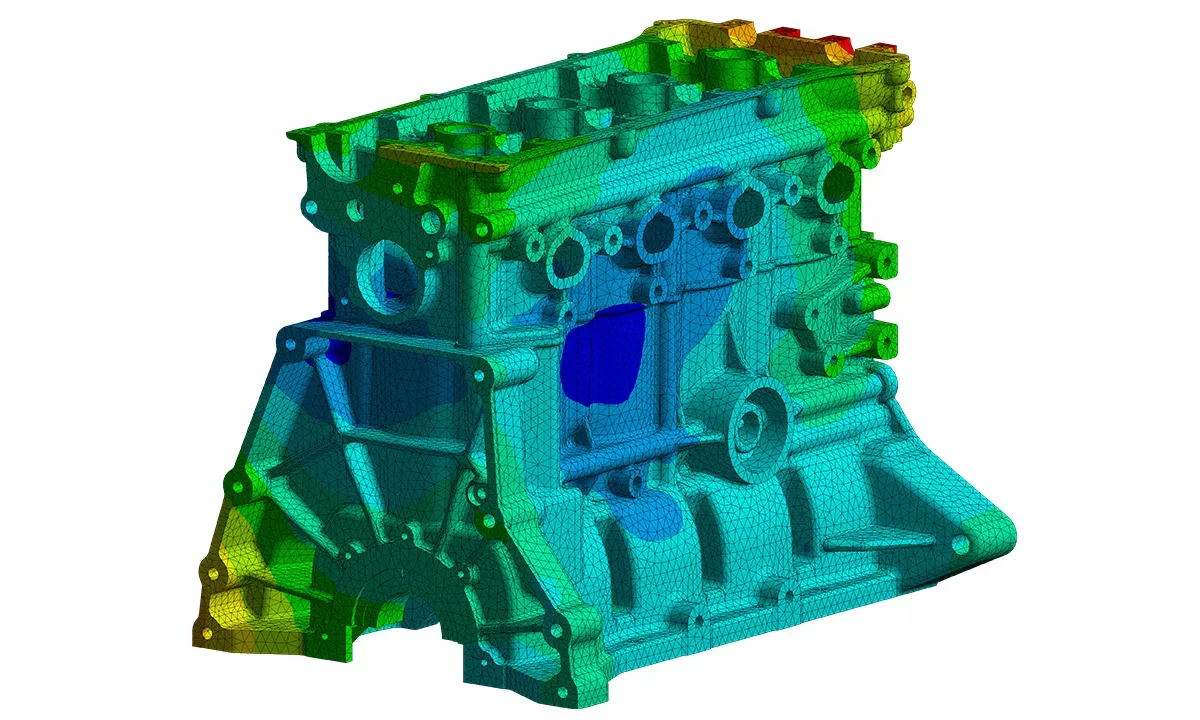
ANSYS Mechanical is finite element analysis software in the Ansys Workbench environment. Engineers use it to set up models and loads, solve for physical responses, and examine results.
Documented analysis areas include structural, thermal, vibration, thermo-electric and magnetostatic simulation. Its scripting and API features support custom workflows, while CAD interfaces connect geometry with Workbench projects.
Commercial pricing was not publicly listed in the pages reviewed. A free Ansys Student bundle includes Mechanical for educational use, but its terms do not establish commercial eligibility.
ANSYS Mechanical Decision Snapshot
A quick way to understand who this product may suit, where its limits matter, and which facts are most relevant before you compare alternatives.
Best suited toEngineering teams that need finite element analysis for structural, thermal, vibration or coupled-field design questions, and can support a dedicated engineering application and its licensing.
Look elsewhere ifBuyers seeking a low-cost, browser-based analysis tool, or a workflow embedded entirely in SOLIDWORKS CAD, may prefer a different product. Ansys does not publish standard commercial Mechanical prices on the reviewed pages, and should evaluate alternatives such as SOLIDWORKS Simulation or Simcenter 3D instead.
PlatformsDesktop, Linux, Windows
TechZella assessment7.8/10
ANSYS Mechanical — What Sets It Apart?
These are the product-specific differences that may matter when deciding whether the software fits your workflow. They are based on documented evidence rather than a universal ranking.
- Mechanical supports multiple structural analysis types, including static, modal, harmonic, transient and buckling analysis.
- Its Workbench environment connects simulation projects with other Ansys applications and supports CAD interfaces.
- Mechanical APIs and scripting support automation and custom preprocessing or postprocessing.
Editorial assessmentANSYS Mechanical Pros & Cons
Pros
- Supports a broad range of documented structural analysis types.
- Workbench connects Mechanical workflows with other Ansys products.
- API, scripting and customization features support automation.
Cons
- Commercial pricing is not publicly listed in the reviewed materials.
- Required license capabilities vary by analysis and configuration.
- Operating-system support is release-specific, and Windows Home editions are excluded in the 2025 R1 guide.
ANSYS Mechanical Gotchas & Operational Limits
These are documented constraints or practical friction points that may matter before you adopt the product.
Mechanical's available capabilities depend on the license level and the specific license assigned to the user.
Teams should verify that each required analysis type and solver is covered by the purchased entitlement before deployment.
Evidence source ↗The 2025 R1 Windows installation guide excludes Windows Home editions.
A workstation running a Home edition may not meet the stated supported operating-system requirements.
Evidence source ↗Ansys Student is limited to educational uses such as self-learning, instruction and student projects.
Organizations cannot treat the free student download as a commercial Mechanical license.
Evidence source ↗ANSYS Mechanical Pricing & Plans
Commercial license
Commercial pricing was not publicly listed in the reviewed official product materials. Contact Ansys or an authorized reseller for a quote.
Check current pricing →Ansys Student
$0
Free educational software bundle that includes Ansys Mechanical. Terms limit use to educational activities; license validity and included versions can change.
Check current pricing →Pricing may change. Verify current plans on the vendor's website.
Cost contextTotal Cost & Hidden Costs
Additional costs or implementation requirements that are documented in the available evidence.
Commercial license
Ansys did not list a public Mechanical purchase price on the reviewed product and documentation pages. Ask Ansys or a reseller for a quote matched to required license capabilities.
Evidence source ↗Installation and technical resources
The product is installed on supported hardware. The 2026 R1 installation guide recommends 8 GB of RAM minimum and 128 GB of free disk space; actual needs depend on model size and workload.
Evidence source ↗License access and concurrency
Workbench licensing documentation describes license checkout and sharing constraints. A single license cannot run two same-type concurrency events simultaneously, such as solving two models of the same type.
Evidence source ↗Student access
Ansys Student is free for educational use, but its stated terms restrict use to learning, instruction, student projects and demonstrations. Commercial use requires an appropriate commercial entitlement.
Evidence source ↗ANSYS Mechanical Competitors & Alternatives
Compare similar products directly, then see which alternatives may make more sense when your requirements differ.
At a glance
Developer ToolsOnly factors supported by the available research are shown. The comparison is descriptive, not a ranking.
Direct competitors
These products address broadly similar requirements. The descriptions focus on documented reasons a buyer might compare them with ANSYS Mechanical.
SOLIDWORKS SimulationCore workflow: Simulation add-in embedded in the SOLIDWORKS Design environment, with direct CAD model integration.
CapabilitiesANSYS Mechanical Features
Simulation
- Static structural analysis
- Modal analysis
- Harmonic analysis
- Transient dynamic analysis
- Buckling analysis
- Thermal and coupled-field simulation
Workflow and automation
- Workbench project workflow
- CAD geometry interfaces
- Mechanical APIs
- Scripting and ACT customization
ANSYS Mechanical Specifications
| Software type | Finite element analysis (FEA) |
|---|
| Deployment | Desktop installation |
|---|
| Supported systems | Windows; Linux support varies by application and release |
|---|
| API | Mechanical APIs and scripting |
|---|
| Commercial pricing | Quote-based; no public list price found |
|---|
| Free student access | Available through Ansys Student for educational use |
|---|
| Windows requirements | 2025 R1 guide lists Windows 10/11 Professional, Enterprise and Education; Windows Home is excluded |
|---|
| Minimum memory | 8 GB in the 2026 R1 installation guide |
|---|
Exit planningMigration & Lock-In
Documented portability, standards, export, or switching considerations. No switching-cost score is shown unless the evidence supports one.
CAD and project workflow
Workbench offers associative CAD geometry interfaces; CAD integration and supported formats should be checked against the specific source CAD application and version.
Evidence source ↗Our evidence-based assessmentTechZella Score
A proprietary editorial score based on product capabilities, usability, value, performance, support and user sentiment evidence.
7.8/10Moderate confidence
Official documentation describes broad structural, thermal, dynamic and optimization capabilities, plus scripting and CAD workflows. Public pricing is not listed, and the available G2 page reports a 4.4/5 rating.
Methodology v1.0. The assessment weighs feature coverage (25%), ease of use (15%), value for money (20%), performance (15%), support (10%) and user sentiment (15%), using researched product evidence and verified review evidence where available. It is a TechZella editorial assessment, not a direct user-review average.
Editorial transparency
Our Review Methodology
Key claims are linked to the sources used to verify them. This evidence record is separate from third-party user ratings.
TechZella evaluates software using documented product capabilities, pricing information, usability and value considerations, independent user evidence where available, and competitive context. The assessment is an editorial review, not a hands-on test unless one is explicitly identified. Our editorial assessment is based on 6 documented sources.
What TechZella adds- Mechanical supports multiple structural analysis types, including static, modal, harmonic, transient and buckling analysis.
- Its Workbench environment connects simulation projects with other Ansys applications and supports CAD interfaces.
- Mechanical APIs and scripting support automation and custom preprocessing or postprocessing.
Important limitations- Public commercial pricing was not found; buyers must obtain a quote or licensing details from Ansys or a reseller.
- The reviewed 2025 R1 installation guide lists Windows 10 and Windows 11 editions but excludes Windows Home editions.
- The free Ansys Student bundle is for educational use and has license limitations; it is not a general commercial license.
Evidence-backed claimsMechanical is a Workbench application for engineering simulation.Ansys documentation describes stress, thermal, vibration, thermo-electric and magnetostatic simulation workflows in Mechanical.
View source ↗Verified 2026-11-10Mechanical includes an API and scripting support.Ansys documentation states that APIs can access, modify and add objects in the Mechanical tree, and documents scripting for automation.
View source ↗Verified 2026-11-10Ansys offers free student access to a bundle that includes Mechanical.The student download page lists Mechanical in the free Ansys Student bundle and restricts use to educational purposes.
View source ↗Verified 2026-11-10Workbench supports associative interfaces with major CAD systems.Ansys says Workbench is CAD-neutral and supports bidirectional, directional and associative interfaces with major CAD systems.
View source ↗Verified 2026-11-10Windows support is edition- and release-specific.The 2025 R1 prerequisites list Windows 10 and 11 Professional, Enterprise and Education editions, and Windows Server 2019 and 2022; Windows Home is excluded.
View source ↗Verified 2026-11-10G2 displays a 4.4 out of 5 rating for Ansys Mechanical.G2's product comparison page displays Ansys Mechanical at 4.4 out of 5 based on 92 reviews.
View source ↗Verified 2026-11-10 Independent review sources
ANSYS Mechanical Ratings & Reviews
Ratings are published by the respective review platforms and may change over time.
FAQ
See the buyer questions below for verified answers about student access, commercial pricing, APIs, CAD workflows and platform support.
Community feedback
Reviews
No reviews yet. Be the first to share your experience.
Write a Review
Please log in to submit a review.
Recently added Developer Tools