Editorial overview
Aggregated Overview
Official documentation verifies desktop chat, local and remote models, MCP tools, and a local API. The app is free, but local-model performance depends on hardware, and cloud-provider usage can cost extra. No verifiable public review-platform rating was found.
This profile combines documented product information and independent evidence where available. It is not a hands-on test unless TechZella explicitly identifies one.
Overview
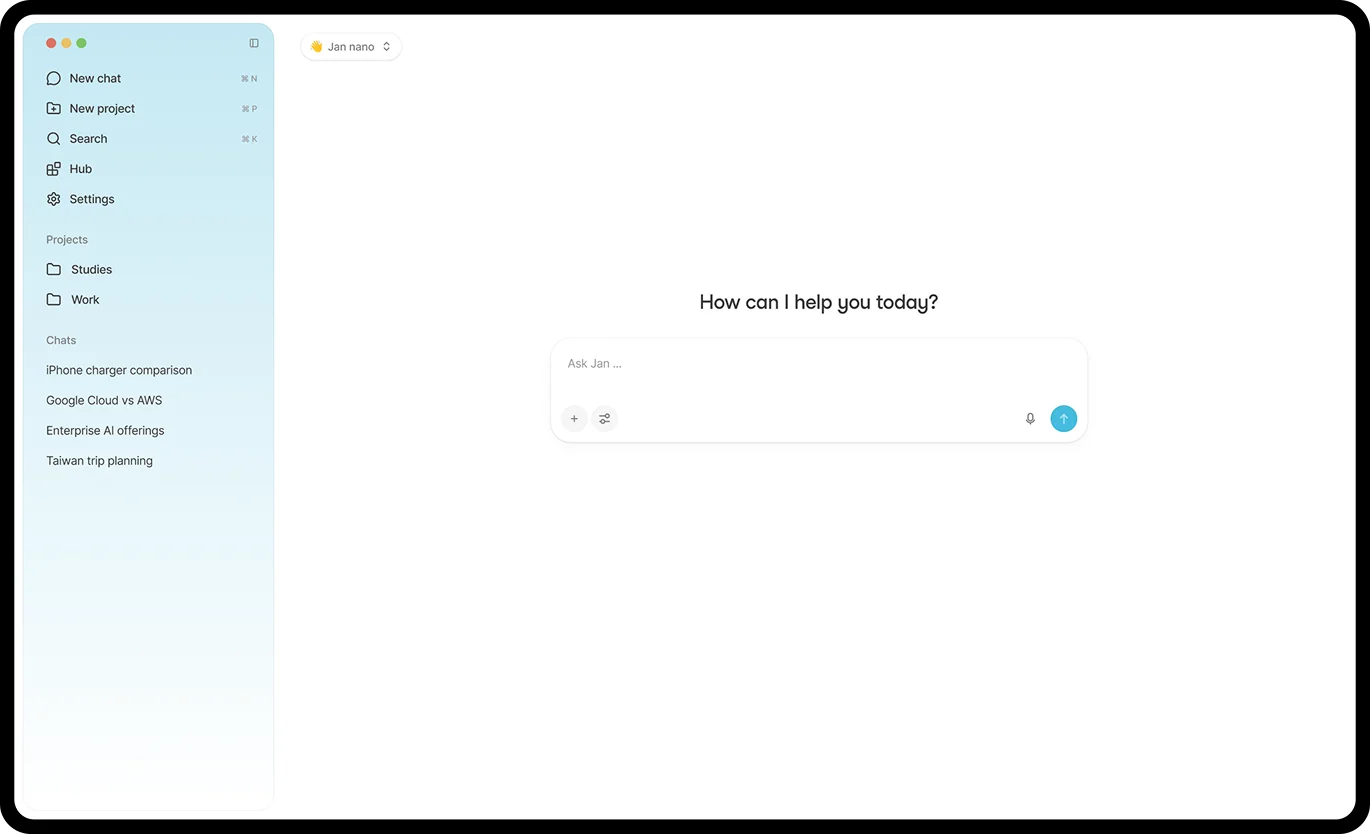
Jan is a free, open-source desktop AI assistant from Menlo Research. It can run supported models locally or connect to cloud providers using user-supplied credentials.
Its product combines chat with model management, MCP connections, projects, assistants, and a local API server. Local inference runs on the user’s computer, so the device’s memory, storage, and supported hardware affect which models can run.
Jan.ai Decision Snapshot
A quick way to understand who this product may suit, where its limits matter, and which facts are most relevant before you compare alternatives.
Best suited toIndividuals and developers who want a desktop interface for local models, provider choice, MCP tools, or a local OpenAI-compatible API.
Look elsewhere ifTeams seeking a centrally managed hosted service, or Intel Mac users who need local models. Jan's current local-model engine on macOS requires Apple Silicon, and should evaluate alternatives such as LM Studio or Ollama instead.
PlatformsLinux, macOS, MCP, REST API, Windows
TechZella assessment7.5/10
Jan.ai — What Sets It Apart?
These are the product-specific differences that may matter when deciding whether the software fits your workflow. They are based on documented evidence rather than a universal ranking.
- Combines local-model chat, cloud-provider connections, MCP tools, and an OpenAI-compatible local API in one desktop application.
- Stores conversations and downloaded models in a local data folder, which users can relocate and inspect.
Editorial assessmentJan.ai Pros & Cons
Pros
- Free and open source desktop application.
- Supports local models as well as configurable cloud providers.
- Provides MCP connections and a local API server.
- Keeps models and conversation data in a user-accessible local folder.
Cons
- Local model choice and performance depend on hardware resources.
- The current macOS local-model engine requires Apple Silicon.
- Remote-provider requests are subject to external provider policies and costs.
- The local API server requires a local model to start.
Jan.ai Gotchas & Operational Limits
These are documented constraints or practical friction points that may matter before you adopt the product.
Jan's local API server needs a local model loaded before it can start, even if requests will later route to remote providers.
A developer planning to use Jan only as a gateway to a cloud provider still needs a compatible local model for server startup.
Evidence source ↗The current bundled local-model engine does not support Intel Macs.
Intel Mac users can connect remote or custom providers, but should not expect local model inference from the current engine.
Evidence source ↗Jan.ai Pricing & Plans
Free
$0
ongoing
Free, open-source desktop application. Cloud model charges, if any, are billed by the connected provider.
Check current pricing →Pricing may change. Verify current plans on the vendor's website.
Cost contextTotal Cost & Hidden Costs
Additional costs or implementation requirements that are documented in the available evidence.
Device, storage, and setup
Jan's Linux and Windows installation pages specify at least 8 GB memory and 10 GB free storage; 16 GB memory is recommended. Model choice and hardware affect local use, and the vendor does not publish a paid onboarding service or onboarding-time estimate in the reviewed pages.
Evidence source ↗Hosting or infrastructure
For local inference, the user supplies the computer and storage; the desktop app itself is free. Jan's local API server runs on the user's machine.
Evidence source ↗Cloud usage and add-ons
When using connected cloud models, users provide provider API keys and follow those providers' billing and privacy terms. Jan's official product page describes the app as free and open source; no Jan desktop subscription or usage overage schedule was found.
Evidence source ↗Jan.ai Competitors & Alternatives
Compare similar products directly, then see which alternatives may make more sense when your requirements differ.
Only factors supported by the available research are shown. The comparison is descriptive, not a ranking.
Direct competitors
These products address broadly similar requirements. The descriptions focus on documented reasons a buyer might compare them with Jan.ai.
CapabilitiesJan.ai Features
Models and chat
- Run downloaded local models on supported hardware
- Connect cloud providers using API credentials
- Download and manage models through the app
Developer access
- Local API server with OpenAI-compatible chat completions
- Anthropic-compatible messages endpoint
- MCP server connections
Organization and storage
- Projects with instructions and files
- Custom assistants
- Local data folder for conversations, models, settings, and logs
Jan.ai Specifications
| License and price | Free and open source |
|---|
| Desktop operating systems | Windows 10 or higher; macOS on Apple Silicon for local inference; Linux distributions including Debian/Ubuntu, Fedora/RHEL, Arch, and openSUSE |
|---|
| Local API | OpenAI-compatible REST API and Anthropic-compatible messages endpoint |
|---|
| Default local API address | http://127.0.0.1:1337 |
|---|
| Minimum memory | 8 GB stated for Windows and Linux; 16 GB recommended |
|---|
| Minimum storage | 10 GB free space stated for Windows and Linux |
|---|
| Data storage | Local user-accessible data folder; can be relocated |
|---|
| Integrations | MCP servers and configured model providers, including OpenAI, Anthropic, and Google |
|---|
Exit planningMigration & Lock-In
Documented portability, standards, export, or switching considerations. No switching-cost score is shown unless the evidence supports one.
Data portability
Conversation and application data are stored in local files, including JSON and JSONL formats. The documentation describes the data-folder structure and how to relocate it.
Evidence source ↗Our evidence-based assessmentTechZella Score
A proprietary editorial score based on product capabilities, usability, value, performance, support and user sentiment evidence.
7.5/10Moderate confidence
Official documentation verifies desktop chat, local and remote models, MCP tools, and a local API. The app is free, but local-model performance depends on hardware, and cloud-provider usage can cost extra. No verifiable public review-platform rating was found.
Methodology v1.0. The assessment weighs feature coverage (25%), ease of use (15%), value for money (20%), performance (15%), support (10%) and user sentiment (15%), using researched product evidence and verified review evidence where available. It is a TechZella editorial assessment, not a direct user-review average.
Editorial transparency
Our Review Methodology
Key claims are linked to the sources used to verify them. This evidence record is separate from third-party user ratings.
TechZella evaluates software using documented product capabilities, pricing information, usability and value considerations, independent user evidence where available, and competitive context. The assessment is an editorial review, not a hands-on test unless one is explicitly identified. Our editorial assessment is based on 6 documented sources.
What TechZella adds- Combines local-model chat, cloud-provider connections, MCP tools, and an OpenAI-compatible local API in one desktop application.
- Stores conversations and downloaded models in a local data folder, which users can relocate and inspect.
Important limitations- Local inference depends on available device memory, storage, and supported hardware; the vendor documents model-loading failures when resources are insufficient.
- Jan's documentation says local models do not run on Intel Macs with the current engine; configured remote providers remain an option.
- Cloud-provider use requires the user's provider credentials and follows that provider's privacy and billing terms.
Evidence-backed claimsJan offers a free, open-source desktop application.The official site describes Jan as free and open source.
View source ↗Verified 2026-11-12Jan Desktop supports local models and connected cloud providers.The official quickstart documents local models and provider connections, including OpenAI, Anthropic, and Google.
View source ↗Verified 2026-11-12Jan's local API supports OpenAI-compatible chat completions and Anthropic-compatible messages.The API reference lists the chat completions and messages endpoints and describes their compatibility.
View source ↗Verified 2026-11-12Jan supports MCP servers as a way to connect tools and data sources.Jan's MCP documentation explains its role as an MCP host and describes connecting MCP clients and servers.
View source ↗Verified 2026-11-12Jan stores conversations and models in a user-accessible local data folder.The official guide documents the data-folder paths, contents, and relocation setting.
View source ↗Verified 2026-11-12The current local-model engine on macOS requires Apple Silicon.Jan's Mac installation and API server documentation identifies Apple Silicon as required for local inference on macOS.
View source ↗Verified 2026-11-12 Common questionsJan.ai FAQs
Answers begin with the clearest available response, followed by the context that helps you act on it.
Is Jan free?
Yes. Jan's official site describes the desktop application as free and open source. Cloud-provider services configured through Jan may have separate provider charges.
Can Jan run AI models offline?
Yes. Downloaded local models can run on the user's computer. Internet access is needed to download the app or model, while connected cloud models require network access.
Does Jan have an API?
Yes. Jan Desktop includes a local API server with OpenAI-compatible chat completions and an Anthropic-compatible messages endpoint.
Does Jan work on Intel Macs?
The app may connect to remote providers, but its current bundled local-model engine on macOS requires Apple Silicon.
Can Jan connect to other tools?
Yes. Jan supports MCP servers, which can provide access to external tools and data sources. Their own data handling depends on the connected service.
Community feedback
Reviews
No reviews yet. Be the first to share your experience.
Write a Review
Please log in to submit a review.
Recently added AI Chatbots