Softpedia Forum is an online community for software and technology discussions. You can ask questions, share recommendations, and find troubleshooting advice. Its discussions cover Windows, Android, Linux, programming, hardware, and more.
The community has been around for years and has built a substantial amount of discussion archives. However, not every recommendation is reliable. Some older discussions may also contain outdated advice.
So, is Softpedia Forum still useful in 2026? Let’s look at how it works, how you can join, and what you should know before relying on its discussions. We’ll also compare it with other communities that may better suit your needs.
Official website: https://forum.softpedia.com/
What Is Softpedia Forum?
Softpedia Forum is an online discussion community operated by SoftNews Net SRL. It brings together people interested in software, technology, and other subjects. Visitors can browse existing discussions or create accounts to participate.
However, it’s important to understand how the forum differs from Softpedia’s main website. While the main website focuses on software listings, downloads, and technology content, the forum brings users together to exchange information.
According to Softpedia’s official Terms of Use, its message board supports English and Romanian discussions. The wider website also provides software information and download resources.
How Is Softpedia Forum Different From the Main Softpedia Website?
Although they share the same brand, both platforms serve different purposes. Here’s how they compare.
| Softpedia Forum | Softpedia Website |
|---|---|
| Community discussions | Software directory |
| User-generated replies | Software descriptions |
| Troubleshooting conversations | Download information |
| Member recommendations | Editorial software information |
| Community opinions | Separate software testing claims |
The forum provides community knowledge, not guaranteed software assessments. For example, a member might recommend an application based on personal experience. However, that recommendation doesn’t automatically establish its safety.
Therefore, you may want to check the developer’s website before downloading unfamiliar software.
What Topics Can You Find on Softpedia Forum?
Softpedia covers much more than software recommendations. Its discussion categories include several technology subjects and general-interest topics.
Some of the main areas include:
- Windows: Operating systems, applications, troubleshooting, and tutorials.
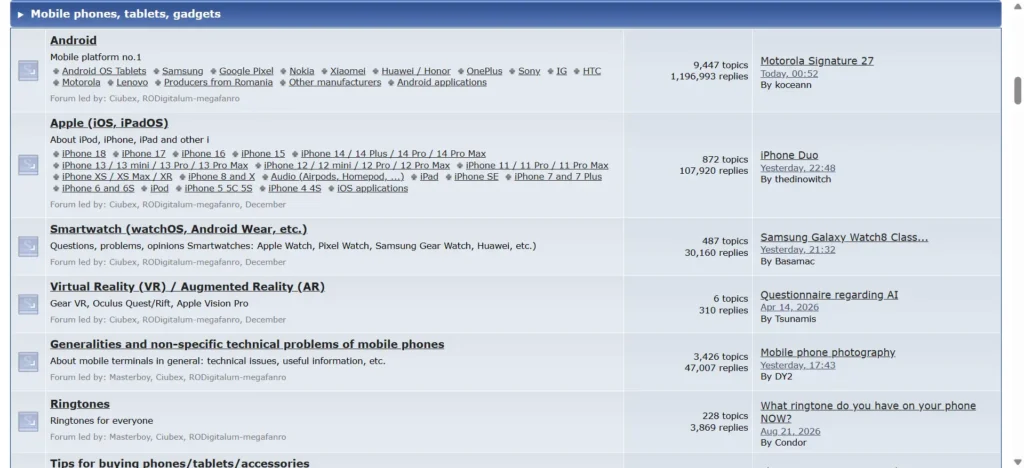
- Android: Smartphone manufacturers, mobile applications, devices, and related questions.
- Apple: iPhones, iPads, applications, and other Apple-related discussions.
- Linux and open source: Distributions, programming, and open-source applications.
- Antivirus and security: Malware, antivirus products, firewalls, and security questions.
- Programming: C++, Java, PHP, databases, and development resources.
- Networking: Network configuration, connectivity, and technical discussions.
- Hardware and electronics: Computer components, devices, and electronics projects.
- Business and telecommunications: Business discussions, service providers, and industry-related subjects.
Beyond these areas, you’ll also find legal, agricultural, and entertainment discussions. This makes Softpedia Forum a broader community than many software-focused discussion boards.
Is Softpedia Forum Still Active in 2026?
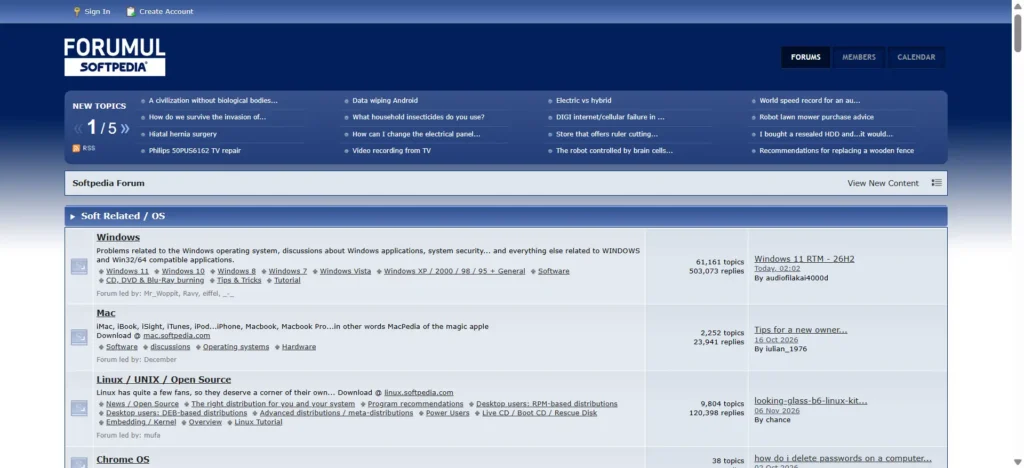
Yes, Softpedia Forum continues to host discussions in 2026. Its public homepage displays recent posts across several categories. Meanwhile, its older discussions provide a substantial archive of community information.
During this research, I checked the publicly visible forum pages and footer statistics. The November 10, 2026 snapshot displayed 30,502,143 total posts and 495,253 registered members.
These figures indicate the community’s historical size. However, registered members don’t necessarily represent active users.
How Large Is the Softpedia Forum Community?
The official forum displays several useful counters. Here’s a snapshot of its overall community and selected discussion sections.
| Community statistic | Observed figure |
|---|---|
| Total posts | 30,502,143 |
| Registered members | 495,253 |
| Programming topics | 27,615 |
| Programming replies | 179,359 |
These numbers reflect the observed forum counters. They can change as members create discussions and publish replies.
Which Softpedia Forum Categories Have the Most Discussions?
Some categories have particularly large discussion archives. For example, telecommunications and Android have substantial reply counts. Windows and programming also contain extensive conversations.
Here are selected figures from the forum’s section counters.
| Category | Topics | Replies |
|---|---|---|
| Windows | 61,161 | 503,073 |
| Android | 9,448 | 1,196,993 |
| Linux / Open Source | 9,804 | 120,398 |
| Antivirus and Security | 12,574 | 119,836 |
| Programming | 27,615 | 179,359 |
| Networking | 23,020 | 228,547 |
These figures belong to individual discussion sections. Also, cumulative replies don’t tell us how frequently people post today. They’re useful for understanding the archive’s size, though.
Are People Still Discussing Older Software and Devices?
Yes, Softpedia retains discussions about older technologies. Its categories include legacy Windows versions and older Apple devices. As a result, you can find historical troubleshooting information alongside newer discussions.
However, older advice needs careful checking before you use it. Software versions, security requirements, and system settings change. Therefore, check the original posting date before following technical instructions.
You may also want to compare older recommendations with current developer documentation. This is especially important when dealing with security software or outdated operating systems.
How Does Softpedia Forum Work?
Softpedia uses a traditional forum structure with nested discussion categories. Each category contains related subforums and individual discussion threads. Members can open these threads and participate in conversations.
The structure is fairly straightforward:
- Main category: A broad subject, such as Windows.
- Subforum: A more specific discussion area.
- Topic: An individual question or conversation.
- Replies: Responses contributed by community members.
Once you understand this structure, finding relevant conversations becomes easier. However, choosing the correct category still matters. A specific question may attract more relevant responses there.
Can You Browse Softpedia Forum Without Registering?
Yes, you can browse publicly accessible discussions without creating an account. However, participating in conversations requires member access. Some additional features also depend on registration.
For instance, registered members can manage subscriptions and account settings. They can also access personal messaging and other member features.
Therefore, you don’t necessarily need an account just to explore existing discussions. You may consider registering when you’re ready to participate.
How Does Forum Moderation Work?
Softpedia publishes terms covering member accounts and user-generated content. These terms also describe circumstances involving content removal and account restrictions.
However, there’s an important distinction here. Softpedia’s terms state that the company doesn’t guarantee the accuracy or reliability of member contributions.
So, you shouldn’t automatically treat forum responses as official guidance. Instead, you can report suspicious content through available channels and avoid sharing private information.
How to Join Softpedia Forum and Create an Account
Softpedia offers free community registration through its official forum. You can create an account using an email address and password. Depending on the registration process, email verification may also be required.
The sign-up process involves your email address and password. Here’s how you can get started on this forum:
Step 1: Open the Official Softpedia Forum
Visit the official website to access the community.
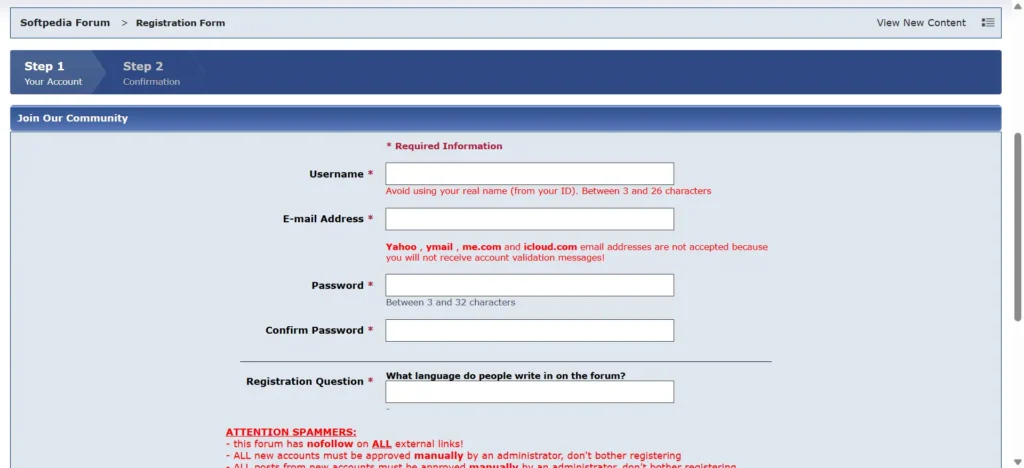
You’ll find different discussion categories on the homepage. Look for the “Create Account” option available at the top-left of the screen, or just simply visit here: https://forum.softpedia.com/index.php?app=core&module=global§ion=register
Step 2: Complete the Registration Form
Select Create Account to open the registration form. Enter the information requested on the page.
The form may ask for details such as:
- Your email address.
- A username.
- A password.
- Any additional verification information.
The exact requirements should be checked on the current registration page.
Step 3: Complete Any Required Email Verification
After submitting the form, check your email inbox. Softpedia may request verification before account activation.
If you receive a verification message, follow its instructions. Also, check your spam folder if the message doesn’t arrive.
Step 4: Sign In to Your Account
Once your account is ready, return to the Softpedia Forum. You can then sign in using your registered credentials.
From there, you’ll have access to member-specific features. These include participation and account management options.
Step 5: Find a Discussion and Participate
Now, you can start exploring relevant conversations. Here’s a simple way to join your first discussion.
- Open the category related to your question.
- Find an existing discussion about the subject.
- Read previous replies before responding.
- Select the reply option when appropriate.
- Explain your problem using specific details.
- Check your notifications for subsequent responses.
For technical questions, include relevant software versions and error messages. However, avoid sharing passwords, private keys, or sensitive documents. Clear questions make discussions easier to understand.
How to Search Softpedia Forum and Find Useful Discussions
Softpedia provides basic and advanced search options for finding discussions. These tools can help you locate information without browsing every category. Advanced search also offers additional filtering options.
According to the forum’s official search instructions, users can search using keywords and refine results. You can also select specific forums and narrow searches by date.
How to Use Basic Search
Basic search works well for straightforward questions. You can enter an application name or relevant keyword.
For example, you might search for a particular software error. Alternatively, enter the name of an application you’re researching.
Selecting the appropriate category can narrow your results. This may help you avoid unrelated conversations.
How to Use Advanced Search
Advanced search provides more control over your results. Its documented options include:
- Searching for specific keywords.
- Selecting individual forum categories.
- Filtering discussions by member username.
- Narrowing results using date ranges.
- Choosing different sorting preferences.
- Displaying complete post text or topic links.
These options can be especially useful for older discussions. Rather than opening unrelated threads, you can narrow the results first.
How to Find Relevant Information in Older Discussions
Older threads can contain useful technical solutions. However, a recommendation from several years ago may no longer work. That’s why checking the discussion’s context matters.
You can evaluate an older thread using these steps:
- Search for the exact application or error message.
- Open the most relevant discussion.
- Check when the original question was posted.
- Look at the date of the latest reply.
- Compare the suggested solution with current documentation.
- Verify that the advice matches your software version.
For example, an older Windows troubleshooting guide may reference discontinued settings. Similarly, a software recommendation may point to an outdated download.
Checking these details can prevent unnecessary problems.
What Useful Features Does Softpedia Forum Offer?
Softpedia includes several features beyond ordinary discussion threads. Members can follow topics, manage notifications, and save discussions. There are also options for printing and downloading certain conversations.
The forum’s official Topic Options guide documents these features and explains how members can use them.
Topic Subscriptions and Email Notifications
You can follow individual discussions and receive future updates. The forum also provides subscription management through member accounts.
Its help documentation describes several notification options:
- Instant email notifications.
- Notifications when you’re offline.
- Daily email notifications.
- Weekly email digests.
This can help you keep track of discussions. You won’t need to revisit every thread manually.
Discussion Printing and Downloads
Softpedia also provides options for saving discussions offline. These can be useful when you want to keep technical information for later.
The documented options include:
- Printer-friendly version: Displays a simplified discussion for printing.
- HTML download: Saves a discussion for browser viewing.
- Microsoft Word download: Provides a document version.
These features may be particularly helpful for longer conversations. You can keep a copy without repeatedly opening the original thread.
Different Discussion Viewing Layouts
The forum documents three ways to display discussion topics. Each layout offers a slightly different reading experience.
| Viewing mode | How it displays discussions |
|---|---|
| Outline | Shows one post alongside a list of remaining posts. |
| Standard | Displays posts sequentially in the selected order. |
| Linear+ | Keeps the original post visible across topic pages. |
You can choose whichever arrangement suits your reading preference. The options are particularly relevant when browsing longer conversations.
Is Softpedia Forum Safe and Trustworthy?
Softpedia operates an established software website and discussion community. However, its reputation doesn’t guarantee every forum recommendation. It’s worth evaluating individual posts and downloads separately.
There are four things to consider when assessing the platform. These include website legitimacy, member recommendations, software testing, and privacy.
Can You Trust Software Recommendations Posted by Members?
Not automatically. Forum posts reflect individual experiences and opinions. Their accuracy depends on the person sharing the information.
In fact, Softpedia’s Terms of Use explain that the company doesn’t guarantee member-generated content. This includes the accuracy and reliability of information posted.
Before installing unfamiliar software, you may want to:
- Visit the developer’s official website.
- Verify the application’s publisher and version.
- Check recent independent security information.
- Avoid unfamiliar executable files and shortened links.
- Confirm that the application still receives updates.
A positive forum response alone isn’t sufficient verification. Checking multiple reliable sources gives you a stronger basis for deciding.
What Does Softpedia’s 100% CLEAN Designation Mean?
Softpedia’s 100% CLEAN designation applies to certain qualifying software products. According to its published terms, these products undergo laboratory testing.
The designation relates to malware testing and the software’s status. However, it applies only to qualifying listings and their testing conditions.
It doesn’t certify every application mentioned in forum discussions. Nor does it automatically verify third-party download links.
Therefore, check the relevant software listing before relying on this designation. You can also visit the developer’s website for current information.
What Information Does Softpedia Collect?
Softpedia’s published Privacy Policy describes several information categories. These relate to user accounts, website activity, and personal information.
The document mentions information such as:
- Email addresses.
- Usernames and account credentials.
- IP addresses.
- Browser and device information.
- Website usage information.
- Communications with the company.
It’s worth reviewing these details before creating an account. Also, avoid publishing sensitive information in public discussions.
Should You Be Concerned About Softpedia’s Privacy Policy?
There’s one documentation issue worth highlighting. The published policy contains two different revision references.
Its header says it was updated on December 30, 2019, effective January 1, 2020. However, the policy’s internal update statement says May 24, 2018. This inconsistency makes the document’s revision history less clear.
An older revision reference doesn’t establish unsafe data handling. However, it makes the company’s current privacy practices harder to assess.
Before registering, you may want to read the published policy carefully. You should also consider what information you’re comfortable sharing.
How Can You Use Softpedia Forum More Safely?
Basic precautions can reduce unnecessary privacy and security risks. These practices apply to most public discussion communities.
- Never share passwords or authentication codes.
- Avoid publishing personal documents or private contact details.
- Don’t download unfamiliar executable files without verification.
- Check recommendations against current developer documentation.
- Avoid following outdated security instructions blindly.
- Keep your operating system and applications updated.
These steps are particularly important in malware discussions. You should never share confidential files to request troubleshooting help.
What Are the Best Alternatives to Softpedia Forum?
Several communities offer more focused technical assistance. The right option depends on the problem you’re trying to solve. Some specialize in security, while others focus on hardware or operating systems.
Here are 12 alternatives worth considering, grouped by their main strengths.
| Alternative | Best suited for | Main strength |
|---|---|---|
| BleepingComputer | Malware and Windows problems | Specialist malware assistance |
| MajorGeeks | Software and PC support | Dedicated software and hardware sections |
| Tom’s Hardware | PC components and building | Hardware-focused discussions |
| Wilders Security | Cybersecurity and privacy | Specialist security discussions |
| Malwarebytes Forums | Malwarebytes products | Product support and malware assistance |
| Microsoft Q&A | Microsoft products | Microsoft technical questions |
| Apple Support Community | Apple devices | Apple-focused discussions |
| LinuxQuestions.org | Linux and open source | Dedicated Linux community |
| Super User | Technical questions | Structured question-and-answer format |
| AskWoody | Windows updates | Windows patching discussions |
| Reddit r/techsupport | Everyday troubleshooting | Community-driven assistance |
| Reddit r/software | Software discovery | Application recommendations |
These communities serve different purposes, not identical audiences. Some are better suited to specific technical problems.
Which Softpedia Forum Alternative Should You Choose?
Each community serves a slightly different purpose. Here’s a quick way to narrow your choice:
- Malware removal: BleepingComputer offers dedicated security assistance.
- Windows software problems: MajorGeeks provides specialist support sections.
- PC building: Tom’s Hardware focuses on hardware discussions.
- Security and privacy: Wilders Security covers specialist security topics.
- Linux troubleshooting: LinuxQuestions.org focuses on Linux discussions.
- Microsoft problems: Microsoft Q&A provides Microsoft-related answers.
- Apple devices: Apple Support Community covers Apple products.
- Software recommendations: Reddit’s r/software supports community discussions.
The best choice depends on your actual requirements. A specialist community may provide better-focused assistance. However, Softpedia remains useful for broader discussions.
Who Should Use Softpedia Forum?
Softpedia Forum may suit people looking for broad community discussions and historical technical information. However, it isn’t necessarily the best choice for every problem.
Softpedia Forum Is Worth Exploring If You:
- Want discussions about different software categories.
- Need information from older troubleshooting threads.
- Prefer traditional discussion boards over structured Q&A.
- Want to explore general technology discussions.
- Are looking for community opinions about applications.
You May Prefer Another Community If You:
- Need specialist malware-removal instructions.
- Want official Microsoft or Apple technical support.
- Require detailed PC hardware recommendations.
- Prefer structured answers and accepted solutions.
- Need clearer information about current privacy practices.
In other words, Softpedia offers a broad range of conversations. Specialist communities can provide more focused support.
Is Softpedia Forum Worth Using in 2026?
Yes, Softpedia Forum is still worth exploring for general discussions. Its historical archive is a significant advantage. It also covers several subjects beyond software troubleshooting.
However, its usefulness depends on what you’re looking for. Member recommendations can vary in quality and accuracy. Some older technical advice may also need updating.
Where Softpedia Forum does well:
- Maintains a substantial historical discussion archive.
- Covers numerous technology and general-interest subjects.
- Provides free community registration.
- Supports advanced searching and discussion filtering.
- Offers topic subscriptions and offline discussion options.
Where it has limitations:
- Member recommendations vary in reliability.
- Some technical advice becomes outdated.
- Romanian discussions may challenge English-only visitors.
- Its published privacy policy contains inconsistent revision dates.
- Specialist communities may offer more focused assistance.
My assessment is straightforward. Softpedia Forum is useful for exploring community knowledge and older discussions. However, it shouldn’t replace official technical documentation.
For malware assistance, you may prefer a specialist security community. For hardware problems, a dedicated hardware forum may be more helpful. Meanwhile, software recommendations are worth checking across multiple sources.
People Also Ask These Questions
-
Is Softpedia Forum free to use?
Yes, Softpedia offers free community registration. Members can participate in discussions and access account features. Some account actions may require additional verification.
-
Can I browse Softpedia Forum without registering?
Yes, publicly accessible discussions can be browsed without membership. However, posting requires a registered member account. Some additional features also depend on account access.
-
Is Softpedia Forum still active in 2026?
Yes, its public homepage continues to display recent discussions. Its November 10, 2026 snapshot showed over 30.5 million historical posts. However, that figure doesn’t represent monthly active users.
-
How do I switch Softpedia Forum to English?
The forum offers English and Romanian interface options. You can use its language selector to change the interface. However, this won’t automatically translate member posts.
-
Is Softpedia Forum safe for downloading software?
Forum recommendations shouldn’t be treated as download verification. Check the application’s official developer website first. Also, distinguish member discussions from Softpedia’s tested software listings.
-
How do I find old Softpedia Forum discussions?
You can use the forum’s advanced search. Enter relevant keywords and choose the appropriate category. You can also narrow results using date ranges.
-
Can I receive notifications about forum discussions?
Yes, members can follow selected topics and forums. Documented options include instant, daily, and weekly notifications. You can manage subscriptions through your account control panel.
-
What are the best alternatives to Softpedia Forum?
BleepingComputer is useful for malware assistance. MajorGeeks and Tom’s Hardware cover different support needs. LinuxQuestions.org focuses on Linux and open-source discussions.
Final Thoughts
Softpedia Forum remains a substantial online discussion community. Its archive covers software, hardware, programming, and more. Its historical conversations can also help locate useful information.
However, it’s worth evaluating recommendations before following them. Check software sources and verify older technical instructions. Also, review the published privacy policy before registering.
The best approach is to use Softpedia selectively. Explore its discussions for community knowledge and historical solutions. For more specialized problems, consider communities focused on your particular needs.
And when you’re downloading software, always verify the publisher independently. A recommendation from a forum member alone can’t establish that an application is safe.