Editorial overview
Aggregated Overview
Official materials document extensive Mac editing, drawing, layer, filter, and AI-assisted tools. The US Mac App Store lists the app as free, while the vendor site separately advertises a 10-day trial. Public review evidence is limited and includes dated, mixed user comments.
This profile combines documented product information and independent evidence where available. It is not a hands-on test unless TechZella explicitly identifies one.
Overview
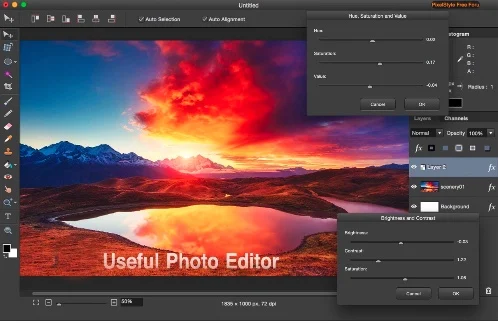
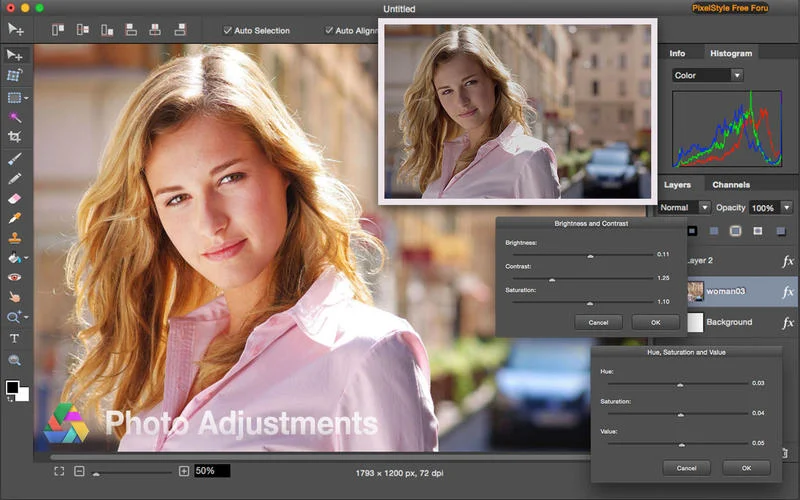
PixelStyle Photo Editor is a macOS application for photo editing, image composition, and drawing. Its tools include layers, adjustment controls, filters, retouching, typography, and vector drawing.
The current App Store listing also describes AI-assisted background removal, object segmentation, and image upscaling. It lists the application as Mac-only and supports macOS 10.13 or later. The vendor separately advertises a 10-day full-feature trial on its website.
PixelStyle Photo Editor Decision Snapshot
A quick way to understand who this product may suit, where its limits matter, and which facts are most relevant before you compare alternatives.
Best suited toMac users seeking a single desktop app for layered photo edits, retouching, drawing, filters, and graphics with SVG import or export.
Look elsewhere ifPeople who need a Windows or web version, or need a verified API or broad third-party integration ecosystem, and should evaluate alternatives such as GIMP or Affinity instead.
TechZella assessment7.4/10
PixelStyle Photo Editor — What Sets It Apart?
These are the product-specific differences that may matter when deciding whether the software fits your workflow. They are based on documented evidence rather than a universal ranking.
- Combines raster photo editing, drawing brushes, vector tools, and SVG import and export in a Mac desktop app.
- The current App Store description lists AI background removal, object segmentation, and upscaling alongside conventional layer and retouching tools.
Editorial assessmentPixelStyle Photo Editor Pros & Cons
Pros
- Combines photo adjustments, retouching, layers, drawing, and design tools.
- The App Store lists AI-assisted background removal, object segmentation, and upscaling.
- Supports SVG and a range of common image formats.
- The current US App Store listing shows the app as free.
Cons
- Available for Mac only; no verified Windows or web edition.
- The vendor's direct purchase price could not be verified.
- The vendor compatibility page and App Store compatibility details are not fully aligned.
- No public API documentation or broad service-integration list was found.
PixelStyle Photo Editor Gotchas & Operational Limits
These are documented constraints or practical friction points that may matter before you adopt the product.
Direct-sale pricing is not clear from the vendor checkout page available during research.
The official website advertises a 10-day full-feature trial and provides a purchase link, but the linked checkout did not expose a readable price. The US App Store listing shows Free.
Evidence source ↗App Store review pages show different levels of public rating information by storefront.
A French storefront displayed an aggregate rating, but the US listing reported that it lacked enough ratings to show an overview. Treat the aggregate as storefront-specific.
Evidence source ↗PixelStyle Photo Editor Pricing & Plans
Mac App Store
$0
one-time
The US Mac App Store currently lists PixelStyle Photo Editor as free to download. Storefront pricing may vary.
Check current pricing →Vendor website trial
10 days
The official product page advertises a full-feature trial. The linked direct-purchase checkout did not show a verifiable price during research.
Check current pricing →Pricing may change. Verify current plans on the vendor's website.
Cost contextTotal Cost & Hidden Costs
The sticker price is rarely the whole cost. TechZella did not find published figures for the items below in the sources reviewed, so confirm them with the vendor before budgeting.
Implementation time
Not publicly documented. Ask for a typical onboarding and migration timeline for a team of your size, and whether paid onboarding is required.
Hosting & infrastructure
Not publicly documented for this product. For SaaS, hosting is normally part of the subscription; for self-hosted or hybrid deployments, budget for servers, backups, security patching and admin time.
Hidden fees & add-ons
No overage, add-on or premium-support fees were documented in the reviewed sources. Request a written quote that lists usage limits, minimum seats, integrations, support tiers and renewal terms.
PixelStyle Photo Editor Competitors & Alternatives
Compare similar products directly, then see which alternatives may make more sense when your requirements differ.
Direct competitors
These products address broadly similar requirements. The descriptions focus on documented reasons a buyer might compare them with PixelStyle Photo Editor.
CapabilitiesPixelStyle Photo Editor Features
Photo Editing
- Layer-based editing and blending modes
- Curves, levels, color balance, and other adjustments
- Healing, clone stamp, object erasing, and inpainting
- Filters, effects, and GMIC filter support
AI-Assisted Tools
- AI background removal
- Automatic object segmentation
- Image upscaling up to 4u00d7
Drawing and Design
- More than 100 built-in brushes
- Text on path and typography controls
- Vector drawing and geometric shapes
- SVG import and export
PixelStyle Photo Editor Specifications
| Platform | Mac; macOS 10.13 or later |
|---|
| Distribution | Mac App Store and vendor website download |
|---|
| Current US App Store price | Free |
|---|
| Vendor website trial | 10 days, full features advertised |
|---|
| File formats | Includes PNG, JPG, HEIC, RAW, PDF, SVG, TIFF, WebP, and GIF |
|---|
| Integrations | GMIC filter support is listed; other service integrations were not verified |
|---|
| API | No public API documentation found |
|---|
| Languages | English, Japanese, Simplified Chinese, and Traditional Chinese |
|---|
| Latest listed version | 4.6.0 |
|---|
Our evidence-based assessmentTechZella Score
A proprietary editorial score based on product capabilities, usability, value, performance, support and user sentiment evidence.
7.4/10Moderate confidence
Official materials document extensive Mac editing, drawing, layer, filter, and AI-assisted tools. The US Mac App Store lists the app as free, while the vendor site separately advertises a 10-day trial. Public review evidence is limited and includes dated, mixed user comments.
Methodology v1.0. The assessment weighs feature coverage (25%), ease of use (15%), value for money (20%), performance (15%), support (10%) and user sentiment (15%), using researched product evidence and verified review evidence where available. It is a TechZella editorial assessment, not a direct user-review average.
Editorial transparency
Our Review Methodology
Key claims are linked to the sources used to verify them. This evidence record is separate from third-party user ratings.
TechZella evaluates software using documented product capabilities, pricing information, usability and value considerations, independent user evidence where available, and competitive context. The assessment is an editorial review, not a hands-on test unless one is explicitly identified. Our editorial assessment is based on 2 documented sources.
What TechZella adds- Combines raster photo editing, drawing brushes, vector tools, and SVG import and export in a Mac desktop app.
- The current App Store description lists AI background removal, object segmentation, and upscaling alongside conventional layer and retouching tools.
Important limitations- The official product page and App Store listing support macOS only.
- The vendor product page advertises a 10-day trial and links to a purchase flow, while the US App Store currently lists the app as free; direct-sale pricing could not be verified.
- The vendor's compatibility statement and App Store listing differ in scope: the App Store specifies macOS 10.13 or later, while the vendor page names a narrower, dated set of releases and chips.
Evidence-backed claimsThe current US App Store listing marks PixelStyle Photo Editor as free and Mac-only.The listing shows Free, says Only for Mac, and specifies macOS 10.13 or later.
View source ↗Verified 2026-09-30PixelStyle includes layer editing, drawing brushes, photo adjustments, filters, and retouching features.The product page describes layer groups and effects, more than 100 built-in brushes, adjustment layers, filters, and retouching tools.
View source ↗Verified 2026-09-30The current App Store description lists AI background removal, upscaling, and object segmentation.The listing describes background removal, up to 4× super-resolution, and automatic object segmentation.
View source ↗Verified 2026-09-30The vendor website advertises a 10-day trial with full features.The product page states that a free download includes a 10-day full-feature trial.
View source ↗Verified 2026-09-30Version 4.6.0 added vector drawing support and corrected blurry imported-image display.The App Store version history lists version 4.6.0 as released four days before the page was checked and names those changes.
View source ↗Verified 2026-09-30PixelStyle supports a range of image formats, including SVG, PDF, RAW, HEIC, TIFF, and WebP.The App Store description lists formats the app can open and export.
View source ↗Verified 2026-09-30 Independent review sources
PixelStyle Photo Editor Ratings & Reviews
Ratings are published by the respective review platforms and may change over time.
FAQ
Does PixelStyle Photo Editor have a free version?
The US Mac App Store lists it as free. The vendor website also advertises a 10-day full-feature trial for its direct download.
Which operating systems does it support?
Apple lists the app for Mac and requires macOS 10.13 or later. No Windows or web edition was verified.
Does PixelStyle provide an API?
No public API documentation was found during research.
Which integrations are documented?
The App Store describes GMIC filter support. No other named third-party service integrations were verified.
Can it work with SVG files?
The vendor documents basic SVG import and export, and the App Store lists SVG among supported formats.
Community feedback
Reviews
No reviews yet. Be the first to share your experience.
Write a Review
Please log in to submit a review.
What Has Changed
This history records material data changes detected when TechZella re-researched the profile.
2026-09-30Research update changed: Pricing, Features, Specifications, Alternatives, Competitors, Trusted ratings, Description.
Recently added Image Editing