
Free
$0
Free edition for home use with common audio formats. It excludes some Pro capabilities, including video playback, broader format support, compatible foot pedals and technical support.
Check current pricing →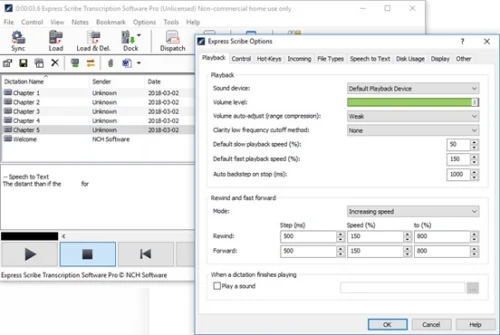
Desktop transcription playback software for audio and video files, with variable-speed playback, hotkeys, foot-pedal support and file-management tools.
The product has broad audio and video format support, playback controls, file intake options and hardware compatibility. Independent review platforms show generally positive user sentiment. Support varies by license and the public purchase page does not expose a stable current license price.
This profile combines documented product information and independent evidence where available. It is not a hands-on test unless TechZella explicitly identifies one.
Express Scribe is desktop audio playback software designed for manual transcription work. It runs on Windows and macOS, and supports keyboard hotkeys, foot pedals, variable playback speed and video playback.
The application helps typists load dictation from local folders, networks, FTP, email, Express Delegate and portable recorders. Users can type in an external word processor while Express Scribe runs in the background.
Express Scribe is a playback and workflow tool rather than a standalone automated transcription service. Its speech-recognition feature relies on a compatible external engine and produces draft text that requires review.
A quick way to understand who this product may suit, where its limits matter, and which facts are most relevant before you compare alternatives.
macOS, Windows
8.4/10
Free edition for home use with common audio formats. It excludes some Pro capabilities, including video playback, broader format support, compatible foot pedals and technical support.
Check current pricing →Paid edition for home, small business, corporate, enterprise and government use. Includes broader format support, video playback, compatible foot pedals and technical support. Current price is presented dynamically on the official purchase page.
Check current pricing →Pricing may change. Verify current plans on the vendor's website.
Compare similar products directly, then see which alternatives may make more sense when your requirements differ.
These products address broadly similar requirements. The descriptions focus on documented reasons a buyer might compare them with Express Scribe.
| Deployment | Desktop application |
|---|---|
| Operating systems | Windows 7, 8, 8.1, 10 and 11; macOS 10.5 or later listed by vendor |
| Web application | No verified web version |
| Mobile applications | No verified Express Scribe mobile application |
| Free edition | Yes |
| Free trial | Yes, limited-duration trial with Pro features |
| Pricing model | Free edition and paid Pro license |
| Integrations | Express Delegate, FTP, email, LAN or local folders, portable recorders, Microsoft Word, other word processors, FastFox and SAPI speech recognition |
| API | Windows command-line SDK; no general REST API verified |
| Input types | Audio files, video files and dictation recordings |
| Foot-pedal support | Yes, with selected USB and legacy controllers |
| Primary workflow | Manual transcription and dictation playback |
A proprietary editorial score based on product capabilities, usability, value, performance, support and user sentiment evidence.
The product has broad audio and video format support, playback controls, file intake options and hardware compatibility. Independent review platforms show generally positive user sentiment. Support varies by license and the public purchase page does not expose a stable current license price.
Methodology v1.0. The assessment weighs feature coverage (25%), ease of use (15%), value for money (20%), performance (15%), support (10%) and user sentiment (15%), using researched product evidence and verified review evidence where available. It is a TechZella editorial assessment, not a direct user-review average.
Answers begin with the clearest available response, followed by the context that helps you act on it.
No reviews yet. Be the first to share your experience.
Please log in to submit a review.