
Apps shown as included with a cloud subscription are not installed automatically.
An administrator must install each eligible app from the app store after subscribing.
Evidence source ↗
Akaunting is accounting software for invoicing, bookkeeping, and financial reporting. It offers hosted cloud plans and a self-hosted edition.
Official documentation verifies core accounting workflows, app extensions, API access, cloud plans, and self-hosting. Public review-platform ratings differ, and no independent performance testing was found. Scores are editorial evidence assessments, not hands-on test results.
This profile combines documented product information and independent evidence where available. It is not a hands-on test unless TechZella explicitly identifies one.
A quick way to understand who this product may suit, where its limits matter, and which facts are most relevant before you compare alternatives.
Freelancers and small businesses seeking basic invoicing and bookkeeping, especially those wanting a self-hosted option or modular add-on apps.
Organizations that need a fully featured accounting system on the lowest cloud tier should check plan boundaries first: double-entry accounting, bank feeds, roles, and expense claims are not included in Standard Cloud, and should evaluate alternatives such as Wave or QuickBooks Online instead.
Cloud, REST API, SaaS, Self-hosted, Web
6.4/10
These are the product-specific differences that may matter when deciding whether the software fits your workflow. They are based on documented evidence rather than a universal ranking.
These are documented constraints or practical friction points that may matter before you adopt the product.
An administrator must install each eligible app from the app store after subscribing.
Evidence source ↗Cloud subscriptions cannot be applied to a self-hosted installation, so buyers should compare the appropriate plan page.
Evidence source ↗Hosting-provider compatibility and administrator access can affect setup and app installation.
Evidence source ↗One company, one user plus one accountant, 1,000 invoices, four included apps, and forum support. The pricing page displays Try It Free; trial length is not stated.
Check current pricing →Up to 10 companies, 10 users, 10,000 invoices, 10 included apps, ticket support, double-entry, bank feeds, expense claims, roles and permissions, and client portal.
Check current pricing →Up to 30 companies, 30 users, 30,000 invoices, 30 included apps, and ticket support. Listed additions include payroll, projects, inventory, CRM, Shopify, and Stripe.
Check current pricing →Unlimited companies, users, and invoices, all listed apps, and ticket support.
Check current pricing →Free self-hosted edition with one company, one user plus one accountant, 1,000 invoices, and community support.
Check current pricing →Self-hosted plan with up to 10 companies and 10 users, with ticket support.
Check current pricing →Self-hosted plan with up to 30 companies and 30 users, with ticket support.
Check current pricing →Self-hosted plan with unlimited companies, users, and invoices, with ticket support.
Check current pricing →Pricing may change. Verify current plans on the vendor's website.
Compare the product with documented alternatives across the factors that can change a buying decision. Each row is evidence-backed rather than a generic feature checklist.
| Decision factor | Akaunting | Wave |
|---|---|---|
| Hosting model | Hosted cloud plans or customer-managed self-hosted deployment. | Wave pricing describes a hosted online accounting service and mobile app; no self-hosted deployment option is described on its pricing page. Source ↗ |
| Pricing model | Cloud plans start at $12 monthly or $8 per month billed yearly; a self-hosted Standard edition is free. | Starter is listed at $0; Pro is listed at $19 monthly in USD, with payment-processing fees and optional services also described. Source ↗ |
| Core accounting scope | Invoicing, bills, transactions, reports, and optional apps for functions such as inventory and payroll. | Starter includes invoicing, estimates, bills, bookkeeping records, and cash-flow and customer management; Pro adds bank imports, receipt capture, expense categorization, and reminders. Source ↗ |
| Mobile access | Official materials describe access through a web interface on mobile devices; a dedicated Akaunting mobile app was not verified. | Wave lists invoicing through its mobile app in the Starter plan. Source ↗ |
Only factors supported by the available research are shown. The comparison is descriptive, not a ranking.
Compare similar products directly, then see which alternatives may make more sense when your requirements differ.
| Decision factor | Akaunting | Wave |
|---|---|---|
| Hosting model | Hosted cloud plans or customer-managed self-hosted deployment. | Wave pricing describes a hosted online accounting service and mobile app; no self-hosted deployment option is described on its pricing page. Source ↗ |
| Pricing model | Cloud plans start at $12 monthly or $8 per month billed yearly; a self-hosted Standard edition is free. | Starter is listed at $0; Pro is listed at $19 monthly in USD, with payment-processing fees and optional services also described. Source ↗ |
| Core accounting scope | Invoicing, bills, transactions, reports, and optional apps for functions such as inventory and payroll. | Starter includes invoicing, estimates, bills, bookkeeping records, and cash-flow and customer management; Pro adds bank imports, receipt capture, expense categorization, and reminders. Source ↗ |
| Mobile access | Official materials describe access through a web interface on mobile devices; a dedicated Akaunting mobile app was not verified. | Wave lists invoicing through its mobile app in the Starter plan. Source ↗ |
Only factors supported by the available research are shown. The comparison is descriptive, not a ranking.
These products address broadly similar requirements. The descriptions focus on documented reasons a buyer might compare them with Akaunting.
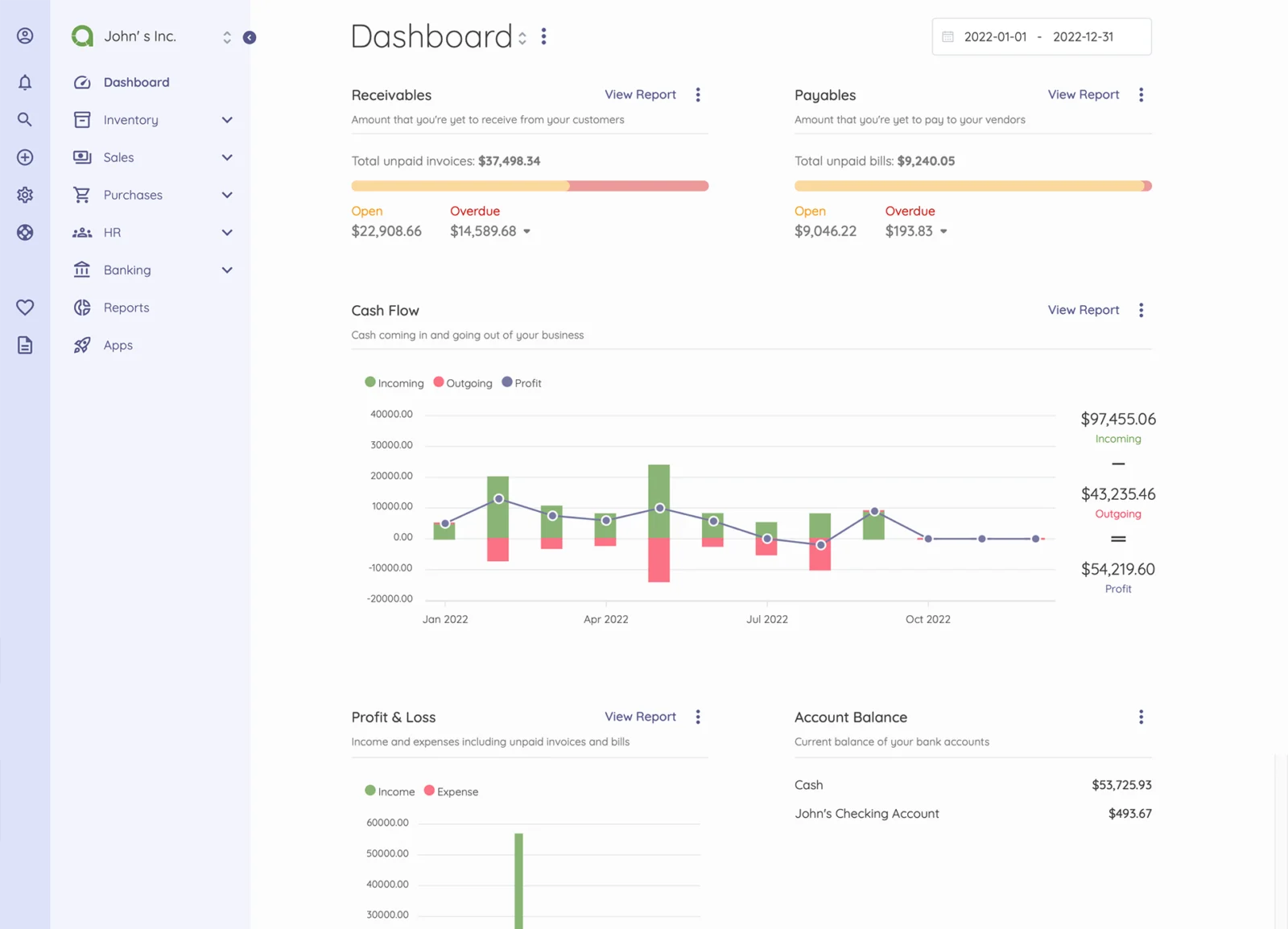
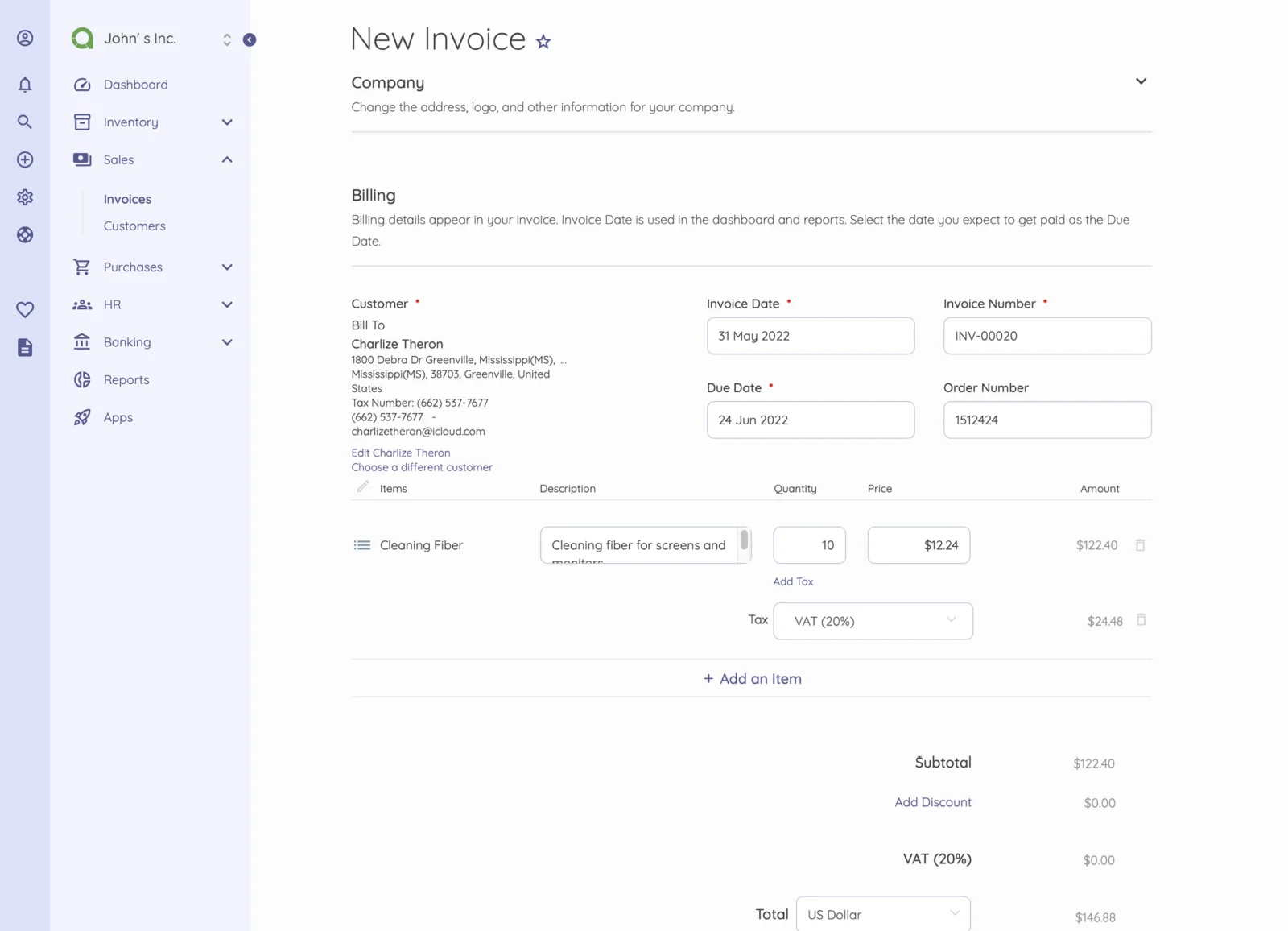
Akaunting is accounting software for freelancers and small businesses. Its core workflows include invoices, bills, customer and vendor records, transactions, and financial reports.
Buyers can use Akaunting Cloud or install the on-premise edition on their own server. The two deployment choices have separate plans, limits, and infrastructure responsibilities.


| Deployment | Cloud or self-hosted |
|---|---|
| API | RESTful API; HTTP Basic authentication documented |
| Self-hosted PHP requirement | PHP 8.1 or higher |
| Self-hosted databases | Examples include MySQL, PostgreSQL, SQLite, and SQL Server |
| Cloud plan limits | Limits vary by tier; Standard lists 1 company, 1 user plus 1 accountant, and 1,000 invoices |
| Bank Feeds availability | US, Canada, Australia, New Zealand, UK, and EU, according to help documentation |
| Trial | Try It Free displayed for cloud plans; duration not stated on the pricing page |
| Free self-hosted plan | Standard On-Premise |
Verified installation, hosting, administration, or environment details that can affect implementation.
| Hosting | Cloud plans are hosted on akaunting.com; on-premise editions run on a customer-managed server. Source ↗ |
|---|---|
| Self-hosted prerequisites | PHP 8.1 or higher, a supported database, a web server, URL rewriting, and listed PHP extensions are required. Source ↗ |
Documented portability, standards, export, or switching considerations. No switching-cost score is shown unless the evidence supports one.
Help documentation describes migration and data import, manual imports for items such as customers and transactions, and data export. It does not establish that every accounting system or data type transfers automatically.
Evidence source ↗A proprietary editorial score based on product capabilities, usability, value, performance, support and user sentiment evidence.
Official documentation verifies core accounting workflows, app extensions, API access, cloud plans, and self-hosting. Public review-platform ratings differ, and no independent performance testing was found. Scores are editorial evidence assessments, not hands-on test results.
Methodology v1.0. The assessment weighs feature coverage (25%), ease of use (15%), value for money (20%), performance (15%), support (10%) and user sentiment (15%), using researched product evidence and verified review evidence where available. It is a TechZella editorial assessment, not a direct user-review average.
Key claims are linked to the sources used to verify them. This evidence record is separate from third-party user ratings.
TechZella evaluates software using documented product capabilities, pricing information, usability and value considerations, independent user evidence where available, and competitive context. The assessment is an editorial review, not a hands-on test unless one is explicitly identified. Our editorial assessment is based on 5 documented sources.
The company’s launch post is dated September 14, 2017 and announces the first stable public version.
View source ↗Verified 2026-10-18The official plans pages distinguish cloud hosting from on-premise plans hosted on the customer’s server.
View source ↗Verified 2026-10-18The developer help page describes CRUD access to Akaunting entities and documents HTTP Basic authentication.
View source ↗Verified 2026-10-18Official help documentation distinguishes Akaunting-developed feature apps from integrated apps and gives examples of each.
View source ↗Verified 2026-10-18The current pricing page lists tier limits and included apps for Standard, Premium, Elite, and Ultimate Cloud.
View source ↗Verified 2026-10-18The pricing page places double-entry and bank feeds among Premium Cloud additions.
View source ↗Verified 2026-10-18Akaunting’s help article lists the US, Canada, Australia, New Zealand, the UK, and the EU for its Bank Feeds feature.
View source ↗Verified 2026-10-18Yes. Akaunting lists a free Standard on-premise edition. Cloud plans are paid, though the pricing page displays a Try It Free option without specifying its duration.
Yes. The on-premise edition runs on a customer-managed server and requires PHP 8.1 or higher, a supported database, a web server, and required PHP extensions.
Yes. Its documentation describes a RESTful API for CRUD operations and HTTP Basic authentication.
The app store includes third-party options such as PayPal, Slack, HubSpot, WooCommerce, and Shopify. Availability and pricing can vary by app and plan.
No. Bank Feeds is listed among Premium Cloud additions. The help documentation names availability in the US, Canada, Australia, New Zealand, the UK, and the EU.
No reviews yet. Be the first to share your experience.
Please log in to submit a review.