
Acceptable Ads is enabled by default in the desktop product.
Users who expect every ad to be blocked need to disable the setting or adjust filters.
Evidence source ↗
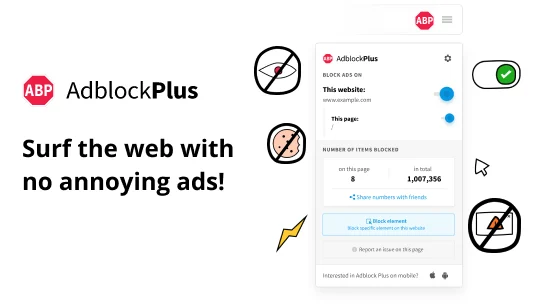
Adblock Plus is a browser extension and mobile app that blocks ads and selected trackers using filter lists. Its core ad blocking is free; Premium adds optional distraction-blocking features.
The assessment reflects documented browser coverage, configurable filter lists, a free ad-blocking tier, optional Premium controls, one verified Chrome Web Store rating, and an independent editorial review. It does not represent hands-on testing.
This profile combines documented product information and independent evidence where available. It is not a hands-on test unless TechZella explicitly identifies one.
A quick way to understand who this product may suit, where its limits matter, and which facts are most relevant before you compare alternatives.
Individuals who want free ad and selected tracker blocking through a supported browser extension, with optional controls for cookie notices and other distractions.
Buyers seeking a single, system-wide desktop blocker, an advertised enterprise integration suite, or Premium features on every supported browser and mobile app, and should evaluate alternatives such as AdGuard or uBlock Origin instead.
Android, Chrome, Firefox, Microsoft Edge, Safari
8.0/10
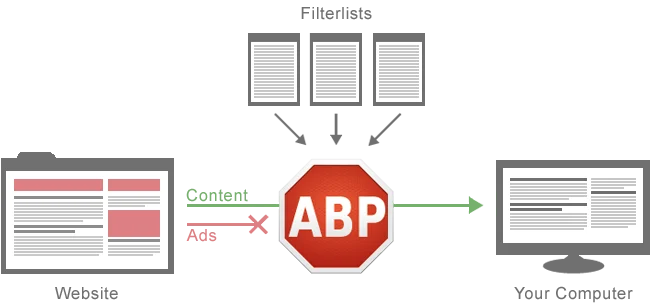
Adblock Plus is an ad-blocking browser extension and mobile app developed by eyeo GmbH. It uses filter lists to block or hide ads and selected tracking requests.
The product’s core ad blocking is free. Acceptable Ads is enabled by default in the desktop product, but users can turn it off. Optional Premium adds controls for cookie notices and other distractions on supported products.
These are the product-specific differences that may matter when deciding whether the software fits your workflow. They are based on documented evidence rather than a universal ranking.
These are documented constraints or practical friction points that may matter before you adopt the product.
Users who expect every ad to be blocked need to disable the setting or adjust filters.
Evidence source ↗The help center lists Premium for Chrome, Firefox, Edge, Opera, and the iOS app, while the Safari Mac app and other mobile apps do not support Premium.
Evidence source ↗Do not assume the same trial applies to desktop Premium subscriptions.
Evidence source ↗Core ad blocking is free across Adblock Plus extensions and apps.
Check current pricing →Optional subscription for extra blocking options, including cookie notices and other distractions. The official page displays multiple price offers; verify the applicable rate at checkout. A seven-day trial is documented for iOS.
Check current pricing →Pricing may change. Verify current plans on the vendor's website.
Comparable options include AdGuard, uBlock Origin, and browser-integrated blockers such as Brave Shields. Their feature scope, platform coverage, and deployment models differ; buyers should compare the relevant browser and device requirements before switching.
| Developer | eyeo GmbH |
|---|---|
| Product available since | 2006 |
| Company address | Kunibertsgasse 10, 50668 Cologne, Germany |
| Platforms | Desktop browser extensions, Safari for iOS, Samsung Internet for Android, and Adblock Browser for Android |
| Premium platforms | iOS app and Chrome, Firefox, Edge, and Opera desktop extensions |
| API | No general-purpose customer integration API verified in reviewed product documentation |
| Integrations | No general-purpose third-party integration catalog verified; distribution is through browser and mobile app stores |
| Free trial | Seven days for Premium in the iOS app; no general desktop trial verified |
| Acceptable Ads | Enabled by default in the desktop product; configurable |
Verified installation, hosting, administration, or environment details that can affect implementation.
| Installation or hosting | Installed as a browser extension or mobile app; the official site also offers Adblock Browser for Android. Source ↗ |
|---|---|
| Customer-facing API | No general-purpose customer integration API was verified in the reviewed product and help pages. Source ↗ |
A proprietary editorial score based on product capabilities, usability, value, performance, support and user sentiment evidence.
The assessment reflects documented browser coverage, configurable filter lists, a free ad-blocking tier, optional Premium controls, one verified Chrome Web Store rating, and an independent editorial review. It does not represent hands-on testing.
Methodology v1.0. The assessment weighs feature coverage (25%), ease of use (15%), value for money (20%), performance (15%), support (10%) and user sentiment (15%), using researched product evidence and verified review evidence where available. It is a TechZella editorial assessment, not a direct user-review average.
Key claims are linked to the sources used to verify them. This evidence record is separate from third-party user ratings.
TechZella evaluates software using documented product capabilities, pricing information, usability and value considerations, independent user evidence where available, and competitive context. The assessment is an editorial review, not a hands-on test unless one is explicitly identified. Our editorial assessment is based on 6 documented sources.
The official help page states that ad blocking is free across its extensions and apps.
View source ↗Verified 2026-10-05The product features page names both lists as enabled by default and says users can remove or add lists.
View source ↗Verified 2026-10-05The official filter-writing guide describes creating custom filters and lists.
View source ↗Verified 2026-10-05The official Premium help page lists cookie-notice and distraction blocking among Premium features.
View source ↗Verified 2026-10-05The official help page names the iOS app and Chrome, Firefox, Edge, and Opera extensions, and distinguishes other apps without Premium.
View source ↗Verified 2026-10-05The iOS setup guide describes a seven-day trial and says the app cannot yet block all ads in apps.
View source ↗Verified 2026-10-05The official imprint gives Kunibertsgasse 10, 50668 Cologne, Germany.
View source ↗Verified 2026-10-05No reviews yet. Be the first to share your experience.
Please log in to submit a review.
Yes. The company says ad blocking is free across its extensions and apps. Premium is an optional paid upgrade.
No. Acceptable Ads is enabled by default in the desktop product. Users can turn it off or customize filter lists.
The official iOS guide describes a seven-day Premium trial without signup or billing information. A general desktop trial was not verified.
The help center lists the iOS app and desktop extensions for Chrome, Firefox, Edge, and Opera. It says the Safari Mac app and other mobile apps do not currently support Premium.
No general-purpose customer API was identified in the reviewed product documentation.