Editorial overview
Aggregated Overview
The feature assessment reflects the vendor's documented editing, project, debugging, version-control, and diff tools. G2 shows 19 reviews and a 4.4 rating; its small review pool and limited public support evidence reduce confidence.
This profile combines documented product information and independent evidence where available. It is not a hands-on test unless TechZella explicitly identifies one.
Decision guideSlickEdit Decision Snapshot
A quick way to understand who this product may suit, where its limits matter, and which facts are most relevant before you compare alternatives.
Best suited toDevelopers seeking a paid, cross-platform desktop editor with broad language support, configurable editing, large-file handling, and optional project-level tools.
Look elsewhere ifBuyers requiring a browser-based editor, a documented public API, or an editor with a free plan may need another product; SlickEdit lists paid one-time-purchase editions, and should evaluate alternatives such as Visual Studio Code or UltraEdit instead.
PlatformsLinux, macOS, Raspberry Pi, Windows
TechZella assessment7.1/10
Overview
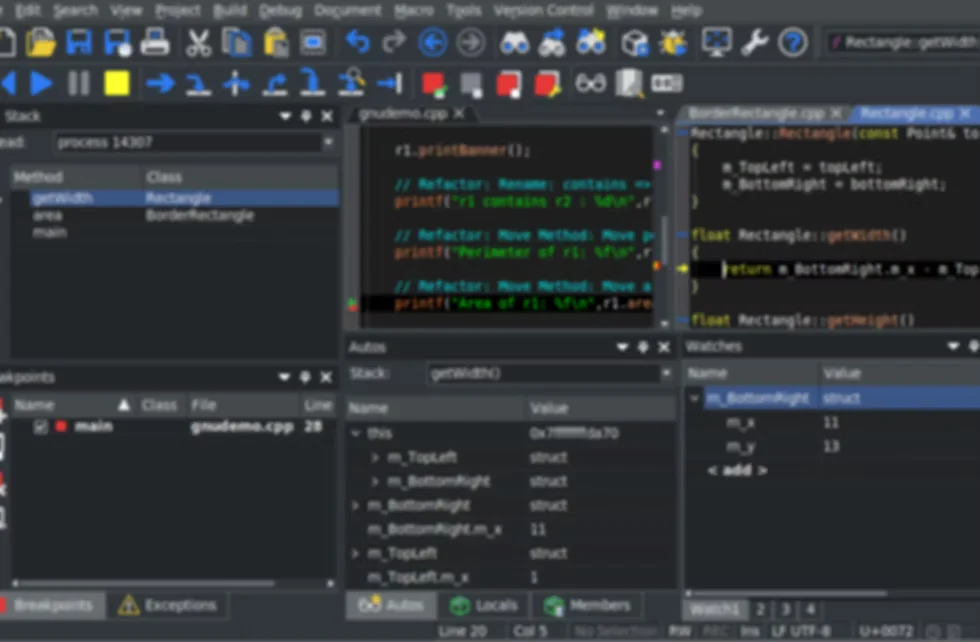
SlickEdit is a desktop code editor offered in Standard and Pro editions. The vendor lists support for Windows, macOS, Linux, and Raspberry Pi, and describes language-aware editing across dozens of programming languages.
Standard focuses on editing, customization, macros, and large files. Pro adds symbol navigation, debugging, project builds, version control, and other project-oriented tools. That edition boundary matters when teams need more than a standalone editor.
SlickEdit — What Sets It Apart?
These are the product-specific differences that may matter when deciding whether the software fits your workflow. They are based on documented evidence rather than a universal ranking.
- The Standard edition lists editing files up to 2 TB, while Pro adds project navigation, debugging, integrated builds, testing, and expanded diff tools.
- Pro documents integrations with six version-control systems: Git, Subversion, CVS, Mercurial, Perforce, and ClearCase.
6 key claims verifiedOur editorial team checked this profile against vendor documentation, product documentation, company information. Supported by 5 documented sources.
CapabilitiesSlickEdit Features
Code Editing
- Syntax expansion and indentation
- Auto-complete
- SmartPaste
- Multiple cursors and selections
- Keystroke emulations
- Aliases and code templates
- Backup History
- Files up to 2 TB
Project Development
- Symbol analysis and navigation in Pro
- Integrated builds in Pro
- Debuggers in Pro
- Java live errors in Pro
- JUnit integration in Pro
Version Control and Diff
- Git integration in Pro
- Subversion integration in Pro
- CVS integration in Pro
- Mercurial integration in Pro
- Perforce integration in Pro
- ClearCase integration in Pro
- Diff and merge tools
Customization
- Slick-C macro recording
- Custom Slick-C macro development in Pro
- Custom menus and toolbars
SlickEdit Specifications
| Editions | Standard and Pro |
|---|
| License model | One-time purchase; official page lists Standard at $125 and Pro at $299 |
|---|
| Free trial | 15 days; request by email |
|---|
| Platforms | Windows, macOS, Linux, Raspberry Pi |
|---|
| Integrations | Pro: Git, Subversion, CVS, Mercurial, Perforce, ClearCase |
|---|
| API | Slick-C macro development is documented; a public web API was not verified in reviewed sources |
|---|
| Language support | Vendor's 2025 product notes describe support for over 70 languages |
|---|
| CMake | 2025 release notes document CMake file API support; CMake 3.22.0 or greater required |
|---|
| Display requirement | Minimum 1920 x 1080 resolution stated by vendor |
|---|
Operational limitsSlickEdit Gotchas & Operational Limits
These are documented constraints or practical friction points that may matter before you adopt the product.
The vendor specifies a minimum display resolution of 1920 x 1080 and notes that some dialogs may still be truncated with larger interface fonts or display zoom.
Check display and scaling requirements on developer workstations before standardizing the editor.
Evidence source ↗SlickEdit's free trial is requested by email and lasts 15 days after the vendor sends an installer link and license file.
Evaluation requires a request and is time-limited rather than an instant anonymous download.
Evidence source ↗SlickEdit Pricing & Plans
SlickEdit Standard
$125
one-time
One-time purchase. Includes core editing and customization features; official product page lists file editing up to 2 TB.
Check current pricing →SlickEdit Pro
$299
one-time
One-time purchase. Adds project navigation, debuggers, integrated builds, version control, Diffzilla features, Java live errors, and JUnit integration.
Check current pricing →Free trial
$0
15 days
Trial for Standard or Pro requested by email; the vendor sends an installer link and license file.
Check current pricing →Pricing may change. Verify current plans on the vendor's website.
Our evidence-based assessmentTechZella Score
A proprietary editorial score based on product capabilities, usability, value, performance, support and user sentiment evidence.
7.1/10Moderate confidence
The feature assessment reflects the vendor's documented editing, project, debugging, version-control, and diff tools. G2 shows 19 reviews and a 4.4 rating; its small review pool and limited public support evidence reduce confidence.
Methodology v1.0. The assessment weighs feature coverage (25%), ease of use (15%), value for money (20%), performance (15%), support (10%) and user sentiment (15%), using researched product evidence and verified review evidence where available. It is a TechZella editorial assessment, not a direct user-review average.
Editorial assessmentSlickEdit Pros & Cons
Pros
- Available for Windows, macOS, Linux, and Raspberry Pi.
- Standard and Pro are listed with one-time purchase prices.
- Pro combines editing with project navigation, debugging, builds, testing, version control, and diff tools.
- Supports Slick-C macro recording and, in Pro, custom macro development.
- Vendor lists editing files up to 2 TB.
Cons
- The public product page lists no free edition; trial access is limited to 15 days.
- Project-level tools such as symbol navigation, debugging, builds, and version control require Pro.
- The trial must be requested by email.
- G2 reviewers mention a learning curve, but the available review sample is limited.
Independent review sources
SlickEdit Ratings & Reviews
Ratings are published by the respective review platforms and may change over time.
Community feedback
Reviews
No reviews yet. Be the first to share your experience.
Write a Review
Please log in to submit a review.
SlickEdit Competitors & Alternatives
Compare similar products directly, then see which alternatives may make more sense when your requirements differ.
Direct competitors
These products address broadly similar requirements. The descriptions focus on documented reasons a buyer might compare them with SlickEdit.
FAQ
Does SlickEdit have a free trial?
Yes. The vendor offers a 15-day trial for Standard and Pro, requested by email.
How much does SlickEdit cost?
The official product page lists Standard for $125 and Pro for $299, both as one-time purchases.
Which platforms does SlickEdit support?
The vendor lists Windows, macOS, Linux, and Raspberry Pi. Specific system requirements vary by operating system and architecture.
Does SlickEdit integrate with version control?
Yes. The edition comparison lists Git, Subversion, CVS, Mercurial, Perforce, and ClearCase integration for Pro.
Does SlickEdit provide a public API?
The reviewed product pages describe Slick-C macro development and customization, but this research did not verify a public web API.
Editorial transparency
Our Review Methodology
Key claims are linked to the sources used to verify them. This evidence record is separate from third-party user ratings.
TechZella evaluates software using documented product capabilities, pricing information, usability and value considerations, independent user evidence where available, and competitive context. The assessment is an editorial review, not a hands-on test unless one is explicitly identified. Our editorial assessment is based on 5 documented sources.
What TechZella adds- The Standard edition lists editing files up to 2 TB, while Pro adds project navigation, debugging, integrated builds, testing, and expanded diff tools.
- Pro documents integrations with six version-control systems: Git, Subversion, CVS, Mercurial, Perforce, and ClearCase.
Important limitations- Standard does not include the Pro-only symbol analysis, debuggers, integrated builds, or version-control integration listed in the edition comparison.
- The vendor's trial process requires an email request and provides a 15-day trial license.
Evidence-backed claimsSlickEdit Standard is listed at $125 as a one-time purchase.The official product page displays the Standard edition price and labels it a one-time purchase.
View source ↗Verified 2026-10-01SlickEdit Pro is listed at $299 as a one-time purchase.The official product page displays the Pro edition price and labels it a one-time purchase.
View source ↗Verified 2026-10-01The vendor's trial for Standard and Pro lasts 15 days.The official trial page explains that users request a trial by email and receive a license file for 15 days.
View source ↗Verified 2026-10-01Pro includes version-control integrations for Git, Subversion, CVS, Mercurial, Perforce, and ClearCase.The official edition comparison lists those six version-control systems as Pro features.
View source ↗Verified 2026-10-01SlickEdit 2025 documents support for CMake's file API, with CMake 3.22.0 or greater required for the new support.The official What's New page describes the CMake file API support and minimum CMake version.
View source ↗Verified 2026-10-01SlickEdit Inc. was incorporated in 1988, according to the company's About Us page.The company page says J. Clark Maurer incorporated SlickEdit in 1988.
View source ↗Verified 2026-10-01