
ActiveState describes Komodo IDE as retired and points users to the open-source repository.
Buyers should plan to own installation, maintenance, and compatibility assessment rather than expect vendor updates or support.
Evidence source ↗
Komodo IDE is a discontinued, multi-language desktop development environment for dynamic languages and web technologies. ActiveState released its source code as Open Komodo IDE.
The archived product documentation and ActiveState materials describe multi-language editing, code intelligence, debugging, and source-control features. ActiveState says it retired the IDE; current support and maintenance are not verified, and accessible review evidence is insufficient for sentiment
This profile combines documented product information and independent evidence where available. It is not a hands-on test unless TechZella explicitly identifies one.
A quick way to understand who this product may suit, where its limits matter, and which facts are most relevant before you compare alternatives.
Developers who need a no-cost, source-available legacy IDE for existing Perl, Python, PHP, Ruby, Tcl, or web-language projects and can manage installation and maintenance themselves.
Teams seeking a currently maintained IDE, vendor-backed support, current platform compatibility guarantees, or a supported trial and purchase path, and should evaluate alternatives such as Visual Studio Code or PyCharm instead.
Linux, macOS, Windows
5.6/10
Komodo IDE is ActiveState’s former desktop integrated development environment for programming languages including Python, Perl, PHP, Ruby, and Tcl, alongside web technologies such as JavaScript, HTML, and CSS. Its feature set included language-aware editing, code intelligence, project tools, and debugging.
ActiveState says it retired the IDE and made its source code available through OpenKomodoIDE. Its repository contains legacy build instructions, but the reviewed sources do not establish current compatibility or ongoing vendor support. This makes it more suitable for legacy use or self-managed experimentation than for buyers requiring a supported development tool.
These are the product-specific differences that may matter when deciding whether the software fits your workflow. They are based on documented evidence rather than a universal ranking.
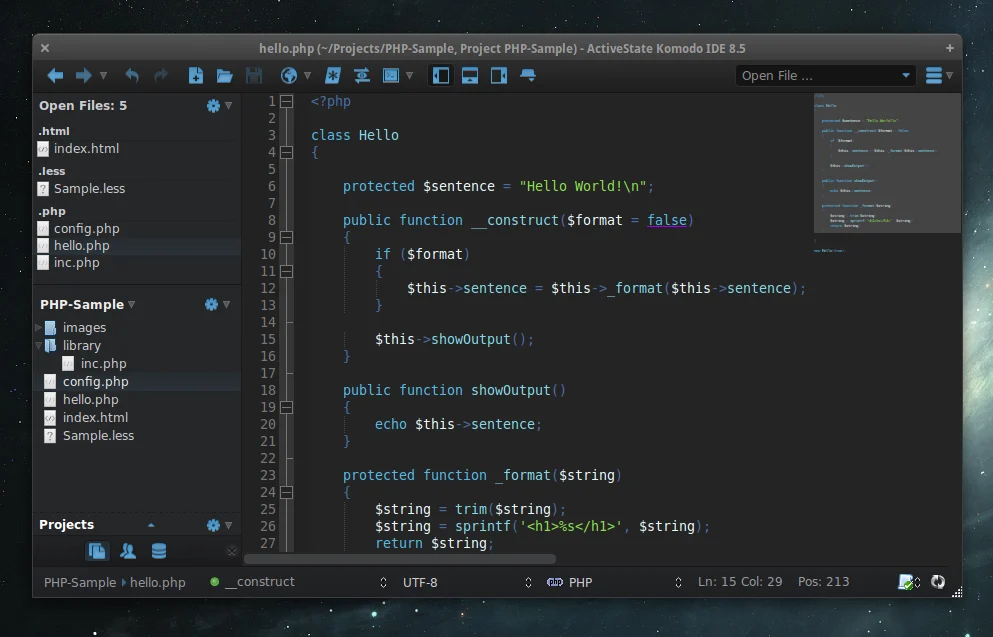
| Product status | Retired by ActiveState; source code available |
|---|---|
| Latest archived version found | Komodo IDE 12.0.1 |
| Historical platform support | Windows, macOS, Linux |
| Current API | Not verified |
| Free trial | No current trial verified |
| Hosting model | Desktop application; no hosted edition verified |
Verified installation, hosting, administration, or environment details that can affect implementation.
| Installation or hosting | Desktop application with historical Windows, macOS, and Linux builds; the repository also documents building from source. No hosted/SaaS deployment was verified. Source ↗ |
|---|
These are documented constraints or practical friction points that may matter before you adopt the product.
Buyers should plan to own installation, maintenance, and compatibility assessment rather than expect vendor updates or support.
Evidence source ↗The retired IDE source is publicly available from ActiveState's OpenKomodoIDE repository. Current packaged-product pricing, support, and trial availability were not verified.
Check current pricing →Pricing may change. Verify current plans on the vendor's website.
A proprietary editorial score based on product capabilities, usability, value, performance, support and user sentiment evidence.
The archived product documentation and ActiveState materials describe multi-language editing, code intelligence, debugging, and source-control features. ActiveState says it retired the IDE; current support and maintenance are not verified, and accessible review evidence is insufficient for sentiment scoring.
Methodology v1.0. The assessment weighs feature coverage (25%), ease of use (15%), value for money (20%), performance (15%), support (10%) and user sentiment (15%), using researched product evidence and verified review evidence where available. It is a TechZella editorial assessment, not a direct user-review average.
No reviews yet. Be the first to share your experience.
Please log in to submit a review.
Compare similar products directly, then see which alternatives may make more sense when your requirements differ.
These products address broadly similar requirements. The descriptions focus on documented reasons a buyer might compare them with Komodo IDE.
Is Komodo IDE still actively developed by ActiveState? ActiveState’s OpenKomodoIDE repository says the company retired Komodo IDE. Current vendor development was not verified.
Is Komodo IDE free? The source code is available publicly. No current commercial pricing or supported trial was verified.
Which platforms did Komodo IDE support? Historical ActiveState materials list Windows, macOS, and Linux. Those listings do not guarantee compatibility with current operating systems.
Does Komodo IDE include an API? No public product API was verified in the reviewed sources.
Key claims are linked to the sources used to verify them. This evidence record is separate from third-party user ratings.
TechZella evaluates software using documented product capabilities, pricing information, usability and value considerations, independent user evidence where available, and competitive context. The assessment is an editorial review, not a hands-on test unless one is explicitly identified. Our editorial assessment is based on 4 documented sources.
The repository describes Komodo IDE as retired and provides its source code and build instructions.
View source ↗Verified 2026-10-01ActiveState's Komodo IDE materials list Windows, Mac, and Linux installers; the source repository includes platform-specific build sections.
View source ↗Verified 2026-10-01ActiveState's Komodo 11 release page describes code intelligence, autocomplete, and debugging, and identifies Python, Go, Ruby, and PHP among supported languages.
View source ↗Verified 2026-10-01The ActiveState downloads archive lists Komodo IDE 12.0.1 files.
View source ↗Verified 2026-10-01The reviewed current repository and documentation identify the retired, open-source codebase; historic pricing and trials appear only in old release materials.
View source ↗Verified 2026-10-01